
B2B email segmentation groups eligible contacts according to differences that should change the message, timing, or next action. Start with lifecycle stage and expressed interests, define inclusion and exclusion rules, and assign an owner to each field. Test overlapping conditions before sending, then keep only segments that support a meaningful communication difference.
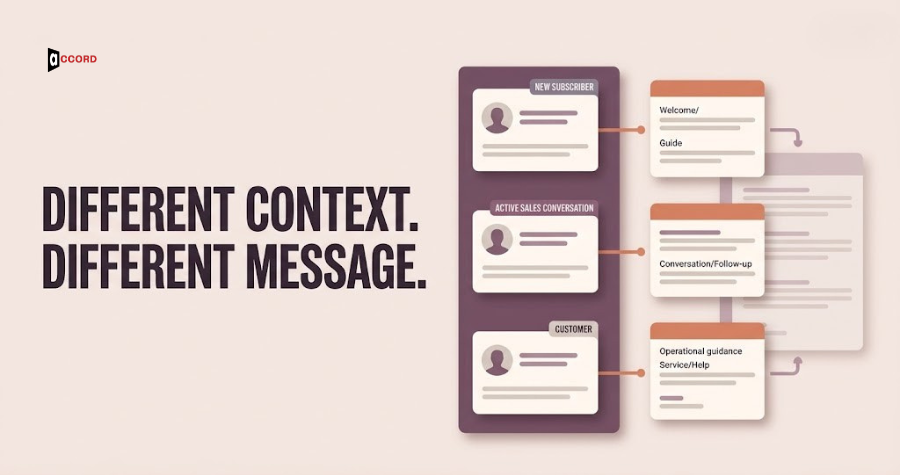
Many email programs divide contacts by industry or job title and call the work finished. Those fields can help, but they may not explain what the reader needs now. A current customer evaluating an additional service should not receive the same message as a new subscriber learning the basics.
Segmentation connects audience data with editorial and operational decisions. It works when the team can explain why two groups receive different communication and can maintain the rules that separate them.
This guide focuses on permission-based B2B email audiences. It is a practical framework for choosing useful segments rather than a directory of every filter a marketing platform can provide.
Start with the communication decision
Before creating a segment, complete this sentence: this group needs a different message because something relevant about its relationship, interest, or next task is different.
A new subscriber may need orientation. A current customer may need guidance about using an existing service. A former event attendee may want material connected to the topic they selected. These differences suggest distinct communication.
By contrast, a segment based on a field that never changes the content may add maintenance without improving relevance. A company-size split is useful only when the offer or explanation changes meaningfully across those sizes.
List the decisions your team can actually support with content. A segmentation plan that requires twenty unique newsletters is impractical if the team can produce only one useful issue each month.
Accord's email marketing services include audience segmentation, but the business purpose should lead the configuration.
Separate subscription eligibility from audience preference
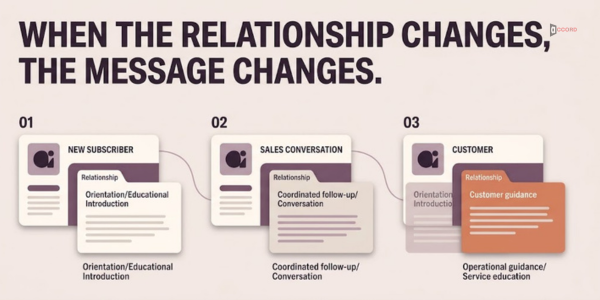
Eligibility determines whether a contact can receive a particular kind of message. Preference helps decide which eligible message is most relevant. Do not combine them into one loose "active" label.
A person may be eligible for a requested event update but not a general promotional sequence. A customer may need service notices while having opted out of marketing. The data model should preserve those distinctions.
Apply restrictions before interest or lifecycle rules. An engaged contact should not enter a campaign if a relevant unsubscribe or suppression state excludes them.
Document the source of eligibility and how updates reach the sending platform. A CRM field and an email-platform field can disagree if integrations are not designed carefully.
Treat missing eligibility information as a problem to resolve, not as a default permission to send. A detailed interest profile cannot compensate for an unclear subscription relationship.
Build a small lifecycle model
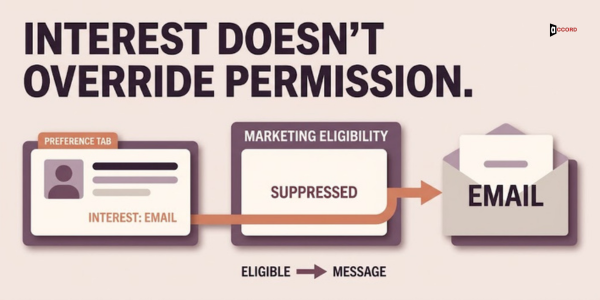
Choose lifecycle stages that describe the relationship and lead to distinct communication. Possible stages include new subscriber, engaged researcher, active sales conversation, customer, and former customer, depending on the business.
Define entry and exit conditions in observable terms. "Warm lead" is ambiguous. "Requested a consultation and has an assigned sales owner" gives the team a clearer rule.
Avoid making the lifecycle model carry every sales qualification concept. Marketing stage, sales opportunity stage, and subscription status may need separate fields with explicit relationships.
Allow exceptions. A customer contact can also subscribe to general educational content. The system needs a priority rule when two legitimate communication paths overlap.
Keep the stage definitions available to marketing, sales, and operations. If each team interprets the same label differently, the resulting segments will be difficult to trust.
Add expressed interests before speculative traits
Preferences selected by the reader can provide a useful starting point. Topic choices, event registrations, and explicit information requests often explain what communication the person expects.
Use behavioral signals cautiously. A visit or click can suggest interest but does not necessarily establish a buying project. Automated or accidental activity may also appear in reporting.
Record how an interest was assigned. A self-selected preference should be distinguishable from an inferred one, especially if the inference affects frequent or commercial messages.
Avoid sensitive or unnecessary profiling. Collect information that supports the communication decision rather than building an expansive personal profile.
Give readers a way to correct preferences where practical. A segment becomes more useful when the person can tell you that their responsibilities or interests have changed.
Translate B2B email segmentation into explicit logic
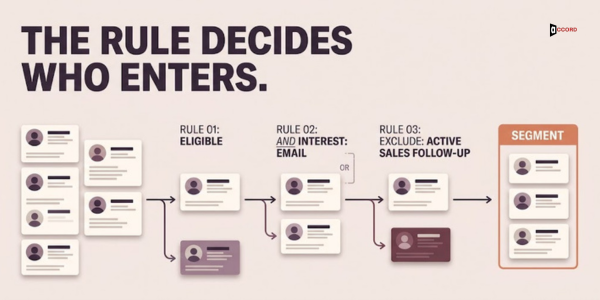
Write each segment in plain language before configuring filters. Identify the required conditions, optional conditions, and exclusions.
Mailchimp's segment documentation explains filtering contacts through conditions and logical relationships. Whatever platform you use, check how it interprets combinations of conditions and whether the group updates dynamically.
A hypothetical segment might include eligible newsletter subscribers who selected technical SEO as an interest, while excluding people already in an active sales follow-up for the same service. The exact exclusion depends on your communication policy.
Pay attention to AND and OR. "Customer AND interested in training" is different from "customer OR interested in training." A misplaced condition can expand the audience far beyond the intended group.
Record the human-readable rule next to the technical configuration. This gives reviewers a practical way to compare the intended audience with the actual result.
Define field ownership and update behavior
For every field used in a segment, identify who owns it, how it changes, and which system is authoritative. A segment is only as reliable as the data feeding its conditions.
Subscription preferences may come from a preference center. Customer status may come from an approved account system. Sales-conversation status may require an assigned sales owner. These sources need coordinated updates.
Specify how blank, unknown, and outdated values behave. A missing industry should not silently place a contact in a category that implies confirmed fit.
Define precedence when sources disagree. If a preference update and a scheduled integration write to the same field, the system should not undo the reader's latest choice.
For data problems affecting account relationships or field accuracy, connect the work with CRM enrichment and validation before adding more campaign logic.
Resolve overlaps with a communication priority
Contacts often belong to more than one useful segment. Overlap is not automatically a defect, but unmanaged overlap can produce excessive or contradictory communication.
Create a priority rule for campaigns that could reach the same person. An active service issue, a requested follow-up, or a time-sensitive event message may deserve different treatment from a general newsletter.
Use a contact-level view of recent and scheduled sends where the platform supports it. Reviewing each campaign in isolation can hide the combined experience.
Do not solve overlap by forcing every contact into one permanent category. That can erase legitimate interests and make the model too rigid.
Instead, distinguish identity fields from temporary campaign eligibility. A reader can remain interested in several topics while being excluded from a particular send because of timing or another active conversation.
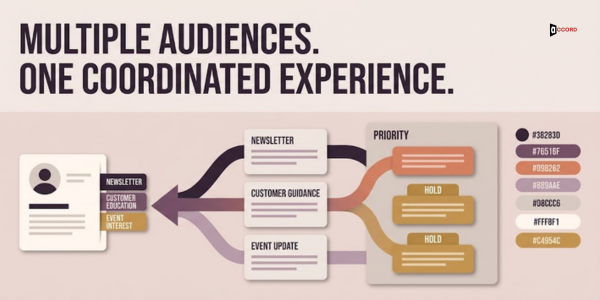
Match each segment to a content job
Write a short content brief for every segment you intend to maintain. State the reader's likely question, useful evidence, expected next action, and appropriate frequency.
A new-subscriber message might explain what the newsletter covers and offer topic choices. A customer education message might clarify a workflow or answer a recurring implementation question.
Keep the core facts consistent across versions. Segmentation should adjust relevance and depth, not produce contradictory descriptions of the service.
Avoid changing only the greeting or subject line and claiming a distinct strategy. The content should earn the existence of the segment.
If two groups repeatedly receive the same useful message, consider combining their campaign treatment while retaining the underlying data for future decisions.
Test with named scenarios before launch
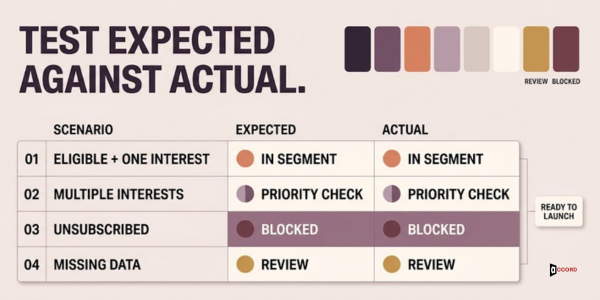
Create a small set of test contacts representing expected cases. Include an eligible subscriber with one interest, a subscriber with several interests, an unsubscribed contact, a customer, an active sales conversation, and a record with missing data.
Write the expected result for each scenario before running the filters. Then compare the actual membership and scheduled communication against that expectation.
Test changes over time. A person who becomes a customer or updates preferences should enter and leave the relevant segments correctly.
Check the destination as well as the send. A preference form that stores the wrong value can make a perfectly configured segment behave incorrectly.
Keep the test scenarios when the system changes. They provide a practical regression check for new fields, integrations, and campaign rules.
Work through an illustrative lifecycle program
Imagine a B2B agency with a monthly educational newsletter. Readers can select website operations, lead research, or email programs as interests. The team also records whether a person is in an active service discussion.
A new subscriber receives an orientation message and then joins the appropriate editorial audience. A reader who requests a consultation moves into a coordinated sales follow-up while remaining subscribed to education, subject to the team's contact-frequency rule.
A customer receives relevant operational guidance instead of repeated introductory service pitches. If their role changes, the preference page allows them to update interests without creating a second contact record.
The team begins with these few differences and adds another segment only when a recurring content need appears. It reviews overlap before each major campaign.
This is a hypothetical program, not a claim that a particular lifecycle structure or frequency has produced measured results for Accord.
Measure whether segmentation changes usefulness
Compare outcomes that match the content job. Orientation may be evaluated through completed preferences and relevant replies. Customer education may be evaluated through useful feedback or completion of the intended task.
Keep audience composition in mind. Different segments may vary in relationship, size, and business readiness, so a simple performance comparison does not prove that one message is superior.
Review complaints, opt-outs, and confused replies alongside positive actions. These signals can reveal an audience-definition problem even when a campaign appears active.
Do not create new segments solely to explain a disappointing result after the fact. Begin with a plausible communication difference and a measurement plan.
Use the findings to improve content and rules together. A segment with weak results may need better material, clearer expectations, more accurate data, or retirement.
Maintain a segment register
Keep a compact register containing the segment name, purpose, plain-language rule, technical owner, content owner, active campaigns, and last review. This makes the system understandable when team members change.
Flag segments that no longer support distinct content or have unreliable fields. Retire them deliberately after checking dependent campaigns and automations.
Avoid leaving obsolete filters with familiar names. A segment called "current customers" can become misleading if it depends on a field that stopped updating months ago.
Review the register when the business changes its offer, sales process, or subscription options. Those changes can alter the meaning of existing audience groups.
The goal is a manageable system in which every segment has a reason to exist and a person responsible for keeping that reason valid.
Frequently asked questions
How many segments should a small B2B team start with?
Start with a few groups that require different communication and can be maintained reliably. Lifecycle stage and expressed topic interests often provide a useful foundation. Add complexity only when you can explain the content difference, maintain the underlying data, and review overlapping sends.
Should industry be the main segmentation field?
Use industry when it changes the problem, examples, terminology, or offer. It may be less useful than relationship stage or expressed interest for some campaigns. Do not split the audience by industry merely because the field is available in the database.
Can one contact belong to several segments?
Yes. Multiple interests and relationships can be legitimate. Manage the communication overlap through campaign priority, exclusions, and frequency rules rather than erasing useful data. Test the combined experience so the person does not receive conflicting messages from separately managed campaigns.
What is the difference between a tag and a segment?
A tag is commonly a stored label, while a segment is a group defined by conditions, although terminology and behavior vary by platform. Read the documentation for your system. The operational question is how membership changes and whether the audience remains accurate over time.
When should a segment be retired?
Retire it when it no longer supports a meaningful content difference, its data cannot be maintained, or the business purpose has ended. Check dependent campaigns first and preserve relevant history. Removing unused complexity can make the remaining audience rules easier to understand and test.
Build fewer, more useful audience rules
Choose the communication differences first, then define eligibility, lifecycle, interests, and overlap. Test representative contacts and maintain the fields that make those rules work.
Contact Accord Tech Solutions to review an email audience structure using your current content plan, subscription sources, and CRM fields. The result should be a segmentation system your team can explain and sustain.
Methodology and sources
Original editorial audience-design framework. Mailchimp's current segment documentation supports the limited discussion of conditions and logic. The agency program is hypothetical. No measured audience data, predictive behavior claim, or guaranteed campaign result is used.