
If you send B2B emails, you might be frustrated. You spend time writing emails, testing subject lines, and adding personal touches. But most of the time, you get no replies.
Reply rates in B2B email marketing are dropping in 2026. It’s not because your emails are bad. The rules have changed.
Here’s why inboxes are crowded. People get too many emails every day. AI tools now scan emails for spam or generic content. And readers decide in seconds if your email matters.
The good news? You can fix this. Focus on email deliverability, write emails that people care about, and follow proven steps for follow-ups and personalization. These actions can help you get more replies.
In this post, I will explain why your emails are being ignored. I will show what changed in 2026. And I will give practical steps to help your emails get read and answered.
Why Your Emails Are Failing in 2026
If you send B2B emails, you may have noticed something frustrating. Your emails are not getting replies like before. It is not your fault. The email world has changed. People get more emails than ever, they have less time, and technology filters what reaches their inbox.
On average, a B2B professional gets over 120 emails every day. That is a lot of messages. Most emails are only glanced at. If your email does not stand out, it gets ignored.
There are two main reasons your emails are being ignored: inbox overload and email filtering.
Inbox Overload & Reader Behavior
The first problem is simple: people get too many emails. Your readers are busy. They check emails on phones, tablets, and computers. They scroll fast and decide in seconds if an email matters.
Even a well-written email can be ignored if it does not grab attention.
Here are some reasons emails get ignored:
-
Subject lines are long or unclear.
-
Emails feel generic or impersonal.
-
The message does not match what the reader cares about.
-
Emails focus too much on selling.
Understanding your reader is key. Write emails that match their interests. Keep it short and clear. That way, your emails get read and replied to.
AI Detection & Spam Filters in 2026
The second problem is technology. In 2026, Email systems are updated. Now this systems use AI to detect spam and low-quality emails. These analyze subject lines, content, links, and sending style.
If the email seems irrelevant or unimportant, it may never reach the inbox. This is where email deliverability and inbox placement become important. Even a great email can fail if it doesn’t land in the inbox.
Studies show that about 20 to 25 out of 100 get blocked and never reach the inbox. Spam filters stop them.
This happens for many reasons. The sender may not look safe. Email setup may be wrong. Too many emails may bounce back.
There is a simple fix. Send to the right people. Use a trusted email address. Create content that bypasses AI filters while engaging with readers.
How to Ensure Your Emails Reach the Inbox
Sending is not enough. The real goal is the inbox. If your email lands there, people can see it. Even a well-written email can fail if it lands in spam.
Email deliverability is the key. Studies show that around 25% of B2B emails never reach the inbox. This usually happens because of technical issues, a poor sender reputation, or spam triggers.
To reach the inbox, you need two things. A good email setup and smart sending habits.
Here’s how it works.
SPF, DKIM, and DMARC Setup
The first step is to make sure your email server is secure. SPF, DKIM, and DMARC are protocols that let email senders know that your data is authentic.
-
SPF (Sender Policy Framework): Allows your server to send mail for your domain.
-
DKIM (DomainKeys Identified Mail): A tool used to authenticate your email address. Adds a signature that proves your email wasn’t changed in transit.
-
DMARC (Domain-based Message Authentication, Reporting, and Conformance): The combination of SPF and DKIM tells your mail server what to do with inspection.
How to set them up:
-
Add the SPF record to your domain DNS server.
-
Sign your domain with DKIM.
-
Set up DMARC to monitor and enforce email rules.
Emails with proper authentication are 50–70% more likely to reach the inbox. This step is essential for any serious email campaign.
Managing Your Sender Reputation
Sender reputation management is very important. Your sender reputation is like your email credit score. A lower score means that your emails are more likely to be blocked or forwarded, even if you have good content.
Things that affect your reputation:
-
High bounce rates or invalid emails.
-
Emails marked as spam by recipients.
-
Compression is lower, as there are fewer openings or clicks.
Studies have shown that senders with a bad reputation are three times more likely to suffer negative consequences.
Sender Reputation Management Tips:
-
Send emails regularly. Avoid big spikes in volume.
-
Watch complaints and unsubscribe rates.
-
Only email verified and active contacts.
A good reputation improves email deliverability and helps your messages reach the main inbox.
Keeping Your List Clean
A clean email list is very important. Sending to invalid or inactive addresses hurts your reputation and increases bounces.
Best Practices:
-
Remove broken or invalid emails frequently.
-
Filter those who haven’t opened your email yet and try to re-engage with them before you delete it.
-
Never buy email lists. They usually contain unverified addresses that damage deliverability.
Good list hygiene for email marketing can reduce bounce rates by up to 40% and help your emails land in the inbox.
Bounce rate reduction and Avoid Spam Triggers
High bounce rates and spam triggers can quickly ruin your deliverability. Every bounce or flagged word can lower your reputation.
How to reduce bounces:
-
Verify emails before sending.
-
Delivered to active subscribers only.
-
Warm up new domains before sending a new email.
How to avoid spam triggers:
-
Avoid the words “free,” “fast,” or “work now” in the Subject title.
-
Keep Titles short and to the point.
-
Make sure your content matches what your readers care about.
By combining bounce rate reduction and spam trigger avoidance, your emails are more likely to reach the inbox and get read. Following these steps improves inbox placement, reduces complaints, and increases reply rates.
Email Warm-Up & Domain Preparation
If you are sending emails from other new domain, you need to warm it up well. If you don’t do it, your email may become spam and never reach the inbox. Being trustworthy with the email provider will increase email engagement and increase response rates.
Studies have shown that warmed-up domains receive 40% more emails in their inbox than cold domains. Small changes in your warming up can make a big difference in your results.
Domain Warming Strategy
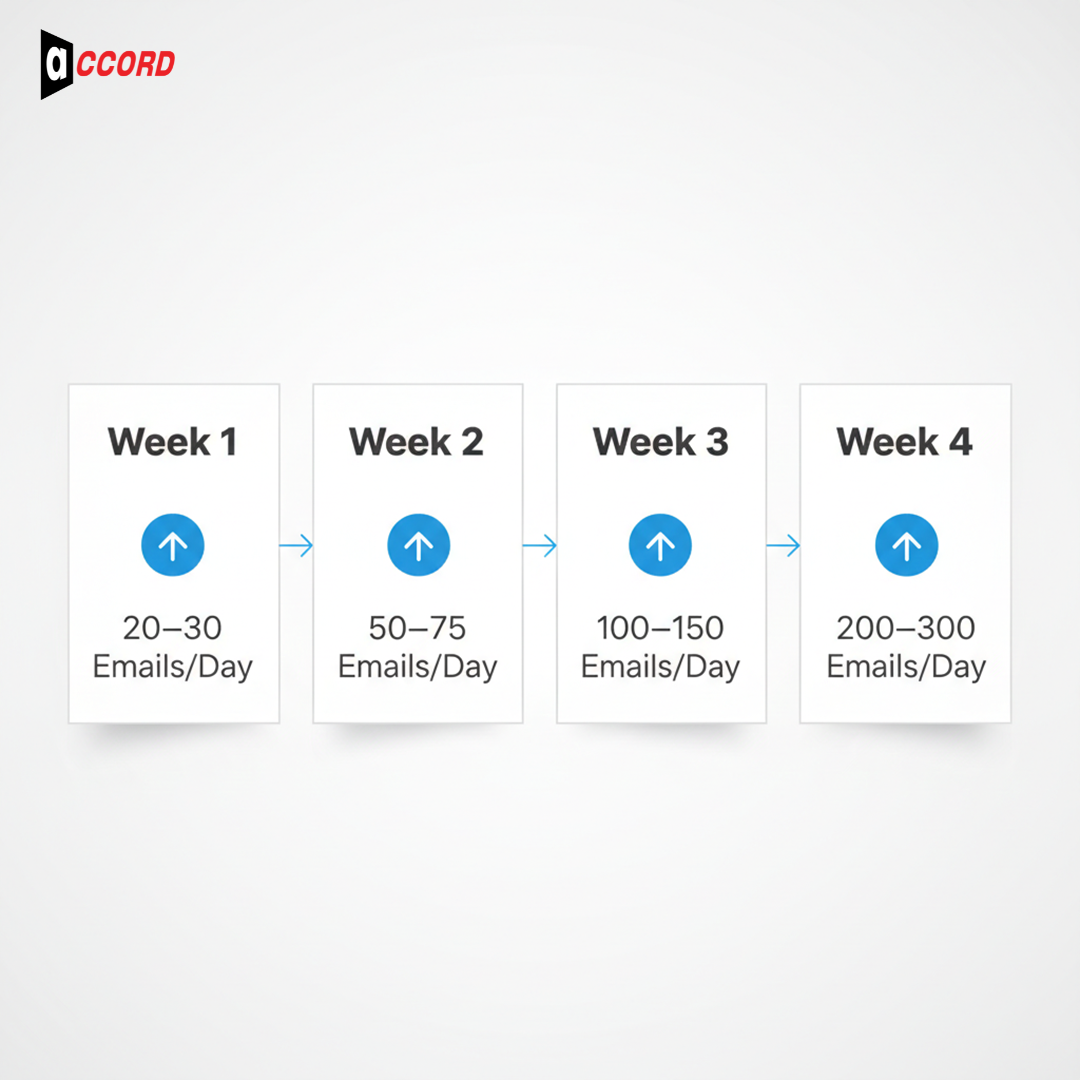
Warming up a domain means sending emails slowly at first and then increasing over time. This shows the email recipient that your server is reliable.
Example of warming up a new domain in 2026:
|
Week |
Emails per day |
Notes |
|
1 |
20–30 |
Send to your most engaged contacts |
|
2 |
50–75 |
Add loyal customers or subscribers |
|
3 |
100–150 |
Expand to more active contacts |
|
4 |
200–300 |
Start the full campaign sending |
Tips for a good domain warming strategy:
-
Start small and increase slowly.
-
Send first to your most active and engaged users.
-
Watch bounce rates and complaints daily.
A proper warm-up keeps your emails out of spam and improves inbox placement.
Email Throttling Best Practices
Sending too many emails at once can trigger spam filters. This is why email throttling is important. Limit the number of emails you send at once.
How to throttle emails:
-
Increase your sending volume gradually.
-
Send an email within a few hours or a few days.
-
Don’t add large volumes from a new domain right away.
Throttling keeps the sender's reputation and helps prevent too many emails from landing in the inbox.
Combining Email Warm-Up With Deliverability Checks
By following the process, you will keep your server safe. Consider factors such as inbox placement, bounce rates, and complaints regularly.
Tips to combine warm-up with checks:
-
Use this tool to navigate to your mailbox.
-
Track open and reply rates for early signs of problems.
-
Adjust sending volume and content based on performance.
Writing Emails That Actually Get Replies
Sending emails is easy. Getting replies is hard. Most B2B emails fail because they do not grab attention or guide the reader to act.
Research shows that over 60% of people decide to open or ignore an email within 3 seconds. This means the subject line and first sentence are very important. Let’s see how to write emails people actually respond to.
Understanding Human Psychology
People respond to emails based on how they feel. Three simple steps can help you get replies:
-
Reciprocity: Give something first. A helpful tip or resource makes people want to reply.
-
Curiosity: Make readers want to know more. A surprising line or question works well.
-
Pattern Interruption: Break expectations. Start with a short, surprising sentence to grab attention.
The first sentence is as important as the headline. A boring beginning will quickly put readers off.
Example:
-
Weak: “I wanted to check in about our services.”
-
Strong: “You won’t believe how your inbox could work harder for you this week.”
Using these triggers makes people notice your emails and reply.
Crafting Effective Subject Lines and Hooks
Subject lines are the first thing people see. In 2026, inboxes are full, and readers scan. Good subject lines are:
-
Short and clear under 50 characters.
-
Interesting without being misleading.
Good subject lines:
-
"Simple facts to get more replies."
-
“How the competition earns 3x more responses.”
-
“A few simple changes can improve your email strategy.”
Resources to get ideas:
-
Avoid using words like “Free” or “Act Now.”
-
Write like a normal person.
-
Talk to your readers and don’t try to sell.
The first line should contain the title. Keep it short, clean, and easy to read.
Clear CTA & Email Structure
Even the best email fails if the reader does not know what to do. Every email should have a clear subject line. Multiple actions confuse readers.
Email campaign setup instructions:
-
Keep the email short and simple. Use short paragraphs with the main points.
-
Prioritize what is important.
-
Consider the call to action: “Answer questions for information” or “Click for information.”
Format Example:
-
Subject line: Some Simple Tips to Improve Your Response Rate.
-
Statement 1: You can increase your response rate by 30% with one small change.
-
Body: 2-3 short paragraphs of explanation.
-
CTA: Receive this email for the next lesson.
Short, to-the-point emails get 50% more responses than longer ones.
Follow-Up Sequences That Increase Replies
Many emails go unanswered because people send only one email at a time. A good follow-up sequence can change that. 3 to 5 follow-ups can increase replies by 30-50%.
Follow-up does not just mean sending more emails. It works for timing, content, and relevance of your emails.
Timing & Number of Touchpoints
Follow-ups need the right timing. Too soon annoys people.
Best schedule for 2026:
-
First follow-up: 2–3 days after first email
-
Second follow-up: 5–7 days later
-
Third follow-up: 7–10 days after the second
Most campaigns succeed with 3–5 touchpoints. Each follow-up should add value. Repeat the first email exactly, and people will ignore it. Proper timing can increase reply rates by 20% or more.
Unsubscribe & Complaint Management
Protect your sender reputation. High complaints or spam reports hurt email deliverability.
Best practices:
-
Make it easy to unsubscribe.
-
Monitor complaints and avoid future sends to those contacts.
-
Clean your list regularly to avoid unresponsive users.
Proper unsubscribe & complaint management will keep your emails in your inbox.
Segmentation & Personalization for Higher Engagement
Regular emails will go unanswered. Target the right audience and personalize your content to increase engagement.
-
Turn the attention of your target audience.
-
Tailor the email to your audience’s busy schedule and problems.
-
Marketing managers care about leads and campaigns.
-
The startups focus on growth and return on investment.
-
Sales reps care about efficiency and conversions.
Relevant emails can increase the result in a 45% response rate.
Examples of personalized Emails
-
SaaS: It’s a software that reduces onboarding time by 30%.
-
B2B: How big companies get 3x more leads without extra spend.
-
Start: One simple change can double your progress in these three months.
The more relevant and personal your content is, the more likely it is to receive a reply.
Measuring Progress: 2026 Impact Survey
Tracking results is important. Metrics show what works and what doesn’t.
Tracking and Adjusting Strategy
Use metrics to improve campaigns:
-
Track replies, opens, clicks, and complaints.
-
Test subject lines, sending times, and personalization.
-
Adjust follow-ups based on results.
-
Keep testing and iterating to improve reply rates.
Tracking and improving ensure your B2B email marketing stays strong in 2026.
Tools vs Strategy: Balancing Automation with Human Touch
In B2B email marketing, using tools can save a lot of time. But using tools alone can make your email look fake. You want to strike a balance between automation and human touch.
Some tasks work well with tools. Other tasks need personal attention to get replies and build trust.
|
Task / Goal |
Best Approach |
Notes / Example |
|
Sending bulk emails |
Automation |
Schedule and send many emails at once. |
|
Segmenting contacts |
Automation |
Quickly group people by role, industry, or engagement. |
|
Tracking results |
Automation |
See open rates, clicks, replies, and bounce rates easily. |
|
Writing subject lines |
Human |
Personalized lines get more opens and replies. |
|
First email to an important lead |
Human |
Research the person and write a tailored email. |
|
Follow-up emails |
Mix of both |
Automate reminders but add personal points for value. |
|
Replying to responses |
Human |
Build trust with thoughtful answers. |
|
Testing different content |
Both |
Tools test automatically, but humans decide what works best. |
Conclusion
Getting more replies in 2026 is simple. You do not need to send more. You need to send better. Be smart with each email. Your emails need to reach the inbox, grab attention, and feel useful to the reader. Good email deliverability is the first step; if your emails don’t land, they won’t get read.
Make sure your list is clean, and your domain is properly warmed up. A careful email warm-up helps you avoid spam filters and improves inbox placement. Keep your subject lines and opening lines clear and interesting. Focus on one main idea in each email. Send follow-ups with care and make each message feel personal.
When emails are simple and useful, people reply more. When they feel real, people trust them. You can use tools to help, and you can learn from experts, but always write like a real person. Start now, focus on connection, and watch your reply rates improve.