
In today's digital era, people are now getting answers directly from Google without clicking on any website. This is called zero-click search. Studies show that over half of all Google searches now end without a click. On mobile devices, this number can go as high as 77%. By 2026, zero-click searches may reach 65 to 70%.
This is essential because traditional SEO strategies focus on clicks. Now, just being on the front page isn’t enough. Your content needs to appear in featured snippets, People Also Ask boxes, and other Google options to display answers on search pages.
A good zero-click SEO strategy is designed to help users click on the right pages on your website. People will see your brand and start trusting it.
In this article, we’ll explain how zero-click search works, why clicks don’t count, and how to get more visitors and results in 2026. By following these steps, you can make your content visible and useful, even when users stay on the search page.
Understanding Zero‑Click Search
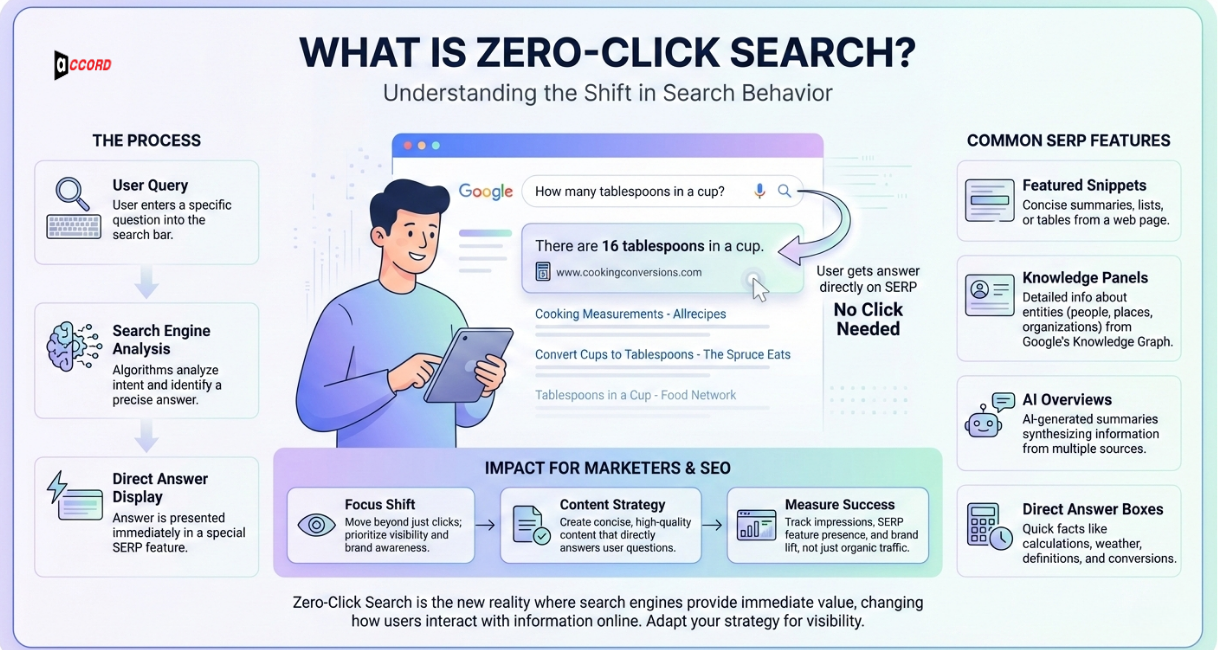
You might think SEO is all about getting people to click on your website. But things are changing. More than half of all Google searches now end without a click. People get their answers directly on the search page. This is called zero-click search.
Zero-click searches happen because Google wants to give answers fast. Users do not need to visit a website to get what they want. Even if your page is number one, it might not get clicked. This makes a zero-click SEO strategy very important. It focuses on being seen, not just clicked.
What is Zero‑Click Search?
A zero-click search happens when Google answers a question on the search page. Users read the answer there and don’t click any links.
For example, if someone searches “how far is the moon”, Google may show the distance in a box at the top. The user sees the answer instantly. They don’t visit any website.
Search engines are doing this more because users want answers quickly. This means your site must show up in these answer boxes to stay visible. Even without clicks, people will notice your brand.
How does the search engine Prioritizing Answers Over Clicks?
Google and other search engines are looking for answers, not clicks. They use custom boxes and wrappers to give people what they need quickly.
This will affect your results in two ways:
-
Your website will get fewer clicks because the answer is already on the page.
-
Your content will only increase awareness and credibility if it appears in those boxes.
A strong zero-click SEO strategy helps you take advantage of this. You get visibility even when people do not click.
Types of Zero‑Click Features
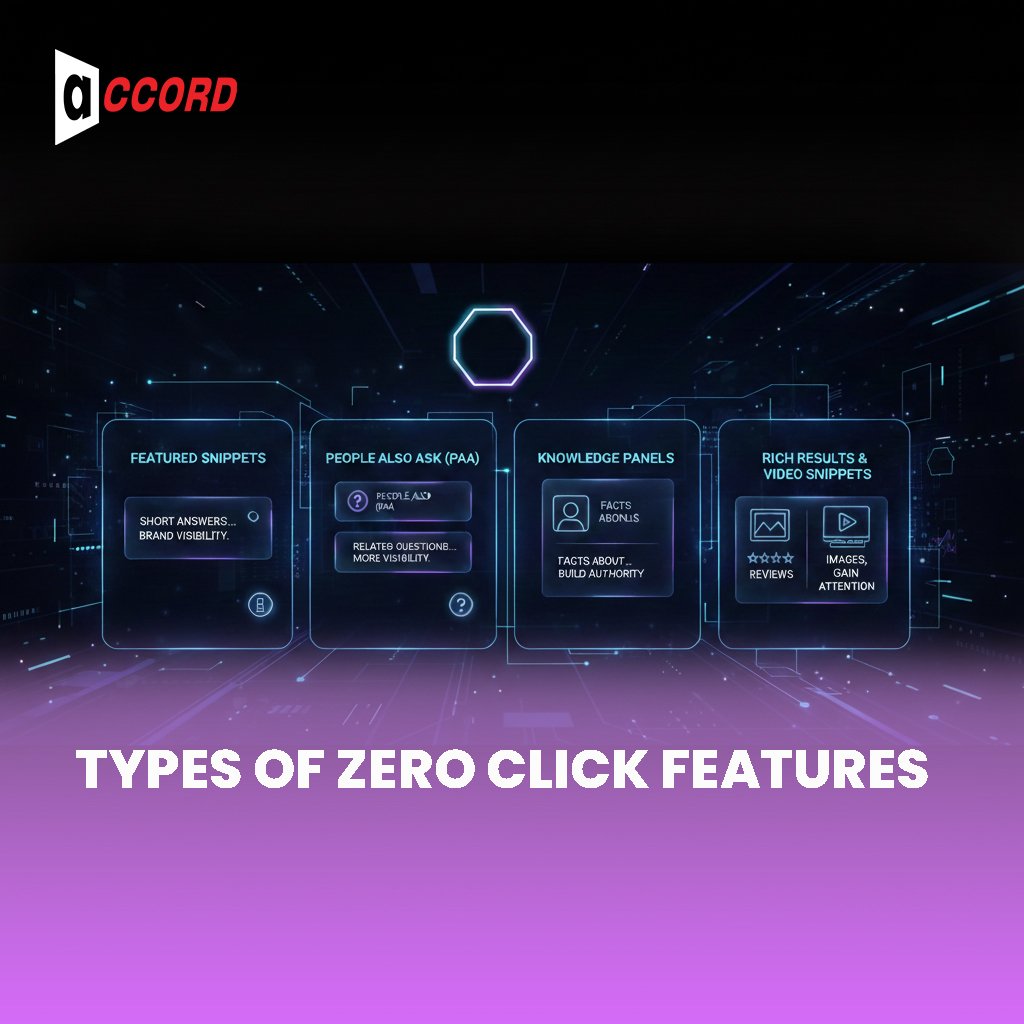
Several main features cause zero-click searches. These are the places your content can appear.
-
Featured Snippets – Short answers at the top of the page. They can be paragraphs, lists, or steps. Even without a click, people see your brand.
-
People Also Ask (PAA) – Boxes with related questions. They expand when clicked. Your answers can appear here, giving your brand more visibility.
-
Knowledge Panels – Facts about people, brands, or places shown on the side or top of results. They build authority for your brand.
-
Rich Results & Video Snippets – Images, reviews, product info, or video previews. Users can see what they want without clicking. Your content still gains attention.
Zero-click features change how people use search. Fewer clicks mean less traditional traffic. But appearing in these features gives your brand visibility, trust, and recognition.
Featured Snippets Optimization
Getting your content into a featured snippet is one of the best ways to get noticed on Google. These snippets show answers at the very top of search results. People see your content first, even if they do not click on your website.
A good featured snippets optimization strategy is about more than keywords. It is about making your content clear, simple, and easy to read. This helps Google show your content in the answer boxes. Doing this can increase your visibility, build trust, and bring more people to your site over time.
Types of Featured Snippets
There are different types of featured snippets. Each one works a little differently.
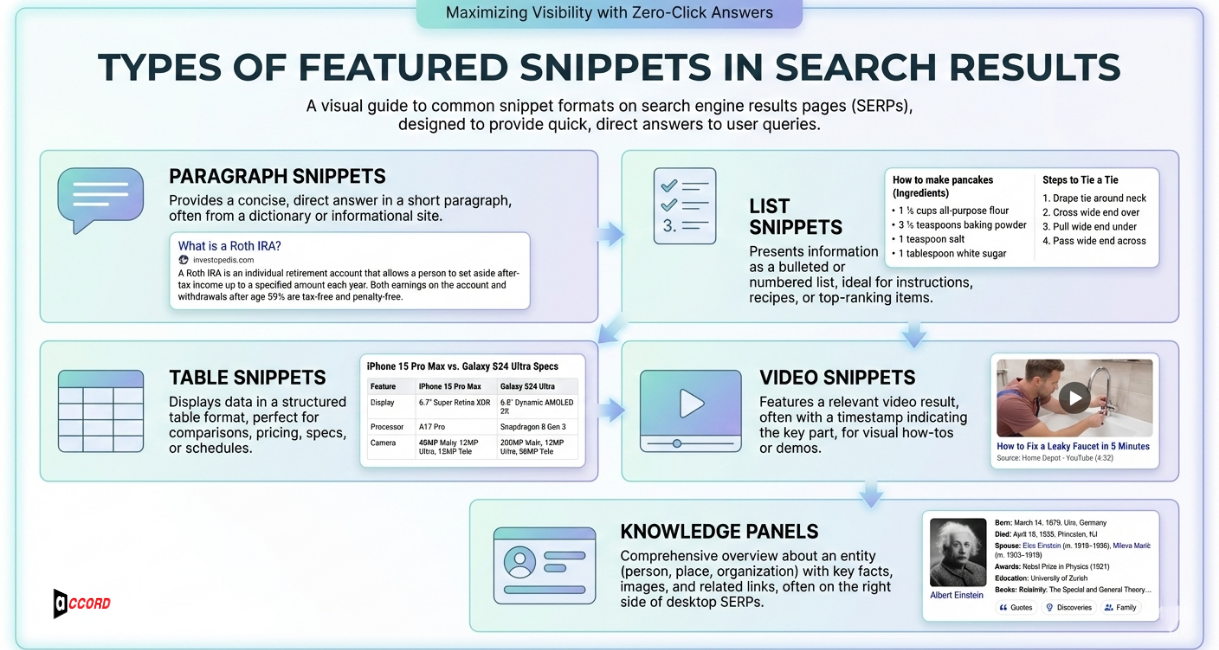
Paragraph Snippets
These are short answers in a few lines of text. A search like “What is a black hole?” might show a small paragraph at the top. Users get the answer right away. Your brand is seen even if no one clicks.
List Snippets
These are steps or bullet points. A query like “How to fix a leaky faucet” might show a numbered list of steps. People can follow the steps right in the search. They do not need to open a page.
Table Snippets
Tables show clear data. They help compare things fast. For example, a search like 2026 smartphone specs may show a table. It can compare models and features. This makes the info easy to read. It also feels more trustworthy.
Video Snippets
Videos can also appear in search results. Many come from YouTube. Videos explain things fast. They help users understand without reading much. Tutorials, demos, or guides often show up here. Even without clicks, users see your content and brand.
Knowledge Panels
Knowledge panels show quick facts. They can be about a person, a brand, or a place. They often show images and key details. They may also show links. Showing here builds trust. It helps people recognize your brand.
How to Prepare Content for Snippets
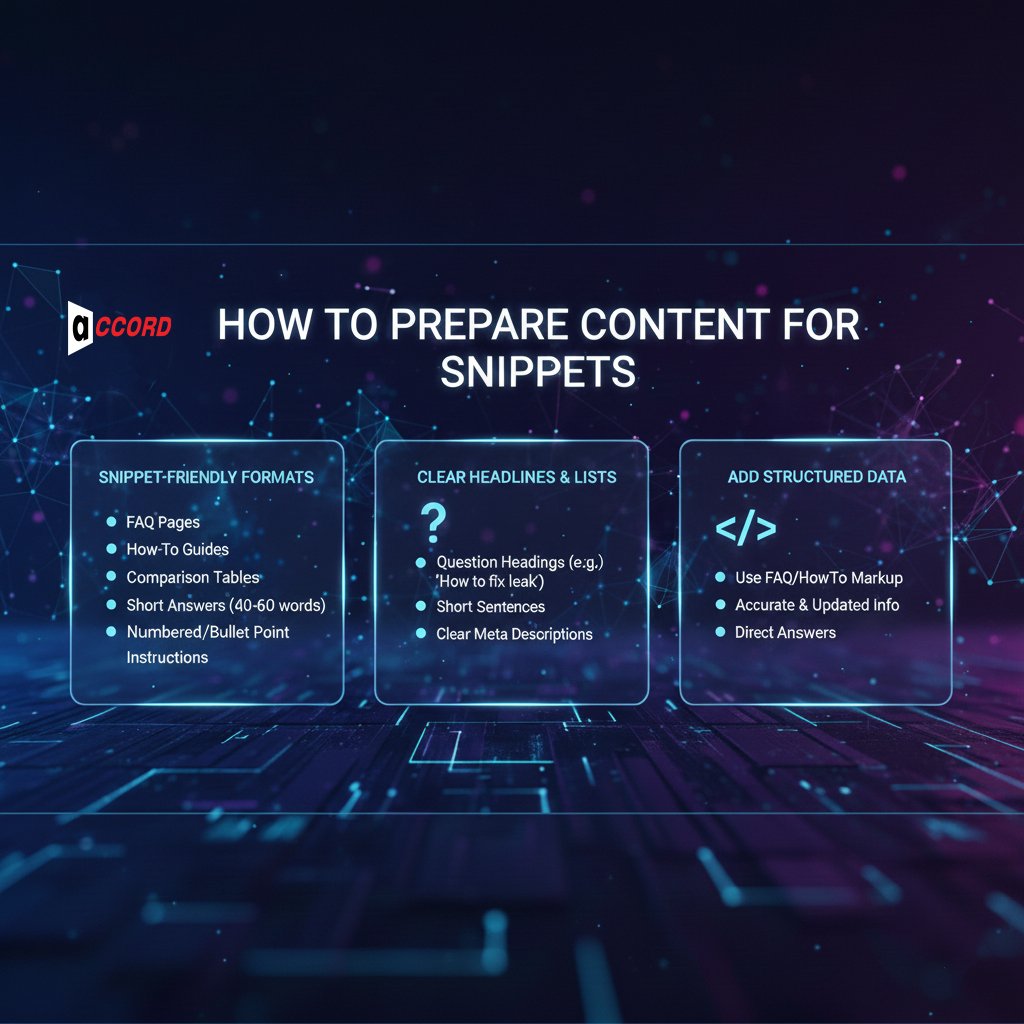
Here is how you can make your content ready for featured snippets:
Use Snippet-Friendly Formats
Create FAQ pages. Write how-to guides. Add comparison tables. Keep answers short.
Aim for 40 to 60 words. Use numbers or bullet points for step-by-step instructions.
Write a clear headline and lists.
Heading topics include questions, such as “How to fix a leak.” Create short sentences. The principle is as simple as looking. Meta descriptions should describe the results clearly.
Add Structured Data
Use the FAQ or HowTo markup. This tells Google what your content is about. Make sure your information is accurate and up to date.
Answer the question correctly.
Always provide a full answer. Avoid long conversations. Simple answers get picked for snippets more often.
People Also Ask (PAA) SEO
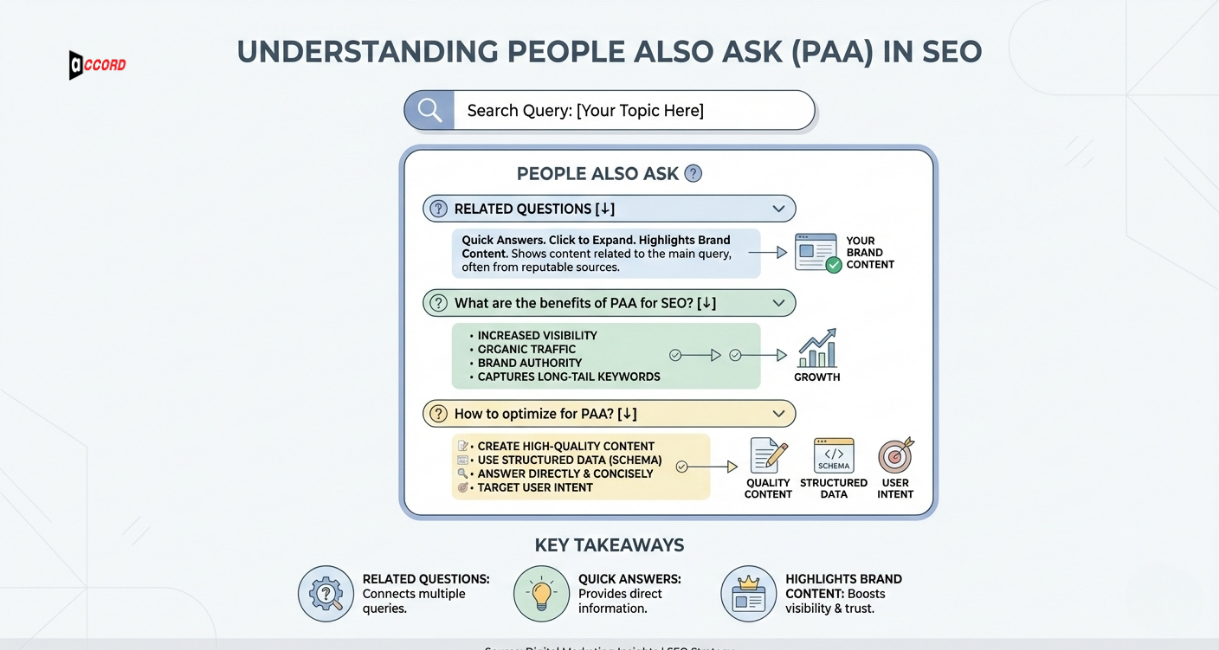
Another way to get Google’s attention is to encourage People Also Ask boxes, or PAA boxes. This is a small box that displays relevant queries at the bottom of the search results. When someone clicks a question, Google shows a short answer from a website. PAA boxes appear for many common searches. They give you another chance to be seen.
PAA optimization works well with featured snippets. While snippets show one main answer at the top, PAA boxes give multiple ways to appear on the page. Using both can make your brand more visible and trusted.
How to Optimize for PAA
Here are some ways to appear in PAA boxes:
Use FAQ Sections and Question-Answer Content
Write pages that answer questions directly. FAQ pages work very well. You can also format normal content with headings that ask a question and then give a clear answer. Keep the answer short and simple so that Google can find it easily.
Detailed Link Internally and Target Specific Questions
Use the internal links to connect to relevant articles. This will help Google understand your website better. Think about the questions people are searching for. This role provides a great opportunity to appear in the PAA box.
Optimizing for people also asks seo help your content get more visibility and trust. Even if users don’t click, they see your brand and know your content is reliable.
Optimizing for featured snippets helps your content stand out and get noticed. Even if users don’t click, they see your brand and trust your content. A strong featured snippets optimization plan can help you stay ahead in search results in 2026.
Blog SEO Strategies and On-Page Best Practices for 2026
Search is changing fast. More than half of Google searches now end without a click. That does not mean blogs are useless. This means we need a new approach. Your blog can increase your visibility, credibility, and results if users do not click.
In 2026, the best blogs combine a strong content strategy with strong on-page SEO. This makes your content more readable, visually appealing, and easier to search for. When done correctly, your website can be secure and build authority.
Snippet-Ready Blog Formats and Content Structure
Some blogging formats are better than others for zero-click SEO. Using this, you can display your content in featured snippets or PAA boxes.
FAQ Pages
Answer questions in short, clear sentences. Keep each answer about 40–60 words. This helps Google show your content in snippets.
How-To Guides
Step-by-step guides work well for list snippets. Break tasks into small steps. Keep sentences simple and easy to follow.
Comparison Tables
Tables make data easy to read. Use them to highlight features, products, or statistics. Google likes clear tables. It often shows them for searches like best laptops 2026 or compare smartphones.
Use strong headings and Meta Description
Make sure each heading matches the topic or question. Write short meta descriptions.
Sum up the answer in one or two lines. This helps Google understand the page. It also makes people want to click.
Use bullet points and lists.
They are easy to read. Google can scan them fast. Users like them too. Lists increase the chance of showing in search snippets. Using these formats makes your blog snippet-ready, easier to read, and more visible.
Optimizing for Humans and Search Engines
Your content should help both readers and search engines. Start with clear answers.
Say the main point first. Naturally use keywords. Google prefers content that is easy to read and helpful.
Structured Answers
Answer one question at a time. Use clear headings. Add bullet points. Use numbered steps. This helps readers understand fast. It also helps search engines.
Schema Markup
Add simple structured data. Use FAQ, HowTo, or Article schema. This tells Google what your page is about. Keep it clean. Update it when needed.
Page Speed and Mobile Setup
Pages should load fast. They must work well on phones. A fast site keeps users happy.
It also helps your rankings.
Internal Linking
Link pages that are related. This keeps readers on your site longer. It also helps Google understand your site. Use simple anchor text. Make sure they match the topic.
Search Engine Ranking Factors to Watch
Search is changing fast. In 2026, ranking is not only about links or clicks. Google looks at visibility and engagement. It checks how well your content answers questions.
Even if people do not click, your content still matters. It builds trust and authority.
It also builds brand awareness. Knowing what Google cares about helps you stay visible.
Measure Success Without Only Clicks
Clicks are not the only sign of success. In a zero-click world, focus on being seen and trusted.
-
Impressions: Check how often your page appears in search. More views mean more people see your brand.
-
Brand Searches: See if people start searching your brand name. This shows your brand trust is growing.
-
Engagement Numbers: Look at the time on the page. Check how far people scroll. Notice shares. These signs show your content helps users.
-
Improve Your Strategy: Track posts that show in snippets or PAA boxes. Update them often. Fresh content performs better.
Use clear content formats, strong on-page SEO. This helps your blog stay visible.
It builds trust and helps readers. Even with fewer clicks, your content builds authority and recognition.
This is the key to a successful SEO strategy for blogs in 2026. Make content easy to read, structured for search, and optimized for engagement. Track more than just clicks.
This helps you improve over time.
How AI Search Changes Ranking
Search engines now show answers right away. They use smarter systems. This affects which content appears first. Clear and helpful content wins.
Answer Engine Optimization (AEO)
Make your content clear and easy to read. Use short paragraphs, bullet points, and step-by-step instructions. This helps Google show your content in featured snippets and answer boxes.
Generative Engine Optimization (GEO)
Your content can appear in summaries and answer previews if it is clear, accurate, and structured. Use facts, lists, and headings to make it easy to understand.
Ranking Tips for AI-Ready Content
-
Answer questions directly and clearly.
-
Use headings, lists, and numbered steps.
-
Keep information accurate and trustworthy.
This approach keeps your content visible. It works even when users do not click on results.
Tools to Track Rankings and Snippets
The right tools help you follow search changes.
-
SERP Trackers: See where your page shows in snippets and answer boxes.
-
Keyword Tools: Find the questions people search for every day.
-
Content Tools: Check if your content is clear and well-structured. This helps it show in search results.
These tools show what works. They help you improve fast, and content gets noticed.
In 2026, search is not only about clicks. It is about being seen, being trusted, and about helping users.
That is what Google looks for. Clicks alone are not enough. Focus on impressions, brand searches, engagement, and structured answers. This makes your content more visible and respected.
When you follow these rules, your content becomes the go-to answer for readers, even if they do not click. That is how you stay ahead in search.
Conclusion
In 2026, being visible, keeping users engaged, and having clear content will matter most.
Your content should give quick, clear answers. Use headings and short paragraphs. Aim for featured snippets and People Also Ask boxes. Track how many people see your content and search for your brand. Make pages fast, mobile-friendly, and easy to navigate. Link related content so readers can explore more.
In the future, video snippets, knowledge panels, and rich results will grow. Brands that share helpful content will earn trust and authority.
Accord Tech Solutions can help your website stay visible and trusted. Our professional SEO services make content clear, structured, and ready for search. With the right strategy, your content can reach more people and grow your brand in 2026.