
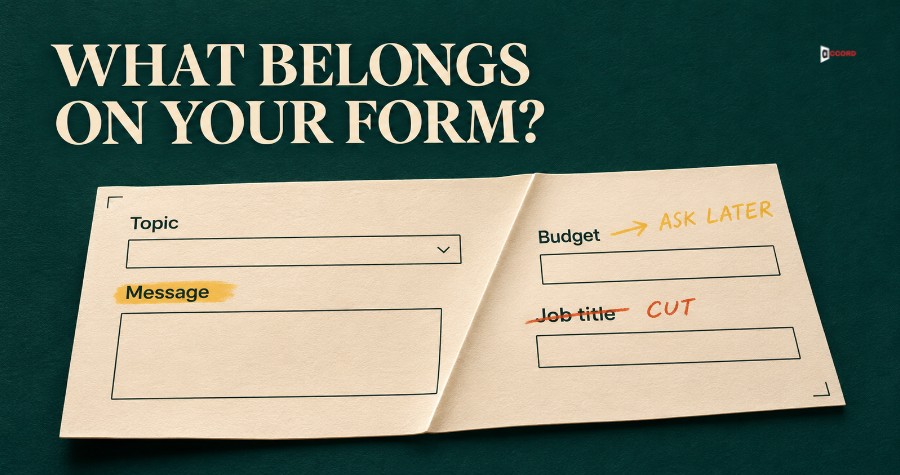
Open your contact form on your phone and count the boxes. Then, for each box, name the person who reads the answer and say what that person does with it. If you cannot, the box is costing you something. It may stop a buyer who would have written to you, or collect an answer that nobody uses.
A contact form is the web part of your growth engine, and it is where search, email and social work turns into an inquiry. The usual advice is a number, such as "keep it to four fields", and a number does not say which four. This post gives a test for each box instead. The test is our own starting point, not an industry rule.
What should a B2B contact form ask?
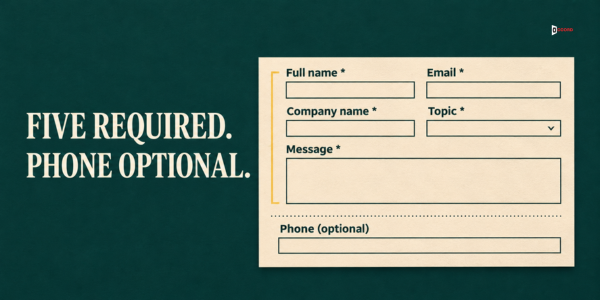
In our view, five required boxes and one optional box are a good starting point: name, email, company, a topic choice and a message, plus phone if the visitor prefers a call. The topic choice is the one conditional box, and the note under the sample says when to drop it. Here is a sample you can copy, one element per line, in order. Square brackets show what you replace. The topic choices suit a marketing firm, so replace them with your own, in your buyers' words.
Heading: [Tell us what you need]
Note: [Boxes marked * are required.]
Full name *
Email *
Company name *
What is this about? * [dropdown: Getting found on Google, Emails to prospects, A new website, Social media, Something else, Not sure]
What would you like help with? *
Phone (only if you prefer a call) [optional]
Button: [Send my request]
Under the button: [We reply within one business day. A person will read your message and write to you.]
The five required boxes depend on how you answer. The topic dropdown earns its place only if more than one person replies to inquiries, because its job is to send each one to the right person. If one person answers every inquiry, drop the dropdown and start with four required boxes: name, email, company and message. The optional phone box stays either way.
Behind the form, record the landing page (the first page of the visit), the source (the page or site that sent the visitor, or "direct" if there was none), the campaign tag if there was one, and the date and time. The visitor never sees these hidden fields, but your team will need them later.
The W3C Web Accessibility Initiative, the standards group for web accessibility, has guidance on form instructions, updated 13 May 2024. It says instructions should indicate which input is required and which is optional, and that placeholder text inside a box is not a replacement for a label. So keep a visible label on each box and mark the required ones, as the sample does. Also type a normal email address and phone number into your own form to check that it accepts them.
The last line of the sample matters, because the visitor does not know what happens next. Only write a time you can keep. A quote or demo request may need a faster time than one business day. Our guide on speed to lead and response times gives a starting-point structure for deciding who replies and how fast.
Does a shorter contact form always get more inquiries?
Not always, and nobody can promise it for your site. One reported case is ImageScape. Unbounce, a landing page software company, reports in a 2014 article on choice and conversion that ImageScape cut a form from 11 fields to 4. It says submissions rose 160% and the conversion rate rose 120%. The page does not say how this was measured, gives no sample size, test length or traffic source, and does not say whether the extra leads were good ones. So the result is a reason to run your own test, not a rule. Cutting the wrong field can lower the quality of inquiries.
No primary study settles the field count for B2B forms, so this post gives no field-count statistics. A better question than "how many fields?" is "what does each field let us do?"
What are the B2B contact form best practices for choosing fields?
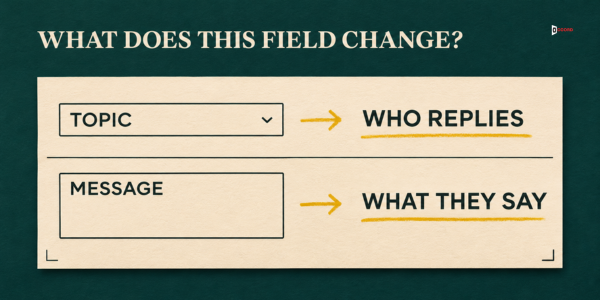
Use one test for every box: does someone use the answer to decide who replies, or what the reply says? A field earns a place if the answer does at least one of two jobs. Name and email pass automatically, because you cannot write back without them.
Route. The answer decides who replies. Routing means sending the inquiry to the right person. A topic choice such as "A new website" or "Emails to prospects" can do this job.
Reply. The answer changes what the first reply says, or lets you check fit before you write. "We need help with our emails" lets you start with the right question.
Every field then gets one of four verdicts. Keep means it does at least one job. Ask later means it does a job, but only once the buyer has a reason to answer, so you ask in your first reply or on the first call. Cut means it does no job, or you can find the answer yourself. Hidden means the form records the fact without asking the visitor, such as the page they were on.
First, write down what a qualified inquiry means for your business. In this post it is one that comes from a company you serve and asks for something you sell. Yours may be stricter, such as a minimum company size. Write it in one sentence and share it with everyone who answers the form.
Which fields should a B2B contact form keep, cut or move?
Here is the verdict for 13 common fields.
| Field | Verdict | Reason | Fix |
|---|---|---|---|
| Full name | Keep | You cannot write back without it. | Use one box, unless your CRM (customer relationship management system, where you store contacts) needs two. |
| Keep | You cannot reply without it. | A work address helps, but accept any valid address, including free mail. | |
| Company name | Keep | Reply: it lets you check fit and make the reply specific. | Test removing it later if the email domain shows the company on most inquiries. |
| Topic (dropdown) | Keep | Route: it decides who replies. | Keep it only if more than one person replies. Offer 4 to 6 choices in total, including "Not sure". |
| Message | Keep | Reply: the visitor's own words show what they need. | Use one prompt: "What would you like help with?" |
| Phone | Keep | Reply: it lets a visitor who prefers a call ask for one. | Make it optional, and reply by email if it is blank. |
| Job title | Cut | Reply: it helps only if you reply differently to senior and junior people, and it is often public. | Check the company site or LinkedIn page. |
| Company size | Cut | Route: it matters only if size decides the owner, and it is often public. | If size does decide who replies, keep it as a dropdown of ranges. |
| Industry | Cut | It does no job, because you can usually read it from the company website. | Check the website for two minutes before replying. |
| Timeline | Ask later | Reply: it could shape the reply, but a visitor who is still looking may not have a date. | Ask in the first reply: "Is there a date this needs to be in place by, or are you still looking at options?" |
| Budget | Ask later | Reply: it could shape the reply, but a visitor who has not seen a price may not know what to write. | Ask for a range in the first reply or on the call. |
| How did you hear about us | Hidden | Typed answers can be vague. | Record the source and campaign tag, then ask on the call. |
| File upload | Cut | It does no job, adds a step and can bring spam or unsafe files. | Offer an email address for files once you have replied. |
Two notes on the table. A topic dropdown should use the visitor's words, not your internal service names. A campaign tag is a short label in a web link, such as utm_source=linkedin, that names where the click came from. Some forms also reject a plus sign or block free mail, which can turn away a real buyer.
Our guide to traffic that does not turn into leads suggests four fields: name, work email, company and one short question. The topic dropdown and the optional phone box are the two additions here.
Where does a contact form fit in a B2B growth engine?
A B2B growth engine is a connected system that helps the right buyers find, trust and respond to your company, as our guide puts it. SEO and AEO (answer engine optimization, search work aimed at AI answer tools) help buyers and AI tools find you. Lead generation decides which companies to reach. Email starts conversations. Web development builds the pages that turn attention into a booked call, and your contact form is one of them. Social media builds trust. The form receives visitors from the other parts and hands on a named inquiry with a topic and a source, first to the person who replies and then, as a record, back to the other parts.
When the form does not record the source, the other parts lose their feedback. The email report shows clicks but no inquiries, and the search team cannot see which pages bring qualified inquiries.
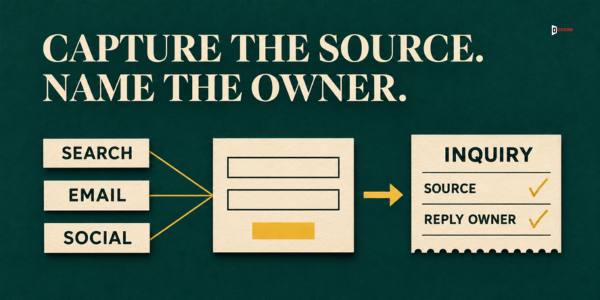
Here is a ten-minute check of whether your form is connected. Open your last 10 real inquiries, not spam, or all of them if you have fewer. For each one, find where the person came from and who replied. If 8 of the 10 have both, your form is connected to the rest. With fewer inquiries, use the same share: at least four in five, rounded up. If the source is blank for most (a working form writes "direct" when there is none), ask your web developer to add hidden fields that record it. If you have no inquiries yet, send one yourself from a link in your own email and see whether the source appears in your record.
What should you ask instead, and where?
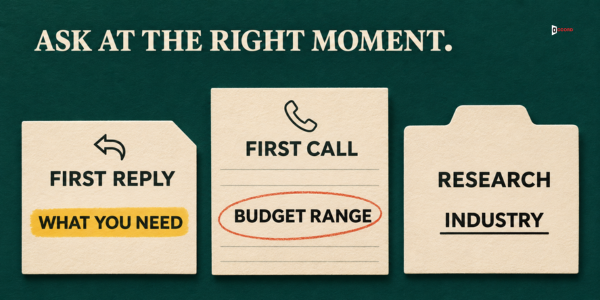
Ask-later fields move to a place where the buyer has a reason to answer. There are three places.
The first reply. Ask one question, not a questionnaire, and draw it from what the visitor already wrote. Two samples follow. If the visitor chose "Not sure" or wrote very little:
Could you tell me in a sentence what made you write to us today?
If the size is unknown:
Roughly how many people on your side would use this?
The first call. Use the call for questions that need a conversation: budget range, who else decides, what the buyer uses today and what has been tried. Ask the human version of "How did you hear about us": "What made you start looking for help now?"
Your own research. Industry, company size and job title are often public. If you find nothing, write "unknown" in your record and ask on the call. Do not guess.
What do you do with the answers?
- Sort out the spam. Mark messages that sell something to you or contain nothing real as spam, and keep a count so you can check what was removed. Do not count spam in any rate.
- Check fit before you reply. Mark the inquiry qualified or not qualified, using your one-sentence definition. If you cannot tell, ask one question in your first reply and keep it not qualified until the visitor answers.
- Route by topic. Send the inquiry to the owner of that topic. Give "Not sure" and "Something else" one default owner, and name a backup for holidays.
- Reply within one business day. A qualified inquiry gets an offer to talk or a direct answer. An inquiry you could not mark gets one question from the samples. A not qualified inquiry gets a polite note and, if you know one, a pointer to a better option.
- Record and share what you learned. Write the topic, mark, source and outcome in your CRM. If the source is blank, write "unknown" and do not guess. Once a month, send the count of qualified inquiries to whoever owns each source, such as search, email or social.
A "Not sure" topic or a very short message leads to one question in the first reply. A blank phone box does not. A visitor can write a clear brief without giving a number, so do not ask for one. Add a one-line follow-up question only when the message lacks something you need in order to reply. If the visitor does not answer, check only that a human reply went out when you promised.
How do you know whether the new form works?
Treat the change as a test of two things: whether more people write to you, and whether they are the people you want. Count with one definition before and after. The qualified rate is the number of qualified inquiries divided by the number of all inquiries, after spam is removed.
Pull the last eight weeks of inquiries. If that gives fewer than 20, go back up to six months. Write down inquiries, qualified inquiries, the qualified rate and the typical time to the first reply. Then change the fields only, and keep the page design, the offer and the traffic source the same if you can, so you know what did the work. Wait as long as your baseline covered, then count again. Count each window one week after it ends, so replies to your questions are in. Compare the number of qualified inquiries first, then the rate and the reply time.
Small numbers move a lot. If your form gets 10 inquiries a month, one extra qualified inquiry changes the rate by many points. With fewer than 20 inquiries even after six months, skip the rate and read each one. A before-and-after count is weaker than a split test, where half of your visitors see each form, because other things may change in the same weeks. Some B2B sites lack the traffic for a split test, so it still beats a guess.
Two different problems can follow a change. If qualified inquiries fall, put back the one field whose answer you used to reply, as an optional box. If your team only has more low-fit messages to sort, tighten your one-sentence definition of qualified and add a line above the button saying who you serve. Do not put back everything.
Imagine: a small firm cuts a nine-field form to five required fields
Imagine a 12-person agency called Bramblewood Data Cleanup, which organizes customer records for small B2B companies. This example is invented, including every name and number. The sample numbers are not a benchmark, so compare them only with your own site.
The old form had nine fields: name, work email, company, phone (required), job title, company size, industry, budget and message. Bramblewood defined a qualified inquiry as one from a company it serves that asks for work it sells. It removed spam first and used one rate everywhere: qualified inquiries divided by all inquiries.
In eight weeks on the old form, 30 inquiries arrived and 12 were qualified, counted a week after the window closed. The qualified rate was 12 divided by 30, which is 40.0%. None of the 30 had a recorded source, so the connection check failed. The first reply took about two business days, because every inquiry went to the founder.
Bramblewood then moved to five required fields (name, email, company, topic and message) plus an optional phone box. It added hidden fields for the source and the campaign tag, named an owner for each topic, and kept the founder as the default owner for "Not sure". In the next eight weeks, 46 inquiries arrived and 17 were qualified. The qualified rate was 17 divided by 46, which is 37.0%. A source was recorded for 45 of the 46 (a direct visit counts as recorded), and every inquiry had a named replier, so the check passed. The first reply now took about one business day.
Inquiries rose from 30 to 46, which is 16 more, or 53% more. Qualified inquiries rose from 12 to 17, which is 5 more, or 42% more. The qualified rate fell by 3 points, and the inquiries that were not qualified rose from 18 to 29, so the team had 11 more messages to sort.
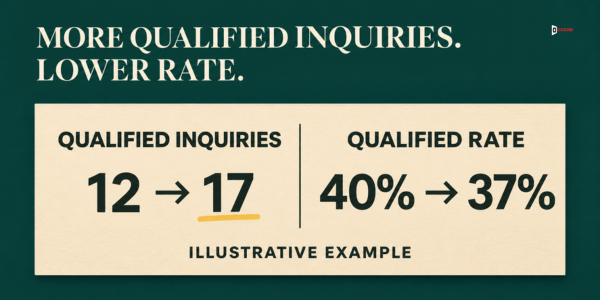
Did the change work? Bramblewood got 5 more qualified inquiries, and the rate fell a little. One more qualified inquiry would have made it 18 of 46, or 39.1%, so a single inquiry moves the rate by about 2 points. Bramblewood also changed who answers, so the faster reply is not proof that the shorter form did it. The season may also have changed. Direction: more qualified inquiries and a connected source record, with a lower rate. Bramblewood keeps the new form and checks again in eight weeks.
Now the signals. The source field showed that of the 17 qualified inquiries, 8 came from blog pages, 5 from links in outbound email, 3 from LinkedIn posts and 1 was blank, which adds to 17. Each owner got the count for their own source once a month, and the person who writes the blog posts chose the next topics from the pages that had brought the 8. Bramblewood compared counts, not rates, because the number per source was small.
The topic dropdown carried a signal too. Four of the 46 inquiries chose "Not sure". Each got the one-line question from this post, and three answered. The web owner reworded the dropdown choices using what those three wrote.
Frequently asked questions
How many fields should a B2B contact form have?
We suggest five required fields, which are name, email, company, topic and message, plus one optional box, phone. If one person answers every inquiry, drop the topic and use four required fields. There is no outside proof of one best number for B2B contact forms, so test it on your own site.
Should I ask for budget on the contact form?
On a general contact form, we suggest asking later, because a visitor who has not seen a price may not know what to write. Ask for a range in the first reply or on the call. A quote request page is different, because the visitor has already asked for a price.
How do I know where an inquiry came from without asking?
Ask your web developer to add hidden fields that record the source and the campaign tag, without any typing. Then ask on the call, "What made you start looking for help now?"
What if I cut fields and get worse inquiries?
Do not put back every field. If qualified inquiries fell, put back the one field whose answer you used to reply, as an optional box. If you only have more low-fit messages to sort, tighten your definition of qualified and add a line saying who you serve.
Do I need to worry about accessibility on a contact form?
Yes. The W3C Web Accessibility Initiative says to mark which boxes are required and which are optional, and not to use placeholder text instead of a label. Give every box a visible label.
Does the contact form still matter if most of our leads come from outbound email?
Yes. A buyer who receives your email may visit your site before replying, and a short form gives that buyer a second way to reach you. The form also records the source, so the email and search teams can see which message and which page bring qualified inquiries. In a growth engine, that record is how search, email and the web part learn from each other.
Next step
In a working session we map which part of your growth engine your contact form belongs to, which part is weakest, and what each field does under the two-job test. If you would like that, book a 30-minute working session with us and bring your current form and your last 20 inquiries. You can use everything in this post without us. Accord sells lead generation, email, SEO and AEO, web and social as one connected growth engine, so we have an interest in this subject.