
Do not set one follow-up time for every lead. Speed to lead is the time between a buyer showing interest and your first human response, and the right speed depends on the trigger. A demo request and a single blog visit do not deserve the same speed, so each type of trigger needs its own time. A speed-to-lead SLA (service level agreement) is a written promise inside your company that says who makes the first human contact after each trigger, and how soon.
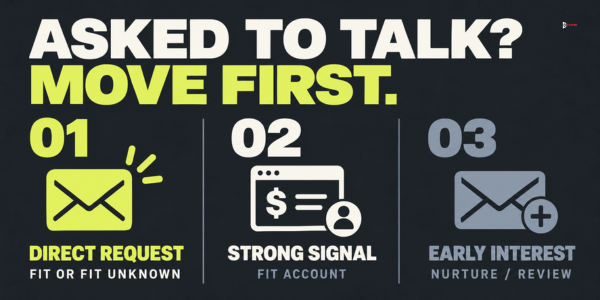
A workable starting point uses three tiers. Tier 1 is a person who asked to talk, such as a demo request or a reply, and gets the fastest human answer. Tier 2 is a person or fit account that showed strong interest without asking, and gets an answer within one or two business days. Tier 3 is early or weak interest, which gets no response deadline and goes to nurture, a slower series of helpful emails, plus a scheduled review. The exact times are in the SLA tables below. They are our proposals, not industry standards, so test them against your team's capacity.
What is a speed-to-lead SLA?
A speed-to-lead SLA has four parts, and it only works when all four are present.
- A trigger. A recorded event that suggests a person may be ready to talk: a form, a reply, a call request, a direct message, a visit to a high-intent page.
- A clock. It starts when the buyer acts, not when your CRM records the action. It uses three timestamps: when the trigger happened, when the owner received it, and when the first human action happened.
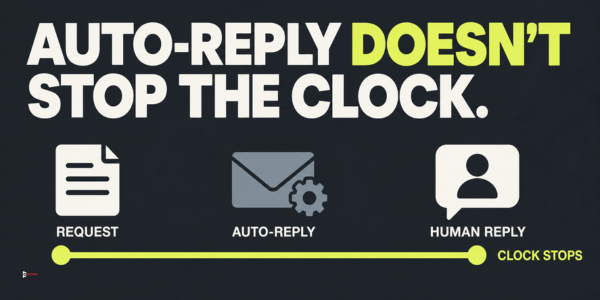
- A first human action. A reply, a call attempt or a personal message from a named person. An automatic acknowledgement does not stop the clock.
- An owner. One named person, with one named backup, who is responsible for that trigger type.
Speed to lead as a single number only measures the leads someone noticed. A team can reply to demo requests in five minutes and still leave other triggers sitting untouched in an inbox. An SLA by trigger closes that gap, because every trigger type gets a time limit and a name next to it.
How is response time split between routing and the rep?
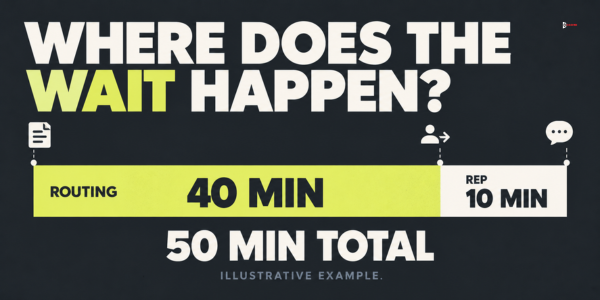
Lead response time has two parts. Processing time is everything that happens before a person sees the lead, and rep response time is how long that person then takes to act. Several vendor guides, including one from LeanData, describe it this way, and they argue that slow follow-up is often a routing problem and not a people problem. Processing covers the form reaching the CRM, the lead being matched to an account, the lead being assigned to an owner and the alert reaching that owner.
Measure the two parts separately by recording three timestamps on every trigger. Timestamp 1 is when the trigger happened, taken from the form, the message or the system log. Timestamp 2 is when the owner received it, meaning the alert actually reached that person. Timestamp 3 is when the first human action happened. Total response time is timestamp 3 minus timestamp 1, and that is the number the SLA clock judges. Routing time is timestamp 2 minus timestamp 1, and rep response time is timestamp 3 minus timestamp 2. Do not start the clock when the CRM record was created. A record created late would hide the routing delay, which is often the biggest part of the wait. If processing takes 40 minutes and the rep acts in 10, coaching the rep will not help. Fixing the route will.
Why does one response time for every lead fail?
A single rule fails in both directions. Make it strict, say 15 minutes for everything, and the team cannot keep it. Make it loose, say 24 hours for everything, and the people who asked to talk wait as long as the people who clicked once.
Research on lead response points to the cost of waiting. In a 2011 Harvard Business Review article, "The Short Life of Online Sales Leads", James Oldroyd, Kristina McElheran and David Elkington reported on an analysis of 1.25 million sales leads from 29 B2C and 13 B2B companies in the United States. Firms that contacted a lead within an hour were nearly seven times as likely to qualify it as firms that waited another hour, and more than 60 times as likely as firms that waited 24 hours or more. The authors defined qualifying as having a meaningful conversation with a key decision maker. In a separate test described in the same article, they sent a test lead through the web forms of 2,241 companies. About 37% replied within an hour, and 23% never replied at all. The average reply time among companies that did reply within 30 days was 42 hours. The article is listed in the BYU research repository.
Read those numbers with care. The study is from 2011 and mostly covers web-form leads, so it does not prove that every trigger decays at the same rate. What it does support is the direction: waiting hurts, and many companies wait longer than they think. Put your fastest attention on the triggers where a person has asked to talk, and measure the rest.
Which triggers should you list?
Start by writing down every way a person can signal interest, one per line. For a typical B2B company they fall into six groups. Requests are the obvious ones: a demo, a contact form, a quote, a booked call. Replies come from a cold email, a newsletter or a LinkedIn message. Direct messages include the person who asks for a checklist or more information after a social post. Behavior comes in two kinds that you must keep apart. An account-level signal tells you which company visited, for example a pricing-page visit matched to a company by an intent tool, but not which person. A known-contact trigger is something a person you can already identify does, such as a CRM contact returning to your pricing page or a form-filler downloading a gated guide. Events and referrals cover a conference scan, a webinar registration or an introduction. The last group is early interest: a newsletter signup, a single blog visit, a social follow.
Work from signals you can actually see and verify, and do not read a person into an account-level signal. A company-level visit, or one anonymous blog visit, does not tell you who looked, so it does not justify a message to a named individual. The account owner reviews the signal and, if the account has a known contact, reaches that person for a reason that does not depend on the visit. For the types of signals worth watching and how to find them, read signal-based lead generation for B2B sales. To decide which behaviors deserve action, see seven B2B buying signals worth acting on.
How do you sort triggers into three tiers?
Two questions place any trigger in a tier. Did the person ask for contact, and does the person or company fit your written description of the ideal customer? Fit has three possible answers: fits, unknown, and confirmed poor fit.
Someone who asked and fits is Tier 1. So is someone who asked and whose fit is not yet known. Call that provisional Tier 1: the chance of a real conversation is highest, and the first conversation is the cheapest way to check fit. Only a confirmed poor fit leaves Tier 1, and confirmed means you can point to a fact you already hold, such as a country you do not serve or a company far outside your written description. That trigger then takes a different path, such as a polite answer, a referral or a self-serve resource, and the reason is written on the record. Unknown is never a reason to move a request down. A person who did not ask but fits and shows a strong behavior is Tier 2, because a fit account acting like a buyer is worth reaching while interest is fresh. Everything else is Tier 3, which means early interest that gets nurture and a scheduled review, not a human-response deadline.
A strong behavior is an action that looks like buying work, and it counts only when you know who did it or which account did it: viewing pricing or service pages, returning within a week, downloading a gated guide (one behind a form) about a buying decision, or registering for an event on your topic. The same actions from an unidentified visitor stay in Tier 3.
One rule keeps the tiers honest. A trigger can move up a tier, but never down, without a written reason. A Tier 3 contact who later books a call becomes Tier 1 at that moment, and the clock for the new trigger starts then.
What response time should each tier get?
The tables below show a sample SLA. Tiers 1 and 2 have a human-response deadline, written as business time inside coverage hours, which the business-hours section below defines. Tier 3 has a review or nurture deadline instead, because adding someone to nurture or reviewing a batch is not a human response to the buyer. The times are starting values, and they assume a team with a few people covering inbound. Change them to match your capacity, but change them in writing, with the reason, so the team can see the history.
| Trigger | Tier | First human action within | Best channel | Owner | Backup |
|---|---|---|---|---|---|
| Demo or quote request | 1 | 15 minutes (aim for 5) | Phone or personal email | Sales rep on rotation | Sales manager |
| Meeting booked through the calendar | 1 | 1 business hour | Confirmation with a short question | Assigned rep | Sales manager |
| Positive reply to cold email | 1 | 1 business hour | Reply in the same thread | Outbound owner | Sales rep on rotation |
| Direct message asking for a resource | 1 | 2 business hours | Reply with the resource and one question | Social owner | Marketing lead |
| Question reply to a newsletter | 2 | 1 business day | Personal email | Marketing lead | Sales rep |
| Pricing-page visit by an identified fit account (account-level signal) | 2 | 1 business day to review and reach a known contact | Personal email or call to a known contact, never to an anonymous visitor | Account owner | Sales manager |
| Return visit to the pricing page by a known fit contact | 2 | 1 business day | Personal email or call | Account owner | Sales manager |
| Gated guide download by a fit contact | 2 | 2 business days | Personal email | Marketing lead | Sales rep |
| Event scan or webinar registration by a fit contact | 2 | 2 business days | Personal email with context | Event owner | Marketing lead |
Tier 3 triggers get a review or nurture deadline, not a response time. Keep them out of the human-response numbers.
| Trigger | Tier | Review or nurture deadline | Action | Owner | Backup |
|---|---|---|---|---|---|
| Newsletter signup | 3 | Added to nurture the same day | Automatic nurture, checked in the weekly review | Marketing lead | None needed |
| Single blog visit, anonymous or account-level | 3 | Counted in the weekly review | No personal contact, because nobody is identified | Marketing lead | None needed |
| Follow on social media | 3 | Weekly review | Review in a batch | Social owner | Marketing lead |
The goal in every Tier 1 and Tier 2 row is a human action that answers what the person or account did. A form fill for a quote needs a quote conversation, not a generic welcome.
What counts as the first human action?
The clock stops when a named person does something a buyer can see or feel. A reply written for this person counts, as long as it is more than a template with only the name changed. So does a call attempt with a voicemail or a short follow-up message, and so does a personal message on the channel the person used. An automatic acknowledgement does not count. Neither does adding the person to a sequence or newsletter, or assigning the lead to a rep in the CRM without any contact.
Keep the automatic acknowledgements, because they tell the buyer the request arrived, but do not let them stop the clock. Otherwise the SLA measures the speed of your software and not your team.
The first action must also answer the trigger. A demo request that gets "Thanks for your interest, here is our brochure" has been answered on time and badly. For each Tier 1 trigger, write down what the first action must include, for example a proposed time, a direct answer and one question back.
How do you handle business hours, weekends and time zones?
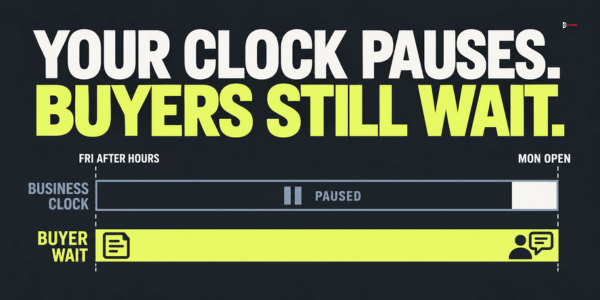
An SLA written in plain hours breaks every Friday evening, so use a business-hours clock and write the coverage hours and the time zone at the top of the sheet. A sample: Monday to Friday, 9:00 a.m. to 6:00 p.m. in the owner's time zone. Replace it with your real hours. The times in the tables above are the standard SLA. They apply to triggers that happen inside coverage hours, and the clock runs only while coverage is open.
Next, write the after-hours exception separately, so it does not blur the standard SLA. A Tier 1 trigger counts as after-hours when it happens outside coverage, or when coverage will close before its standard time runs out. A request at 5:45 p.m. on Friday has exactly 15 minutes of coverage left, so the 15-minute SLA still applies. A request at 6:30 p.m. on Friday does not. For an after-hours Tier 1 trigger, the exception has two parts: an automatic acknowledgement that tells the buyer when a person will answer, and a first human action within the first business hour of the next coverage day, which for the Friday request means by 10:00 a.m. on Monday. If you offer an on-call person with a mobile alert, that person can answer sooner. If you cannot promise the first-hour rule, leave it out of the SLA. Report after-hours Tier 1 triggers separately, with their own target, so the exception does not hide a miss in the standard numbers.
Then look at the regions you sell to. If you sell across US time zones, decide whose business hours apply. One option is the buyer's time zone for phone calls and the owner's for email. If your team sits in one zone, say so on your contact pages and set expectations in the automatic acknowledgement, for example "You will hear from a person within one business day."
The research above counts clock time, not business time. A Friday evening request that waits until Monday morning is a long wait to the buyer, even if your SLA treats it as 15 minutes. The buyer cannot see your internal clock. They only see the time they sent the request and the time they got a reply, so for Tier 1 record the clock-time wait next to the business-time wait.
What about triggers that never reach your CRM?
Some of the best triggers arrive outside your tools: a direct message on a social network, a call to a colleague, a question after a webinar, a text message. No system records them, so they are easy to miss. Add one rule. Whoever receives a trigger by any channel logs it in the CRM the same day. The log records two times: when the buyer sent the message, which is timestamp 1, and when the entry was made. Without the time the buyer acted, the clock cannot run, and a late entry would hide the delay. A short shared form that takes under a minute is usually enough.
Who owns each trigger and who covers absences?
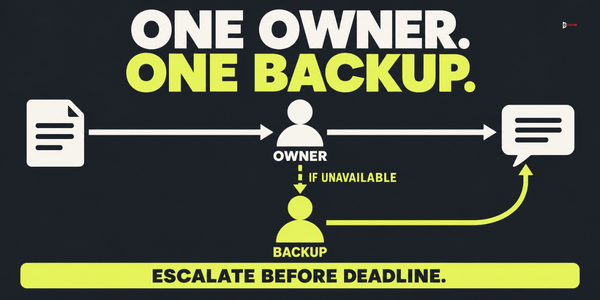
Every trigger type needs one named owner and one named backup. A trigger that belongs to "sales" or "the team" belongs to nobody, and it gets missed when two people each assume the other has it.
For routing, pick one of three patterns and write it down. Rotation has reps take turns by day or week, and it suits requests that arrive at a steady rate where any rep can answer. Territory or account routing sends the request to the rep who owns the account or region, which works when the buyer expects a familiar name. A pool with a claim button leaves leads in a shared queue, and the first rep to press the button owns the lead. That is fast, but it needs a rule that stops reps from picking only the easy ones.
Add an escalation rule, which is a set of alerts that makes a missed deadline visible before it happens. A simple version alerts the owner at 50% of the allowed time, alerts the backup and the manager at 75%, and sends a breach notification to the manager at 100%. The 100% alert is not a warning, because the deadline has passed. It is the record that a miss happened and the prompt to find the cause. For a one-hour SLA that means alerts at 30 minutes, 45 minutes and the hour, and for a 15-minute SLA at about 8 minutes, 11 minutes and 15 minutes. For handoffs between marketing and sales, who owns the handoff when you have no revenue operations team covers the owner-and-deadline method in more detail.
How do you measure whether the SLA works?
For Tiers 1 and 2, track three numbers per tier every week.
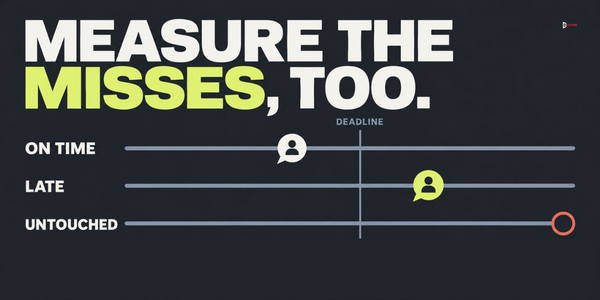
- Share worked on time. Of the triggers logged, the share whose total response time, from timestamp 1 to timestamp 3, fell inside that trigger's own deadline in the table.
- Median hours to first human action. Measure it from timestamp 1. Use the median and not the average, because a few very slow cases would distort the average.
- Share dropped without a reason. Triggers closed with no note. The target is zero.
Count unique people for each trigger type. One person who visits the pricing page four times in a week is one pricing-page trigger, and a form submission from the same person is a separate Tier 1 trigger. For Tier 3, do not report a response time. Track the share added to nurture or reviewed by its deadline, so the human-response numbers stay about humans answering buyers.
To measure, you need three timestamps on each trigger: when it happened, when the owner received it, and when the first human action happened. Most CRMs store the first and the last if the team logs the call or the email against the record, and the middle one often comes from the alert log. If the data is not clean yet, check by hand. Take 20 triggers from last week, look up each timestamp, and calculate the hours between them in a spreadsheet. Twenty is a rough screen and not a statistic, but it shows obvious problems in an afternoon, and hand work shows you problems that a dashboard would hide, such as a form that reaches the CRM two hours late.
Set a target for each tier before you start, for example 90% worked on time for Tier 1 and 70% for Tier 2 (our proposals; adjust them to your team). Also record how many meetings came from each tier. If Tier 1 triggers are worked on time and few meetings result, the problem is the quality of the conversation, not the speed.
What should you change when the SLA is missed?
Do not shorten the SLA first. The table lists the usual causes of a miss and the first fix for each.
| What you see | Likely cause | Fix first |
|---|---|---|
| Tier 1 triggers sit for hours | The alert reaches nobody, or reaches the wrong person | Check the notification path from form to owner |
| Time to first action is high only on Fridays and Mondays | Weekend and after-hours gap | Add the after-hours exception and a named weekend backup |
| Some triggers are never worked | They are recorded in a place nobody checks | Route every trigger type to a queue with an owner |
| Triggers are worked, but late, in one region | No coverage for that time zone | Assign a regional owner or backup |
| Many triggers are closed without a reason | No rule for closing | Require a reason from a short list |
| Fast replies, few meetings | The first message is weak or the lead does not fit | Review ten first messages and ten lead profiles |
The delay is often not in the team. A form that syncs to the CRM once an hour, or an alert sent to a mailbox nobody reads, can cost the first 60 minutes. Test the route by submitting a test request and timing every step.
How do you roll the SLA out without overloading the team?
Begin with Tier 1 only, the smallest set of triggers and the most valuable. Run it for two weeks and fix the notification path, then add Tier 2, and Tier 3 last. Each month, read five missed triggers one by one and change one thing. If the same tier is missed two months running, adjust the time or add capacity, and record the change with the date and reason.
Imagine: a fictional software company and one week of data
The details of this example are invented. Imagine a 60-person software company with two sales reps and one marketing lead. Before the SLA, the team replies to demo requests quickly but has no rule for anything else.
In the first week with the SLA, Tier 1 receives 14 triggers and the team works 12 of them on time (86%), with a median of 0.8 business hours from trigger to first human action and none dropped without a reason. Tier 2 receives 31 triggers, and each is judged against its own deadline. Of 19 triggers with a one-business-day deadline, the team works 9 on time. Of 12 triggers with a two-business-day deadline, it works 4 on time. That is 13 of 31 on time (42%), with a median of 11 business hours to first action and 6 triggers dropped without a reason. Tier 3 collects 52 triggers, and the marketing lead reviews all of them in the weekly batch before its deadline, so no human-response time applies.
Tier 1 is close to the 90% target. The two misses were both requests that the owner saw late because the alert went to a shared inbox. Tier 2 is the real problem: fewer than half were worked within their own deadline, and six were closed with no note.
The team makes three changes. It sends Tier 1 alerts to the owner's phone and to the backup. It sends Tier 2 alerts to the marketing lead as well as the rep, so that a visit by a fit account lands in two places. And it requires a closing reason for every trigger. The following week, Tier 2 on-time work rises to 71% (22 of 31, again against each trigger's own deadline).
Frequently asked questions
Is five minutes the right target for every lead?
No. Many vendor guides recommend five minutes for demo requests, but we could not verify the research behind the figures they quote, so we do not repeat them. Treat five minutes as a stretch target for demo requests when someone watches the queue all day, not as a promise and not as a rule for every trigger. Start with the times in this guide, measure for a month, and tighten the ones you meet easily.
Should every trigger get a reply within a day?
No. Early-interest triggers such as a single blog visit do not need a personal reply. They need a nurture path and a weekly review, so human time stays with the triggers that matter.
Do replies to cold outbound email follow the same SLA?
Yes, a positive reply to a cold email is a Tier 1 trigger, because the person has asked to talk. A reply costs more to lose than a click, so route it to a named owner and reply in the same thread. For the full method, read how to handle cold email replies.
Next step
If you want to turn your own trigger list into a working SLA, book a 30-minute working session with the Accord team. Bring your list of triggers, the last week of requests and the name of whoever answers them today.