
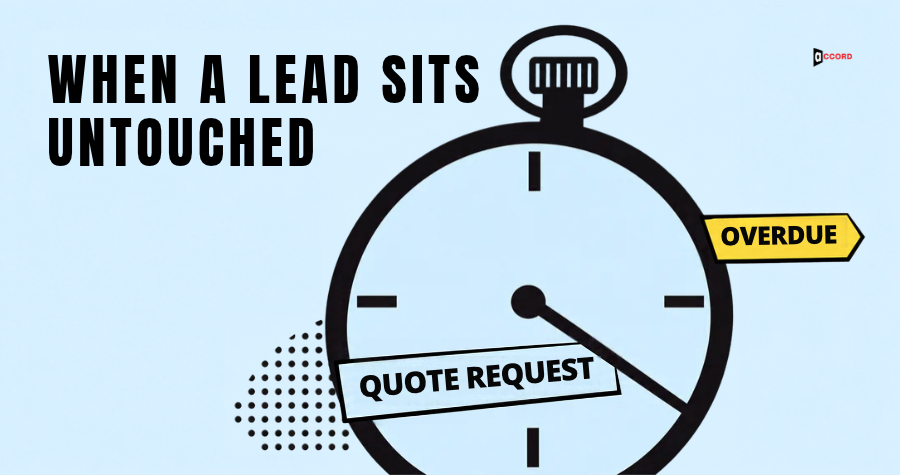
A buyer books a call on your website at 10:10 on a Tuesday. The lead goes to a rep who is at a customer site all morning. The backup rep sees the alert and assumes the owner has it. By Thursday the buyer may have moved on, and nobody on your team knows the lead was never touched. In a B2B growth engine, this is a break at the handoff between your website, where the buyer asked to talk, and your sales pipeline, the list of deals your reps are working. This post gives you a short rule for that moment.
These lead reassignment rules cover one case only: a lead that nobody has touched. Touched means a named person has made first human contact: a reply written for this buyer, a call that was answered or ended with a voicemail, or a personal message on the channel the buyer used, logged with its real time. How fast to answer is a separate question, which our speed-to-lead guide covers. This post starts after the deadline has passed. The times below are Accord's own starting points, not industry standards, so change them to fit your team.
What are lead reassignment rules in four steps?
The rule has four steps in a fixed order. A clock starts when the buyer acts and stops when a named person makes the first human contact and logs it. A reminder goes to the owner and the backup together when the deadline passes. One move follows: if nobody takes the lead, it moves once, to the backup, and the old owner is removed. A stop rule ends it: if the second owner also misses, the lead stops moving, and a named person, the decider, must act, hand it over by name, or close it with a reason.
In short, for a buyer who asked to talk, a lead nobody has touched moves once, to the backup, 3 business hours after it arrives. If the backup also misses, the decider is alerted at 4 business hours and takes over, and must act by the end of the next business day.
Why do leads sit untouched?
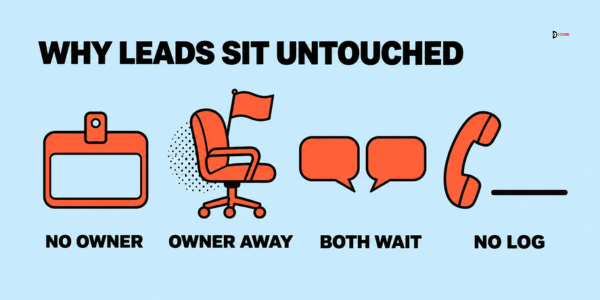
Untouched leads fall into one of four gaps.
Nobody owns the lead. It sits in a shared list, where each person assumes someone else will take it.
The owner is away without saying so. The rep is on a visit, off sick or on leave, but the lead is assigned anyway and the alert waits in an unread inbox.
The owner and the backup each think the other has it. Both saw the alert and neither replied.
The owner worked the lead but did not write it down. The record shows nothing, so the lead looks untouched, and a second person may call the same buyer.
A stale lead, one that went quiet after a touch, needs a follow-up plan. This post covers the first touch that never happened.
What do the times and the copyable rule look like?
The table shows Accord's starting times for two kinds of lead. Both first-contact deadlines are the ones in our speed-to-lead guide, so replace them with the deadlines from your own response-time table.
| Kind of lead | First contact due | Reminder | Move to the backup | Alert to the decider | Decider must act by |
|---|---|---|---|---|---|
| Buyer asked to talk (a call booked through your calendar, or a positive reply to a cold email) | 1 business hour after arrival | At the deadline | 2 business hours after the reminder | 1 business hour after the move | End of the next business day |
| Interest without a request (for example, a pricing-page visit by a known fit contact) | 1 business day after arrival | At the deadline | 1 business day after the reminder | 1 business day after the move | End of the next business day |
The clock runs only while your team works. The guide gives a demo or quote request a stricter 15 minutes. If you use that, the move still comes 2 hours after the reminder.
Here is the whole rule as one block to copy. Square brackets show what you replace.
Lead reassignment rule, version 1. Decider: [name and title]. Backup for the decider: [name]. Coverage hours: [days, hours, time zone].
Owner. Every lead has one named owner and one named backup. A lead with no owner goes to the decider, who must assign it within [15 business minutes] of its arrival and write one line on why the owner was unclear.
Clock. The clock starts when the buyer acts and runs only during coverage hours. It stops when a named person makes the first human contact and logs it the same day, with the real time of the contact.
Reminder. When the deadline passes with no logged contact, the owner and the backup get one message together.
Move. At [2 business hours] after the reminder, the lead moves to the backup. The old owner is removed, and both people are told.
Stop. A lead moves at most once on its own. If the new owner misses a deadline of [1 business hour], the decider is alerted and must act, hand over by name, or close with a reason by the end of the next business day.
Where does lead reassignment fit in a B2B growth engine?
A B2B growth engine is a connected system that helps the right buyers find, trust and respond to your company, as our guide to the B2B growth engine explains. Accord's five services are its five parts. SEO and AEO (search engine and answer engine optimization) give search visibility. Lead generation supplies the account data. Email runs the outreach. Web development turns attention into action, and social media builds trust. In this post, a signal is anything a buyer does that one part passes to the next, such as a form fill, a reply or a booked call.
In this post we place the rule in lead generation, the part that holds the account data, because it is where each buyer gets a named owner. It receives signals from the others: a form fill from web, a reply from email, a message from social, or a search visit that ended in a request. It hands on one thing, a logged first contact by a named person. That log lets the email part stop its automatic messages and the pipeline count a real conversation.
When this part is weak, the other parts can look healthy while nothing reaches the pipeline. The web report counts the form fill and the email report counts the reply, but the buyer hears nothing, and automatic emails may keep arriving.
Here is a check you can finish in ten minutes. Take the last five form fills or replies from buyers who asked to talk. For each one, write down who owned it, when a named person first contacted the buyer, and whether the automatic emails stopped after that. A blank in any of the three is the break.
Step 1: Who owns the clock, and what stops it?
The start. Use the time the buyer acted, not the time your records created the lead, so a late-arriving record does not hide waiting time.
The stop. Only first human contact stops the clock, as defined at the top. A call that rings out with no voicemail does not count, so try another channel. For a booked call, a personal confirmation message from the owner stops the clock, and the meeting itself does not. An automatic reply does not count, because it measures your software. Adding the buyer to an email series does not count either, and neither does assigning the lead to a person, because that moves a name and contacts nobody.
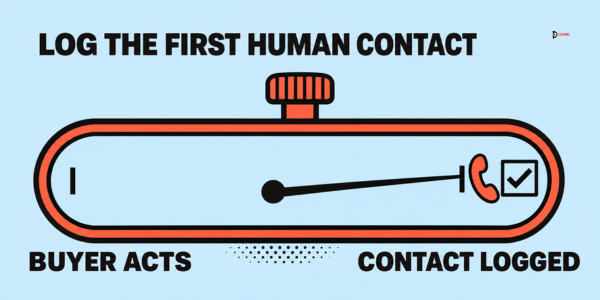
The log. Contact stops the clock only when it is written down, so an unlogged call still triggers the reminder. If a rep forgot, the decider records the contact with its real time and notes that it was logged late. A late log does not remove a reminder or move that already went out; count it as it happened.
Step 2: What should the reminder say, and who gets it?
Send one message at the deadline to two people together, the owner and the backup. Do not send it to the whole team. In our view, a message to everyone reads as a general notice, and each person leaves it for someone else. If you already use the speed-to-lead guide's 100% alert to the manager, keep it and treat this as the owner and backup message. Here is a sample to copy.
Lead overdue: [buyer name] at [company] asked for [what they asked for] at [time].
First contact was due at [time]. It has not been logged.
Reply "mine" if you are working on it now, or "not mine" if you cannot take it.
If nobody takes it, it moves to [backup name] at [time].
"Mine" pauses the move for a short time, for example 30 business minutes, and the person must log contact within it or the move goes ahead. The later marks then shift by the pause. "Not mine" lets an owner release the lead at once. The backup may reply "taking it" at any time after the reminder and becomes the owner at that moment.
Step 3: When should the lead move to someone else?
The move has three design choices, and each has a reason.
It happens at a set time, not when someone decides. If a person must decide, the lead waits for that person's attention. If reps often spend half a day at customer sites, lengthen the window.
It goes to the backup, and the old owner is removed. Copying both people brings back the original problem, because each can assume the other is on it.
It happens once. Some tools keep passing a lead along until someone acts, which, in our view, can hide the real problem: a gap in who is available. Our starting point is one move, then the stop rule.
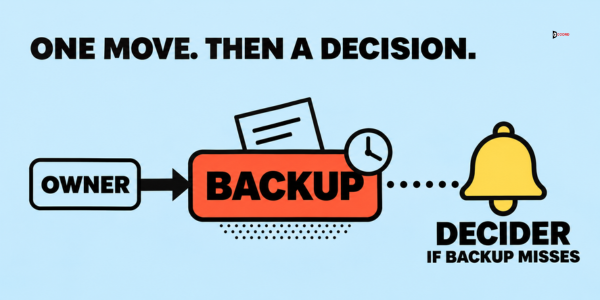
The new owner should not start from zero. Our guide on who owns the marketing-to-sales handoff gives a five-line note you can reuse. When the first owner returns, the lead stays with the new owner unless the decider moves it back for a reason.
Step 4: Who decides when the reminder and the move fail?
Who the decider is. The person who can change the rule and has authority over both the owner and the backup: the sales lead, or the founder in a founder-led company. Name a backup for the decider too.
What the decider can do. Pick one by the end of the next business day. Act: contact the buyer and log it. Hand over by name: give the lead to one person with a new deadline, which is a decision and not a second automatic move. Close with a reason: not our customer, duplicate or test entry, already handled, or the buyer asked us to stop. Closing is not a reply to the buyer, so keep it out of your response-time numbers.
What if the decider also misses? The alert repeats to the decider's backup at the start of the business day after the decider's deadline passes, and it counts in that week's rate of leads reaching the decider. With one founder, the alert repeats every morning until the lead is settled.
What if nobody knows who should own the lead? The decider assigns it within 15 business minutes of its arrival, the same deadline as in the copyable rule, and writes one line on why the owner was unclear. The first-contact clock keeps running from the buyer's action, so the new owner has the rest of the deadline.
What are the edge cases?
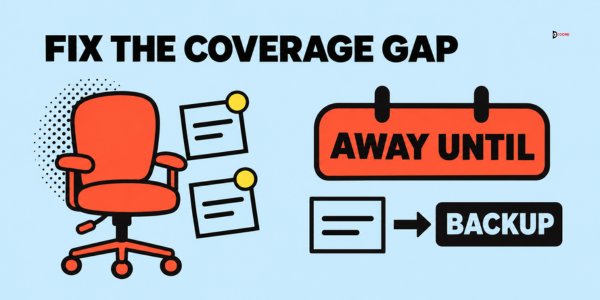
The owner is on leave. Give each person an "away until" date and send leads assigned during that time straight to the backup, with no reminder step. Untouched leads already on the owner's list move to the backup on the last working day. For a sudden absence such as a sick day, the decider moves the owner's untouched leads within the first business hour after learning of it, so the owner must tell the decider as soon as they know. If nobody tells the decider, this step cannot start and the normal timers apply.
The lead replies after the move. A reply is a new request with a new clock. If the buyer replies to the old owner's thread, the old owner forwards it at once and logs it.
Someone else already contacted the lead. Before anyone acts on an overdue lead, read the record and the shared inbox for contact by anyone, including the founder or a colleague who met the buyer at an event. Logged contact by any named person stops the clock. If two people contacted the buyer, the first contact stands, and the second person stops and tells the decider.
There are two records for one buyer. The same person may appear twice with different owners. Before acting, compare email address and company name, and work from one record.
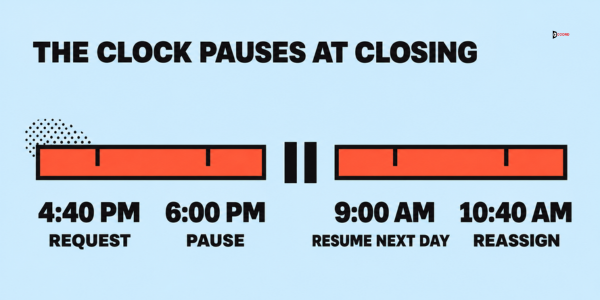
The request arrives near closing time. Take a call booked at 4:40 p.m. with coverage until 6:00 p.m. The reminder falls at 5:40 p.m., and the move comes 2 business hours later. Only 20 minutes remain before 6:00 p.m., so the other 1 hour 40 minutes run from 9:00 a.m., and the move happens at 10:40 a.m. If nobody has replied by then, the buyer has waited 18 clock hours.
How do you set this up in your tools, or without them?
Many customer relationship management (CRM) tools, which are programs that store your leads and notes, can run a rule like this. Two vendor pages show what is possible, as read on 10 November 2026.
Ekho's sales agent documentation gives a typical example policy: remind the rep after 1 hour, alert the sales managers 2 hours later and reassign 24 hours after that. Logging the contact stops the process, and a call that is not logged still triggers the manager alert. The Real Geeks help page describes a "time to idle" setting for real estate teams, where manual calls, texts and emails count and automated messages do not. Its lead can go to the next user once, keep moving through the team, or go to a shared pool.
Without a tool, use a shared sheet with one row per lead and columns for arrival time, owner, backup, deadline, first contact time and status. A named person reads it at set times, such as the top of each hour, sends the reminders and alerts the decider.
Whichever route you take, test it with a lead made from your own details. Leave it untouched and note the time of the reminder, the move and the decider alert. Typical faults are an alert sent to an unread mailbox or a clock set to the wrong time zone.
How do you check that the rule works?
To check your lead reassignment rules, hold a ten-minute review once a week. Every rate is the leads that reached a step, divided by all leads of the same kind that arrived that week. Our starting targets are fewer than 1 in 5 leads needing a reminder, fewer than 1 in 10 reaching the move, and fewer than 1 in 20 reaching the decider. These are proposals, not benchmarks.
| What you see | Likely cause | First fix |
|---|---|---|
| Many reminders at one time of day | A coverage gap, such as lunch or a regular meeting | Name a backup for that slot |
| Leads reach the decider | The windows are too short, or the decider is the wrong person | Read each lead and change one setting |
| Many leads closed as "not our customer" | The page or message that brought them does not say who it is for | Tell whoever owns that page or message, and add who it is for |
Imagine: one week with the rule
This example is invented, including every name and number, and the numbers are not a benchmark. Imagine Fernwick Software, a company of 25 people with two reps, Maya and Owen, and a sales lead, Ravi, who is the decider. Each rep is the other's backup. Coverage is Monday to Friday, 9:00 a.m. to 6:00 p.m., and the deadline is one hour for buyers who asked to talk, as in the table. Leads reach Fernwick from two parts of its growth engine: replies to cold email and call bookings on its website.
First lead: Tamsin, at an invented parts supplier called Orchard Gate, replies to a cold email and asks for a call. That reply is a signal from the email part to the lead generation part.
On Tuesday at 10:10 a.m. the reply arrives and goes to Maya, so the deadline is 11:10 a.m. Maya is at a customer site until 3:00 p.m. and has not set an away date. At 11:10 a.m. the reminder goes to Maya and Owen, and neither sees it, because Owen is in a demo until 1:30 p.m. At 1:10 p.m., 3 business hours after arrival, the lead moves to Owen and Maya is removed. The record shows Tamsin's own words and the source. Owen leaves the demo at 1:30 p.m. and reads the alert. At 1:45 p.m. he emails Tamsin two possible times and logs it. His deadline after the move was 2:10 p.m., so he is on time. The log tells the email part to stop sending Tamsin automatic messages.
Tamsin waited 3 hours 35 minutes. The rule did not make the contact fast, but it put a second person on the lead at the 3-hour mark.
Second lead: a call booked through Fernwick's website arrives on Wednesday at 2:00 p.m. and goes to Owen, who went home sick at noon and told nobody, not even Ravi. Ravi does not know, so the sick-day step, which starts only when the decider learns of an absence, never begins, and the normal timers run. The reminder goes out at 3:00 p.m. and nothing happens. At 5:00 p.m. the lead moves to Maya, who is on a customer call until 6:00 p.m. At 6:00 p.m., 4 business hours after arrival, Ravi is alerted. On Thursday at 9:05 a.m. he reads it. The sender is a student who booked a call for a school project. Ravi closes the lead as "not our customer" and logs the real time. He also sends a signal back to the web part: the page behind the booking link never says who the product is for, so he asks for one line above it, "For business teams".
By Friday, 18 leads that asked to talk have arrived. Of the 18, 14 got first contact by the deadline with no reminder, which is 77.8%. Another 2 got contact after the reminder and before the move. One was moved and contacted in time. One reached the decider. The groups add up: 14 plus 2 plus 1 plus 1 is 18.
So reminders went out for 4 of 18 leads (22.2%, above the target of fewer than 1 in 5). Moves happened for 2 of 18 (11.1%, above the target of fewer than 1 in 10). One of 18 (5.6%) reached the decider, above the target of fewer than 1 in 20, so Ravi reads that lead first. Both moved leads had one cause: an owner who was away without telling anyone. Ravi makes one change: everyone sets an "away until" date before a planned absence and tells him before a sudden one. With 18 leads, one lead moves a rate by 5.6 points, so he reads direction, not proof.
Frequently asked questions
How long should a lead sit untouched before it is reassigned?
Accord's starting points are in the times table near the top: 3 business hours after arrival for a booked call or a positive reply to a cold email, and two business days for interest without a request. Change both to fit your team and coverage hours.
What counts as a lead being touched?
First human contact by a named person, logged with its real time, as defined in the opening of this post. An automatic reply, an email series and a change of owner do not count.
What should happen if the lead replies to the old owner after the move?
The old owner forwards it to the new owner at once and logs it. The reply is a new request with a new clock, as the edge cases section explains, and the new owner answers in the same thread where possible.
Do I need a CRM to run lead reassignment rules?
No. A shared sheet with one row per lead, a named person who checks it and set check times can run the same four steps. It suits up to about 10 leads a day, our starting point.
Why does an untouched lead hurt the rest of a B2B growth engine?
The other parts of a B2B growth engine (search, email, web and social) spend effort to bring a buyer to the point of asking for contact. An untouched lead wastes that effort at the last step. It also gives the other parts false news, because a form fill or reply is counted as a lead even though no conversation followed.
Is there research on the best time to reassign a lead?
Not that this post can cite. The two vendor pages describe their own tools and show different ways of setting the timing. Count your own results for a month before you change the starting points here.
Next step
Once the four steps are written down, the next question is which part of your growth engine this rule touches and which part is weakest. In a working session we map that for your team and draft the four steps of your rule together. To get one, book a 30-minute working session with the Accord team. Bring your response-time table, your owners and backups, and the last five leads that waited too long. Accord sells SEO and AEO, lead generation, email, web development and social media as one connected growth engine, so we have an interest in this subject.