
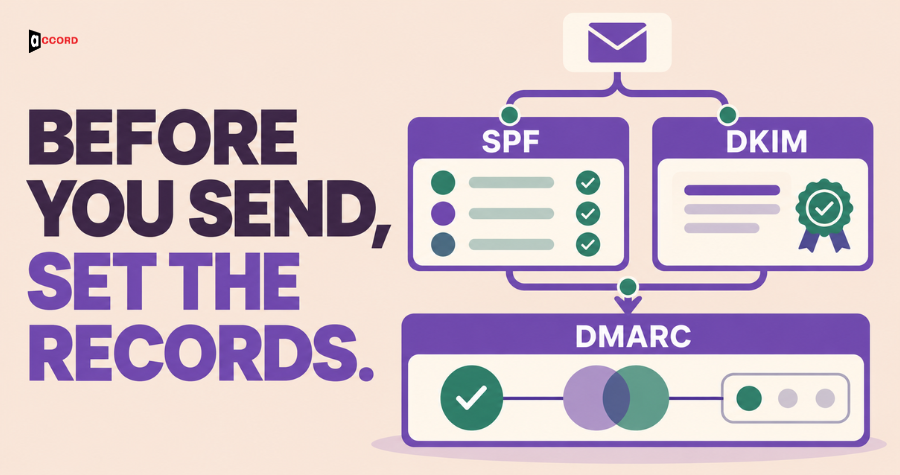
Here is how to set up SPF DKIM and DMARC: list every service that sends mail for your domain, publish an SPF record, turn on DKIM signing, publish a DMARC record set to monitoring only, read the reports for a few weeks, and then tighten the rule one step at a time. SPF is a list of who may send for your domain. DKIM is a tamper-proof seal on each message. DMARC is the rule that says what to do when those checks fail, and where to send reports about it. Google, Yahoo and Microsoft now require these checks from large senders, and the setup is cheap protection for smaller senders too. The checks prove who you are. They do not make anyone want your email.
This guide is for a sales or marketing lead who does not manage the domain but has to get the work done. Accord Tech Solutions sells outbound and email services, including this kind of setup, so weigh our advice with that in mind.
What do SPF, DKIM and DMARC do, in plain words?
First, the place where all three live. Every domain, such as yourdomain.com, has a public settings page called DNS (the Domain Name System). Your domain registrar or hosting company usually runs it. It holds short lines called records. A TXT record holds plain text. A CNAME record points one name at another name. SPF, DKIM and DMARC are all published as these small records.
The live post on what DMARC is and why it matters for email campaigns covers DMARC in general. This guide has a different job: a step-by-step order of work for a B2B team that sends outbound from its own domain or a separate sending domain.
SPF is the guest list. SPF stands for Sender Policy Framework. Picture a party with a list at the door. The list names every service allowed to send mail for your domain, and the receiving mail system checks the sender against it. One detail trips people up. SPF checks a hidden return address used for bounces (messages that report a failed delivery), not the From name a person reads.
DKIM is the tamper-proof seal. DKIM stands for DomainKeys Identified Mail. Picture a wax seal on a letter. Your sending service stamps each message with a digital signature, made with a private key that only the service holds. You publish the matching public key in DNS, and the receiver uses it to check the seal. A good seal means the message came from someone who holds your key and was not changed on the way.
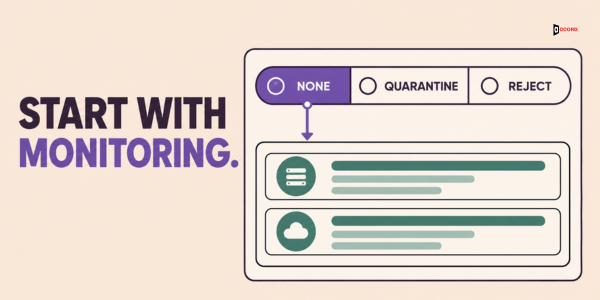
DMARC is the house rule. DMARC stands for Domain-based Message Authentication, Reporting and Conformance. It says: if a message claims to be from my domain and fails the checks, here is what to do, and here is where to send reports. The choices are "none" (do nothing, just report), "quarantine" (ask the receiver to treat the message as suspicious, often by sending it to spam) and "reject" (ask the receiver to refuse it). These are requests, and each receiver still applies its own policy.
One more word matters later. Alignment means the domain people see in the From line is tied to the domain that passed the check. Under the usual relaxed setting, the two only need to share the same main domain, so mail.yourdomain.com can line up with yourdomain.com. A strict setting asks for an exact match. A message can pass SPF or DKIM for another company's domain and still fail DMARC, because that domain does not line up with your From line. DMARC passes when at least one check, SPF or DKIM, both passes and lines up. One aligned pass is enough. You do not need both.
Why do these three checks matter in October 2026?
Mailbox providers now treat these checks as the price of entry for large senders. We read each page below in October 2026, so check them again before you rely on a number.
Google. Google's email sender guidelines say that since February 1, 2024, all senders to Gmail accounts must meet a basic set of rules, which includes SPF or DKIM. Senders of more than 5,000 messages a day to Gmail accounts need SPF, DKIM and DMARC, and the From domain must align with the SPF or DKIM domain. The DMARC policy may be "none". Google's sender frequently asked questions page adds that subdomain mail counts toward the main domain's total, and that from November 2025 Gmail ramps up enforcement gradually, with new domains on a faster timetable. Failing mail might be rejected or sent to spam.
Yahoo. Yahoo's sender best practices ask all senders for SPF or DKIM. Bulk senders need both, plus a DMARC policy of at least "none" that passes. Yahoo's page gives no number for "bulk".
Microsoft. Microsoft's Outlook postmaster policies say that, effective May 5, 2025, domains sending more than 5,000 emails a day to Outlook.com accounts must pass SPF and DKIM, and must publish a DMARC record of at least "none" that lines up with SPF or DKIM. Mail from high-volume senders that falls short is sent to the junk folder, and if the problem stays unresolved it may be refused with the error 550 5.7.515. Microsoft's support page for that error covers Outlook.com and related consumer services such as Hotmail and Live.com. It describes a high-volume sender as one that sends 5,000 or more messages using the same domain in the From address, and it says Microsoft now enforces these rules. Neither page gives a date for when refusals began.
If you send a few hundred messages a day, the 5,000 line may not apply today. Set up all three anyway. Google's basic rules cover every sender to Gmail, and volume grows.
What do you need before you touch any record?
You need a complete list of every service that sends mail with your domain in the From line. Most later failures trace back to a missing name on this list.
Start with the obvious senders: your mailbox provider and the tool that runs your outbound sequences. Then find the quiet ones. A CRM may send meeting reminders, an invoicing tool may send receipts, and a newsletter tool that a colleague set up two years ago may still be running. Ask each team lead: "What tool sends email that shows our domain as the sender?" For each service, write its name, what it sends, who owns the account, and where its "domain authentication" page is. That page tells you which SPF value and DKIM record to publish.
Next, decide whether outbound will use your main domain or a separate one, which a later section covers. Settle it first, because every domain and subdomain needs its own SPF record and DKIM setup. Last, create a shared mailbox for reports, such as [email protected]. Google and Microsoft both advise against using one person's inbox.
How to set up SPF DKIM and DMARC in the right order
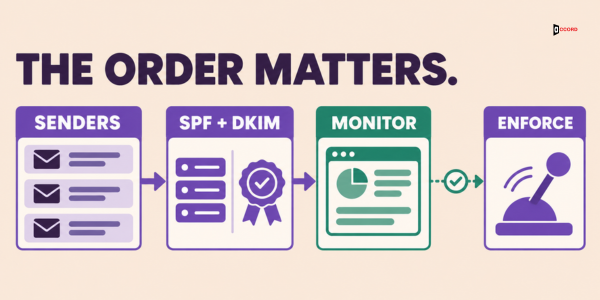
DMARC depends on the other two, so a strict DMARC rule published before SPF and DKIM work is the quickest way to block your own mail. The order is: finish the sender list, publish one SPF record, turn on DKIM for every sender, wait about 48 hours, publish DMARC at "none", read the reports and fix failures, then tighten the rule step by step. Words such as yourdomain.com below are placeholders. Your tools' own pages give the exact values.
How do you set up SPF for every sending service?
An SPF record is one TXT record at the root of your domain, which many DNS screens write as @. Its shape is:
v=spf1 include:_spf.google.com include:mail.yoursendingtool.com ~allThe start, v=spf1, marks it as SPF. Each include: names a service allowed to send. The end says what to do with everyone else.
Two endings are common. ~all (soft fail) says other senders are probably not authorized, so the mail should be treated with suspicion. -all (hard fail) says other senders are not authorized. Neither ending is an order. Each receiving system decides what to do under its own policy, and it may accept, filter or refuse the message. Google's SPF setup page shows ~all, and Microsoft's SPF setup page recommends -all when DKIM and DMARC are also in place. Follow your mail provider's page, write down the choice, and let DMARC do the enforcing.
For Google Workspace, the include is include:_spf.google.com. For Microsoft 365, it is include:spf.protection.outlook.com. When you add a second or third service, add its include to the same record. Do not create a second record. Both providers say each subdomain that sends mail needs its own SPF record.
How do you turn on DKIM for each sending service?
DKIM has two halves. You publish a key in DNS, and then you switch on signing at the service. Forgetting the second half is a common mistake.
For Google Workspace, Google's DKIM setup page says an administrator opens the Admin console, goes to Menu, then Apps, Google Workspace, Gmail, and chooses "Authenticate email". After picking the domain, the administrator generates a new record, with a 2048-bit key (a longer, stronger key) if the domain provider supports it. The default name, called the selector, is google. The record is published at your DNS host as a TXT record with the host name google._domainkey and a value in this shape:
v=DKIM1; k=rsa; p=PUBLIC-KEY-FROM-GOOGLEOnly after it is live does the administrator click "Start authentication".
For Microsoft 365, Microsoft's page How to use DKIM for email in your custom domain says you publish two CNAME records, named selector1._domainkey and selector2._domainkey. Each points to a value that the Microsoft Defender portal shows for your domain. After they are live, you switch on the toggle "Sign messages for this domain with DKIM signatures" on the DKIM tab of the Email authentication settings page.
For every other tool, look for a page called "domain authentication" or "custom DKIM", and make the tool sign with your domain. Many tools sign with their own domain by default. That passes DKIM but does not line up with your From line, so it does nothing for DMARC.
How do you start DMARC without risking your mail?
A DMARC record is one TXT record with the host name _dmarc, so the full name is _dmarc.yourdomain.com. A starting record looks like this:
v=DMARC1; p=none; rua=mailto:[email protected]The part v=DMARC1 says this is a DMARC record. The part p=none is the rule: take no action on failing mail, just report it. The part rua=mailto: is the address for aggregate reports, which are daily summaries from mail providers. Google recommends you always include it. Microsoft's DMARC setup page suggests starting with these reports only, because the other type, failure reports, can be high in volume. Use an address on your own domain, since an address on another domain needs an extra permission record. Many DNS screens also add your domain name to the host field on their own, so read the saved record back.
A rule of "none" does not yet protect your name. It gives you eyes, and this is where a B2B team learns what really sends mail as it. Google's sender guidelines say "none" meets the rule for bulk senders, so you can stay here and still comply.
A note on the standard: in May 2026 the internet's standards body, the IETF, published RFC 9989, which replaces the older DMARC standard. Records that start with v=DMARC1 keep working. The new document calls the old percentage tag, pct, historic, so leave it out of your first record.
How do you read DMARC reports and fix what fails?
Aggregate reports arrive as data files, usually once a day from each large mail provider. They are written in XML, a format built for machines, so Microsoft's page suggests a DMARC reporting service or your own automation. Not every provider sends reports, so they show most of your mail, not all.
Each row shows the sending computer's number address (an IP address), how many messages came from it, and whether SPF and DKIM passed and lined up with your From domain. Microsoft's page stresses the gap between "passed" and "aligned". A row where SPF passed but alignment failed means the sender is allowed but is using its own domain.
Sort rows into four groups. A known service that passes and aligns needs nothing. A known service that passes but does not align needs custom DKIM in that tool. A service you forgot goes on your list and into SPF and DKIM. An unknown source that fails everything is probably someone faking your domain, which is what DMARC exists for. Forwarded mail often fails too, and Microsoft calls that normal.
How long should this last? Google's recommended DMARC rollout says a week at "none" is usually enough to see all your mail streams. Our proposal for a team with several tools is two to four weeks.
When can you make the DMARC rule stricter?
Only when the reports show every real sender passing and aligning. Then change p=none to p=quarantine. Our proposal is to watch the reports and your replies for at least a week, and move to p=reject only if it is clean. Google's rollout page suggests starting quarantine on a small share of failing mail and raising it over time, using the old pct tag. Because the 2026 standard calls that tag historic, ask whoever manages DNS which option they support, and move in small steps either way.
Do you have to reach "reject"? Not to meet the published rules of Google, Yahoo or Microsoft, which accept "none". Microsoft's postmaster page does say "reject" is recommended, so treat it as the goal, not the first step. The reason to tighten is protection, because a strict rule makes fake mail in your name harder to send. The cost is risk, because a forgotten sender will start to fail. Our proposal: for an outbound-only domain with few services, move to quarantine once reports are clean, and to reject after another clean stretch. For a main company domain with many tools, go slowly.
Which mistakes break these checks most often?
More than one SPF record. A domain may have only one. The SPF standard, RFC 7208, says more than one record gives an error, and Microsoft's SPF page says the check then fails. It happens when a new tool's instructions say "add this SPF record". Merge them into one line that starts with v=spf1.
Going over the 10-lookup limit. The standard limits one SPF check to 10 DNS lookups, the questions a receiver must ask DNS to follow your record. Each include:, a, mx, exists and redirect counts, and so do lookups hidden inside an include. IP addresses written out directly do not count. Over 10 gives a permanent error, which counts as a fail. Microsoft lists three fixes: swap an include for a vendor's fixed IP addresses, move some services to subdomains (each has its own 10), or use fewer services.
A DKIM key that is published but not switched on. In Google Workspace, "Start authentication" was never clicked. In Microsoft 365, the toggle is off. Always send a test and read the result.
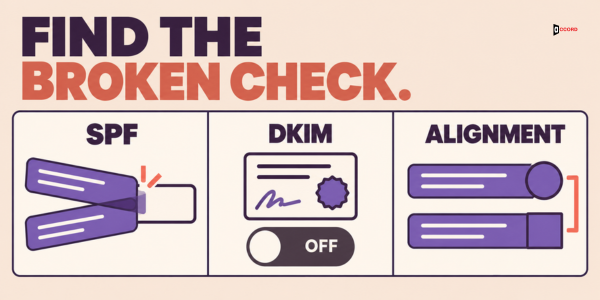
A tool that is not aligned with your From domain. This is a common cause of "SPF passes but DMARC fails". Microsoft's page explains that the service uses its own domain for the return address and for signing, so both checks pass for the service and neither lines up with your From line. SPF is the usual weak spot, because it checks the hidden return address. Fix it with custom DKIM signing on your domain, since one aligned DKIM pass is enough for DMARC.
A forgotten sender, or a typing slip. An old newsletter tool starts to fail the day you tighten the rule. Microsoft's SPF page also lists slips such as include= where include: belongs.
How do you check your setup with free tools?
You can check your SPF DKIM and DMARC settings with a test email and a few free web tools.
The best test is a real message. Send an email from each tool to a Gmail address that is not yours, because Google's DKIM page says sending to yourself does not confirm the result. Open the message, use the "More" menu beside Reply and choose "Show original". This opens the full header, the block of technical lines at the top of every email. Find the line called "Authentication-Results". It shows the result for SPF, DKIM and DMARC. You want a pass on all three, for every service on your list.
For SPF, Google's free Admin Toolbox has a Check MX tool that looks up your SPF record and has an optional DKIM selector field. A free SPF checker from a DMARC vendor can show how many of the 10 lookups your record uses. For DMARC, this command prints the record, as Microsoft's DMARC page shows:
nslookup -type=TXT _dmarc.yourdomain.comShould B2B outbound use a separate sending domain?
Many teams send cold outreach from a domain other than their main one, so a problem in outbound does not reach the company mailbox. The benefit is separation. Microsoft's pages advise a subdomain for email services you do not fully control, so trouble with them does not hurt your main domain's reputation. A fully separate domain has its own name and history, so it is further apart still.
There are costs too. A new domain has no history, and Google's FAQ says new domains follow a faster enforcement timetable, so it needs all three records working from day one and a slow start. Every domain or subdomain needs its own SPF and DKIM work. Someone must look after more records and more reports. And a lookalike domain can confuse a buyer, so pick a name close to your brand.
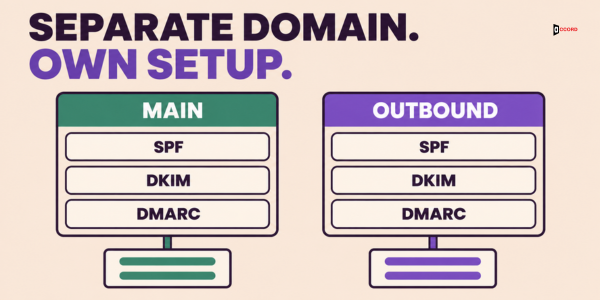
A subdomain does not get around the rules, because Google counts subdomain mail toward the main domain's 5,000 total. A different domain is counted separately. Whichever you choose, how to set up SPF DKIM and DMARC stays the same: three records, one report mailbox and slow tightening. Our proposal for a small team is to do the main domain properly first, and move outbound to its own domain when volume or complaints justify the upkeep.
What do SPF, DKIM and DMARC not do?
They prove who you are. They do not make people want your email.
RFC 9989 is clear that a DMARC pass does not by itself make delivery to the inbox safe or desirable, and a receiver may still send a passing message to spam. Authentication gets you into the room. What happens next depends on your list and your message.
The checks do not clean a list, so a passing message to a wrong address is still a bounce. They do not lower complaints or build a good sending history, and they cannot stop someone registering a lookalike domain. The live B2B email deliverability checklist covers those wider habits. If your records pass and replies are still weak, look elsewhere. Our guide on how to check and fix sender reputation is a good next read.
Imagine: a 12-person company with three sending services
The details of this example are invented. Imagine a 12-person software company with the domain brightfield.example. Maya, the sales lead, wants to start outbound, and Dev, the office manager, looks after the domain.
Maya's list has three senders: Google Workspace for staff mail, a sequence tool for outbound, and an invoicing tool that emails receipts. Dev suspects there is a fourth.
On day one, Dev publishes one SPF record:
v=spf1 include:_spf.google.com include:mail.sequencetool.example include:mail.invoicetool.example ~allA free checker shows 7 of 10 lookups in this sample. On day two, Dev starts DKIM in Google Workspace and publishes the two records the sequence tool shows. The invoicing tool offers custom DKIM only on a higher plan. On day four, Dev publishes this record at _dmarc:
v=DMARC1; p=none; rua=mailto:[email protected]Maya sends a test from each tool to a Gmail address and reads the Authentication-Results line.
| Sender (sample) | SPF | SPF aligned? | DKIM, own domain | DMARC | Action |
|---|---|---|---|---|---|
| Google Workspace | Pass | Yes | Pass | Pass | None |
| Sequence tool | Pass | No | Pass | Pass | None |
| Invoicing tool | Pass | No | Not on | Fail | Set up custom DKIM |
| Old newsletter tool (seen in reports) | Fail | No | Not on | Fail | Retire it |
Read the table from the right. The sequence tool passes SPF for its own return address, so SPF does not line up with brightfield.example. DMARC still passes, because its DKIM signature uses Brightfield's domain and that one aligned pass is enough. The invoicing tool is the lesson. Its SPF says "Pass", but the pass is for the tool's own domain, so SPF is not aligned. With no DKIM on Brightfield's domain either, nothing lines up, and DMARC fails.
In week two, the reports show a little mail from an old newsletter tool that nobody remembered, and the team retires it. In week three, the invoicing plan is upgraded, custom DKIM goes live and the next test passes. After two clean weeks, Dev changes the rule to p=quarantine and keeps watching the reports.
What should you hand to the person who manages the domain?
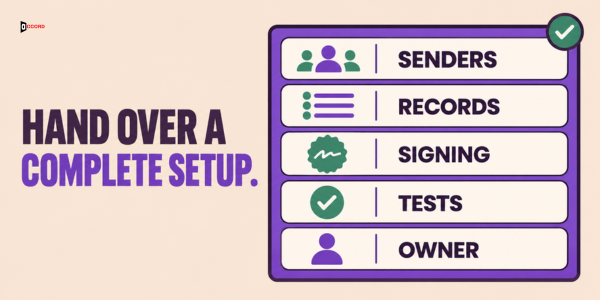
Send one short note, so they do not have to guess. It should hold:
- The list of every sending service, with the owner of each account.
- One SPF line with every include merged, and the ending you chose.
- The DKIM steps for each service, with a request to switch signing on and not only publish keys.
- The DMARC starting record from the setup section, with the report mailbox created first.
- The review plan: who reads the reports, how often, and what "clean" means before the rule gets stricter.
Ask them to send back a copy of each saved record, then run the test email from every service.
Frequently asked questions
Do we need SPF, DKIM and DMARC if we send fewer than 5,000 emails a day?
Set up all three anyway. Google's guidelines say all senders to Gmail must meet a basic set that includes SPF or DKIM, and the full set with DMARC applies above 5,000 messages a day. DMARC for cold email also helps stop others from faking your domain, whatever your volume.
How long should DMARC stay at "none" before we tighten it?
Wait for evidence, not a date. Google's guidance is about a week, and our proposal for a team with several tools is two to four weeks. The section on reading reports explains what "clean" looks like.
Can a non-technical person check these settings?
Yes. Send a test email from each tool to a Gmail address, open "Show original", and read the Authentication-Results line for a pass on all three.
Does passing all three checks mean my cold emails will reach the inbox?
No. The checks show that the mail really comes from you. Whether it reaches the inbox, and whether anyone replies, depends on your list, your message and the complaints you receive.
Next step
If you want a second pair of eyes on your records before you send, book a 30-minute working session with the Accord team. Bring your list of sending services and a test message from each one, and read the results together.