
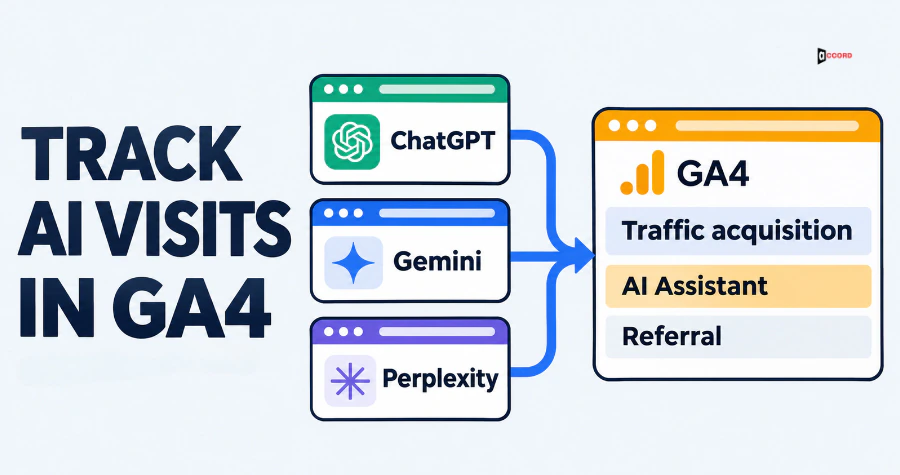
A buyer tells your sales team, "I asked ChatGPT who does this work, and your name came up." The next day you open Google Analytics 4 (GA4), Google's web analytics tool, and try to find that visit. You cannot tell whether it was one visit, ten or none. In a B2B growth engine, this gap sits between SEO and AEO, where an AI tool names you, and web, where a visit should turn into a conversation. If nobody records the visit, nobody can say whether the first part is working.
This post shows how to track ChatGPT traffic in GA4 in five steps and a short monthly task once your sheet is set up. The same steps work for Perplexity, Gemini and other AI assistants. You also get a list of what GA4 cannot see, a record sheet with a fix for each check, and a filled example with every number worked out. The number may be small or zero, so the post also shows how to read it.
The five steps, the checks and the record sheet are starting points of our own, not rules from Google. The facts about GA4 come from Google's help pages, which were read on 10 November 2026. Google can change them, so check your own screen before you rely on a label.
What does GA4 show about AI assistant visits today?
GA4 sorts every session, which is one visit to your site, into a channel. A channel is a group of traffic sources, such as Organic Search, Email or Referral. Google's page on the default channel group lists the channels and the rule for each one.
On 10 November 2026, that page listed a channel called AI Assistant. Google describes it as the channel for users who arrive at your site "from sources like ChatGPT, Gemini, Deepseek, Copilot, or Grok." The same page says the channel excludes Google's AI Overviews and AI Mode. Those two Google features count as Organic Search, the same channel as ordinary Google results.
One rule puts a session into AI Assistant: the medium must exactly match "ai-assistant". The medium is the label GA4 gives to the type of source, such as "organic" or "referral". GA4 sets that medium itself when the visitor's referrer matches a list of AI assistants kept by Google. A referrer is the page or app a visitor came from, which the browser can pass to your site.
The list is not on the page. The help page does not print the referrer addresses that count as AI assistants, so you cannot check the list from there.
The examples are examples. Google's text says "sources like" and names five assistants. Perplexity is not among them. A Perplexity visit may or may not land in AI Assistant on your property. Step 3 shows how to check.
The rules can change. Google's page says the definitions "may evolve as the market changes". A number you read in November may rest on slightly different rules than one you read in February, so write down the month of each reading.
What can GA4 not see?
Answers without a click. GA4 records a session only when a person arrives at your site. If an assistant names your company and the buyer does not click, GA4 has nothing to record. No setting in GA4 closes this gap.
Visits that arrive without a label. When GA4 finds no source information, it files the session as Direct. Google's channel page says Direct covers visits from a saved link or from someone typing your address. A buyer who copies your address from an AI answer and pastes it into a new tab can land in Direct. A buyer who reads your name in an answer and then searches for your company can look like Organic Search.
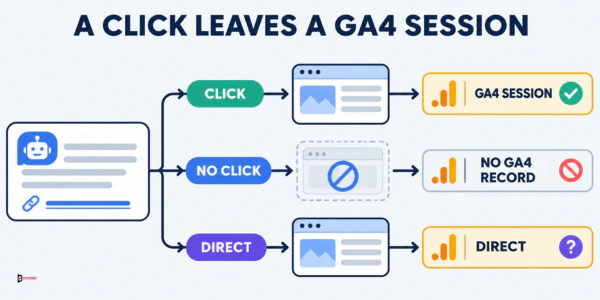
Whether each assistant passes a referrer. Some apps and browsers may pass a referrer and some may not. We have not confirmed from a primary page which assistants do, so your own data is the only evidence for your site.
Visits from Google's own AI features. These sit in Organic Search, as shown above, so the AI Assistant channel can understate your AI exposure.
Privacy and consent limits. If your site asks visitors for cookie consent, a visitor who declines may not be recorded in full. An ad blocker may also hide a visit. Ask the person who installed GA4, and treat any total as a floor, not a full count.
The question the buyer asked. GA4 shows that a session came from an assistant. It does not show the prompt, the answer or the other companies named. For that you need a separate log, which our post on measuring AI search citations and pipeline explains.
None of this makes the number useless. It is a small, partial signal, worth a monthly look as long as you do not treat it as a measure of how much AI answers influence your sales.
Where does AI assistant traffic fit in a B2B growth engine?
A B2B growth engine is a connected system that helps the right buyers find, trust and respond, not one campaign or one channel. It has five parts, named after services: SEO and AEO (answer engine optimization, which helps content answer buyers' questions), lead generation, email, web and social. Each part sends signals, such as a visit, a reply or a booked call, into one pipeline, the path from first contact to a qualified conversation.
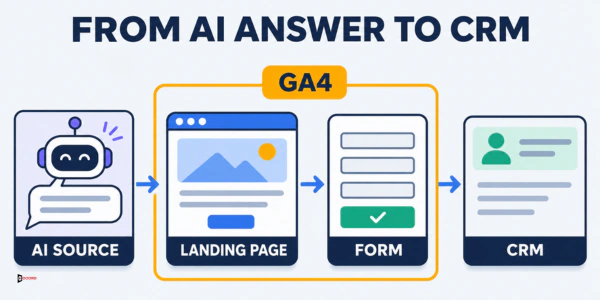
An AI assistant visit is the signal from SEO and AEO, the part where buyers and AI tools find you. GA4 sees only that first step. The web part, the pages that turn attention into a booked call, and your CRM, the sales team's record of each lead, see the rest. So the number only helps if the next two steps work.
A ten-minute check. An assistant picks the page it sends a buyer to, so that page must work for someone who has seen nothing else of yours. Take the page that best answers your buyers' main question, usually a service page or a guide, and open it in a private browser window. It passes if you can say in one sentence what you offer and reach your contact form in two clicks or fewer (our rule of thumb). Then ask whoever installed GA4 whether that form is a key event, which is an action you marked as important. If either check fails, fix it before you read any AI number.
How do you track ChatGPT traffic in GA4, step by step?
The method uses reports that every GA4 property has, and it needs no code. You need view access to your GA4 property. If a label on your screen differs from the one below, look for the closest one.
Step 1: Fix the date range and the scope. Choose the last full calendar month, and pull it from the 3rd of the month onward, because recent data may still change (the 3rd is our choice). Choose one scope and keep it every month: the whole site, or one section such as the blog. To limit the report to the blog, add a filter on Page path and screen class that contains /blog/ (sessions that include a view of a /blog/ page; check the label on your screen). In GA4, go to Reports, then Acquisition, then Traffic acquisition. Write down the total sessions for your range and scope, and the date you pulled it. This total is the denominator, the number every share below is divided by.
Step 2: Read the AI Assistant row. Google's Traffic acquisition help page names Session default channel grouping as the default dimension of this report, so each row is a channel. Find the row named AI Assistant and write down its sessions. If there is no such row, GA4 placed no sessions in that channel in your range. Write 0 here and everywhere else in this post when you looked and found nothing. Your property may also use an editable "primary channel group", which Google's default channel page describes. If you use one, check which group your report follows before you trust a row.
Step 3: Look for AI names in the source rows. Change the table's dimension from the channel group to Session source / medium. The source is the name of the site or app that sent the visit. The medium is its type. Click the plus icon next to the dimension drop-down to add Session default channel grouping as a second dimension, so each row shows its source and the channel it landed in. If the list is long, use "+ Add filter" at the top of the report, as the same help page describes, to narrow it to one name. Look for a short watch list of names your buyers talk about: ChatGPT, Gemini, Perplexity, Copilot and Claude. Before you count a row, check that the source really is the assistant and not a site that happens to contain the word.
Step 4: Add the AI visits that landed outside the AI Assistant channel. Go through the watch-list rows and look at the channel column. Skip every row whose channel is AI Assistant, because the row from step 2 already counts those sessions. Add only the rows in other channels, such as Referral. If one source appears on two lines, with some sessions in AI Assistant and some in Referral, add only the Referral line. Write the source, the channel and the sessions in a separate column. The AI count is the AI Assistant row plus these added sessions. A name with no rows gets 0. If the added sessions repeat most months, consider the custom channel group in the next section.
Step 5: Record the month. Write one line in a sheet: the month, the scope, total sessions, the AI count and the share. The share is the AI count divided by total sessions for the same range and scope. If your contact form is your only key event, write the Key events count for the AI rows beside the share. The column counts every key event each time it happens, so with other key events it mixes them: then leave it out and take the form count from your CRM. Write later results, such as booked calls, in a dated note beside the line, and leave the figures as recorded. Compare months by the share, not by raw counts, because the total changes. Then send the line to the person who owns your web pages and the person who owns your CRM. They are the parts that receive the visit, and they can say what happened next.
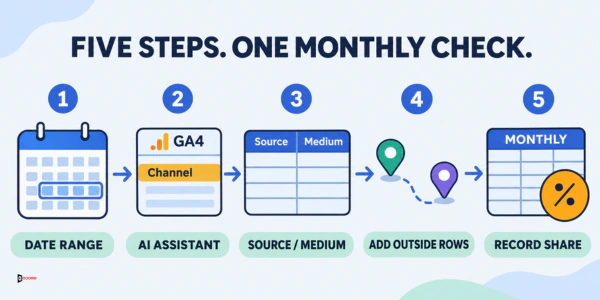
Run the same five steps each month, from the 3rd, with the same scope. The table turns them into a checklist you can copy.
| Check | What to write down | Looks fine when | If not, do this |
|---|---|---|---|
| Scope and range | Scope, dates and total sessions | The scope matches last month | Redo the month with last month's scope |
| AI Assistant row | Sessions in the channel, or 0 | A number or 0 is written down | Check the scope and dates against step 1 |
| Source names | Sessions per watch-list name and the channel it landed in | Every name has a number or 0 | If a name has no number, go back to the source table and write 0 or the sessions found |
| Visits outside the channel | Source, channel, sessions, skipping rows already in AI Assistant | These sit in their own column | If the count repeats each month, consider a custom channel group |
| Share and key events | AI count divided by total sessions; form key events for the AI rows, if the form is your only key event | The share is written as a fraction with its total | Rewrite any rate that does not show its total |
Should you build a custom channel group for AI assistants?
The five steps need no setup. A custom channel group is useful when you want one clean number every month and the by-hand count in step 4 keeps repeating.
A custom channel group is your own set of channel rules. Google's page on custom channel groups says you create one by copying the default group and changing it. You must have the Editor role or higher at the property level, and a standard property can have two custom groups in addition to the default one. Traffic goes into the first channel whose rule it matches, in list order. So a new AI channel must sit above Referral, or Referral takes the visits first.
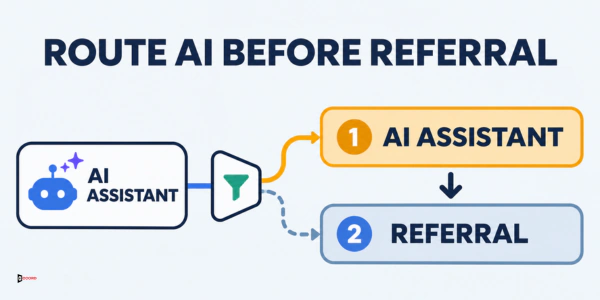
Google's own example for AI assistants is a channel with a "matches regex" condition. A regex, or regular expression, is a code-like pattern for matching text. The example pattern covers assistants such as ChatGPT, Gemini, Copilot and Perplexity, and the page says to update the pattern when the assistants or their addresses change. Check that any pattern you copy covers every name on your watch list. The cost of this route is that someone must own the rule.
Two warnings from the same page matter. Editing a group changes how reports show the data right away, so old and new reports can disagree. Deleting a group cannot be undone.
What if the number is tiny, zero, or unclear?
Your number may be small. We did not find a source we would trust for a typical share, so this post gives none.
The number is small but not zero. Record it and keep the same method for three months before you draw any line. With so few sessions, one visit changes the share a lot, as the example below shows.
The number is zero. Write 0. A zero does not prove that AI answers have no effect. Our post on measuring AI search citations and pipeline lists other signals: a log of when assistants name you, a "how did you hear about us" field on forms, and branded search trends.
You cannot place a visit. Leave Direct sessions out of the AI count and write the Direct total beside your line. A clean count that is too low is more useful than a larger count that nobody can check.
Nothing changes for months. If the count stays near zero while your sales team hears about assistants on calls, your form field and call notes are the better source. Our guide to counting AI influenced pipeline covers that side.
Imagine: one small company, one month, one denominator
Imagine a small distributor called Larkfield Supply. This example is invented, including every number. The numbers are not a benchmark, and your site will look different. Larkfield uses the five steps for October, for the whole site.
Step 1. The Traffic acquisition report shows 1,240 sessions for October. This is the denominator for every share below.
Step 2. The channel rows show: Organic Search 520, Direct 410, Referral 140, Organic Social 60, Paid Search 50, Email 50, AI Assistant 6 and Unassigned 4. Unassigned is the value GA4 uses when no channel rule matches. The rows add up: 520 + 410 + 140 + 60 + 50 + 50 + 6 + 4 = 1,240. The AI Assistant row is 6 of 1,240 sessions, or 0.5%.
Step 3. Larkfield switches to Session source / medium with the channel as a second dimension. Source names are shortened here. "chatgpt" shows 4 sessions and "gemini" shows 2, both in AI Assistant. "perplexity" shows 5 sessions, all in Referral. "copilot" and "claude" show no rows, so Larkfield writes 0 for each.
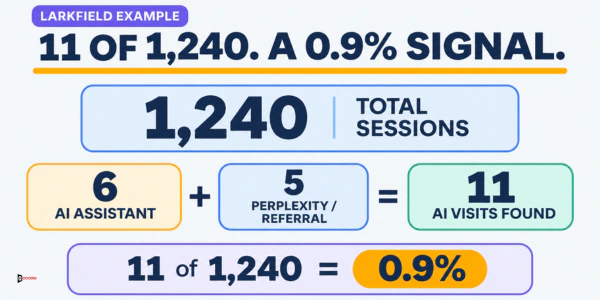
Step 4. Larkfield skips the chatgpt and gemini rows, because their 4 + 2 = 6 sessions are already in the AI Assistant row. It adds the 5 Perplexity sessions, which sit inside the 140 Referral sessions, in a separate column. The AI count is 6 + 5 = 11 sessions. The share is 11 of 1,240, or 0.9% (0.887%, rounded). The whole calculation fits in one table:
| What | Sessions | How it is worked out |
|---|---|---|
| Total sessions (the denominator) | 1,240 | Traffic acquisition report, October, whole site |
| AI Assistant row | 6 | chatgpt 4 + gemini 2, both already in the channel |
| Perplexity, found in Referral | 5 | Added in step 4 |
| AI count | 11 | 6 + 5 |
| Share | 0.9% | 11 ÷ 1,240 = 0.887%, rounded |
Step 5. The contact form is Larkfield's only key event, so the Key events column for the AI rows shows 2 form submissions, from 2 different sessions among the 11. That is 2 of 11, or 18.2%. One more submission would make 3 of 11, or 27.3%, a swing of 9.1 percentage points from a single visit.
Now the signal moves on. Larkfield sends the line to its sales lead. The sales lead finds both submissions in the CRM, adds "AI assistant" to the source field of each by hand, and books a call with one of the two on 12 November. The other buyer does not reply. The web owner finds that both submissions followed visits to one guide page, so that page is checked first. Larkfield writes "1 booked call, 12 Nov" as a note beside the October line and leaves the figures as recorded. It now has three counts: 11 sessions, 2 form submissions and 1 booked call. It keeps them apart and does not say the call was caused by an AI answer. It says one booked call came from a visit that Larkfield counted as AI.
Direct holds 410 sessions, or 33.1% of the total. Some may be assistant visits, but GA4 cannot say, so Larkfield writes "11 sessions found, 0.9% of 1,240, a floor". In November, it repeats the same steps with the same scope and watch list, and only then compares the two shares.
Frequently asked questions
Next step
In a working session, we map which part of your growth engine this topic belongs to and which one is weakest. If you would like that, book a 30-minute working session with the Accord team. Bring a screen share of the report and your list of assistant names, and we will run the five steps together. Accord sells lead generation, email, SEO and AEO, web and social as one connected growth engine, so we have an interest in this subject. You can use everything in this post without us.