
You change a subject line, and your email tool reports that more people opened the message. Then the replies stay the same, or fall. An open count is easy to see and a reply count is slow to arrive, so the gap is easy to miss. This post covers b2b cold email subject lines in four steps: what to test first, which patterns to retire, a test plan you can copy, and a simple rule for reading the result by counting replies.
The batch sizes and the counting rule are Accord's own starting points, not industry rules. Outside facts are linked where they appear. Every name and number in the examples is invented.
What should you test first in B2B cold email subject lines?
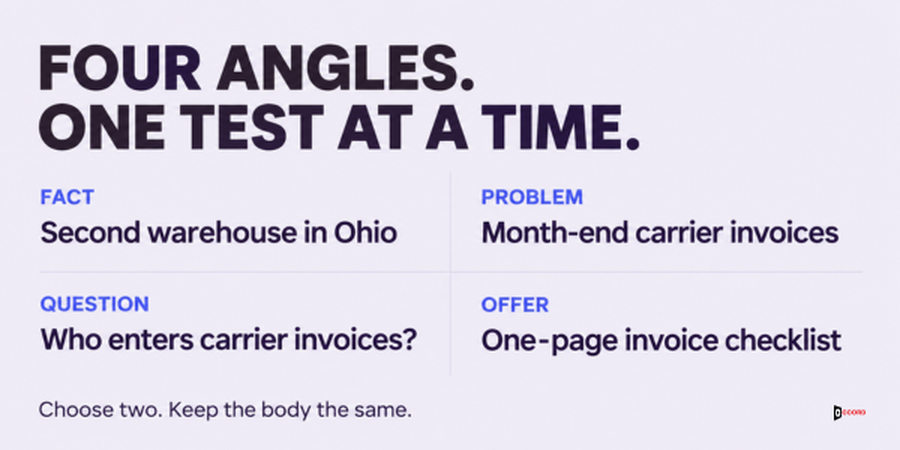
Test one question at a time. The most useful first question is: what should the subject talk about? There are four common answers. Here they are for an invented seller, Marlow Finance Support, a three-person firm that helps freight companies speed up month-end invoice entry. The reader is a finance manager.
A fact about the reader's company. "Second warehouse in Ohio". It matches the reason in the first line of the email, which is how our first message template is built.
The reader's problem. "Month-end carrier invoices". It names the work, not the company.
A question. "Who enters carrier invoices?" It asks something the reader can answer in a few words.
The offer. "One-page invoice checklist". It names the thing you will send if they say yes.
Keep every subject plain and honest, so that it passes the retire list further down, and make each one match the first line of the body.
Once you know which topic works for your list, run later tests on one of these three:
Length. Two or three words against five to seven words. No outside study cited here proves a best length, so this is a fair test, not a rule.
Case. "Month-end carrier invoices" against "month-end carrier invoices". Some teams like lowercase because it feels like a note from a colleague, so test it.
Company name in or out. "Carrier invoices at Northgate" against "Carrier invoices".
Do not test two things in one send, because you will not know which change did it. This is the same one-change rule that our guide to B2B email A/B testing with small lists explains for email in general.
Why are open rates a weak signal for cold email subject lines?
An open rate is the share of emails that your tool counts as opened. Many tools count an open when a small hidden image inside the email is loaded, which works only if loading the image means a person looked at the message.
Apple has changed that. On its page about Mail Privacy Protection, Apple says the feature works by preventing email senders from learning about a person's Mail activity. The page says the Mail app downloads remote content in the background, "regardless of whether you engage with the email." Remote content includes images like the hidden one. So for anyone who uses that feature, a counted open may be the phone loading the image, not the person reading. We read the page on 1 November 2026. It does not say how many of your readers use the feature.
There is a second reason, and it is our own view: a subject that makes people curious can win opens and still lose replies. Its one job is to make the right person open the email and feel the body is worth reading. A reply is the first sign that the whole email worked.
So judge a subject line by replies divided by delivered emails. Use the open count only as a rough hint that something changed. Replies are not perfect either, so the next section fixes the counting rules.
What counts as a reply, and what do you divide by?
Fix three words before you test anything, and keep them the same in every test.
Delivered. The emails you sent, minus the ones that bounced. A bounce is an email that came back undelivered. Delivered is the denominator, the number you divide by, for every rate in this post.
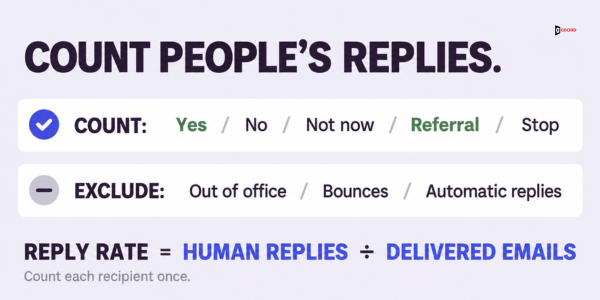
Reply. A message written by a person in answer to your email. Count a yes, a no, a "not now", a question, a right-person name and a request to stop. Do not count out-of-office notes, bounce messages or other automatic replies. Count each person once: if the same person answers three times in one thread, that is one reply, and it takes the kind of their first message.
Useful reply. A reply that is a yes or a right-person name. It also counts at most once per person. It is the reply you want, but a smaller group, so we use it as a second look, not as the main score.
So the reply rate for one subject line is its replies divided by its delivered emails. If 24 replies come from 393 delivered emails, the rate is 24 divided by 393, or 6.1%. The useful reply rate is useful replies divided by the same 393.
A stop request is a reply and counts in the total, but it is not a win. A subject that gets many "stop" replies is not better than one that gets fewer replies and more yeses.
Which subject lines should you retire now?
Retire means stop using, without a test. Some patterns do not need a test, because they go against what mailbox providers ask of senders. Google's email sender guidelines say not to send messages with subject lines starting with "Re:" or "Fwd:" unless the messages are actual replies or forwards. The same page says headers and content should not be misleading or deceptive. Yahoo's Sender Hub best-practices page also says not to use deceptive subject lines. We read both on 1 November 2026. This is provider guidance, not legal advice.
From that guidance, and from plain logic, retire these now:
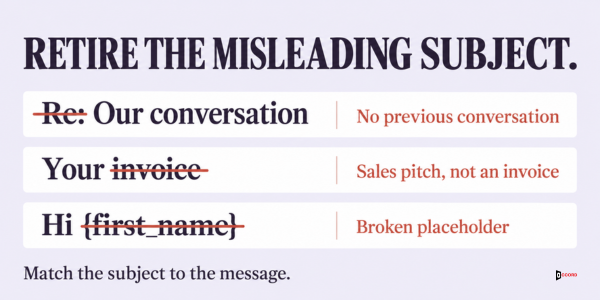
- A fake "Re:" or "Fwd:" at the start, for a conversation that never happened.
- Any subject that promises something the email does not contain, such as "Your invoice" on a sales email.
- Fake urgency you cannot back up, such as "Last chance" on a first message.
- A subject with a broken placeholder, such as "Hi {first_name}" or the wrong company name. A placeholder is a slot that your tool fills in from your list. Check a sample of real previews before every send.
Capital letters and strings of exclamation marks are not banned by anyone, and no provider page we read says they cause a block. In our view they look like a mass email, so test them against a calm version.
"Quick question" and "Partnership opportunity" also deserve a test, not a ban. They tell the reader nothing about the email, and in our view a plain subject that names the topic should do better, but that is a guess. Put the vague line against a plain one and let the replies decide.
Is there a list of spam words you must avoid?
Many people search for "subject line spam words", so this gets its own answer. Google's sender guidelines page, which we read on 1 November 2026, does not publish a list of banned or spam words. On the same date we did not find one on Yahoo's Sender Hub page or on Microsoft's Outlook.com sender policies page either. These pages may not show everything a provider looks at. Our guide to improving cold email deliverability makes the same point about word lists.
Lists of "spam trigger words" do exist on vendor sites and in free checker tools. Treat each as that company's opinion. What the providers do say is about accuracy, which is why the retire list is built on accuracy, not on a word list.
If you think a word is hurting you, run the placement test from the deliverability guide: send the message to your own test mailboxes and note the folder it lands in, then change that one word and send again. A folder in your own test mailbox is one observation, for that mailbox on that day. It does not show where all your emails land, but it is real and you can repeat it.
What does a copyable test plan look like?
This plan tests two subject lines. Copy the table into your notes and fill in the right-hand column before you send.
| Step | What to set | Our starting point |
|---|---|---|
| 1. Question | Write the one question the test answers | "Does a fact in the subject get more replies than the problem?" |
| 2. Versions | Two subject lines that differ in one way only | Version A and version B |
| 3. Body | The same body, the same sender name, the same footer | No edits between versions |
| 4. Split | Give each reader to A or B by chance, not by choice | In a spreadsheet, add a column of random numbers, sort by it, give the top half to A |
| 5. Timing | Send both versions on the same days, at the same hours, from the same mailboxes | Each mailbox sends half A and half B |
| 6. Size | Enough readers to expect at least 15 replies in total | 15 divided by twice your usual reply rate, per version |
| 7. Stopping plan | Before the first send, write down how many batches you will send and the date of the one final reading | Two batches, one reading after the second |
| 8. Window | Count replies that arrive within 7 days of each send | The same window for A and B |
| 9. Record | Delivered, replies and useful replies for each version | One line per test |
Step 6 needs your usual reply rate, for example 5% or 0.05. Double it to 0.10, then divide 15 by 0.10 to get 150. You need about 150 delivered emails for each version, 300 in all. At 3% the answer is 250 per version, and at 10% it is 75. The lower your reply rate, the larger the test must be.
Treat this size as a floor, not a promise. It gives you about 15 replies in all, the least the counting rule can use, and at that level the rule only calls a very large gap, such as 12 replies against 3. To catch a smaller difference you need many more replies. If you do not know your usual rate, use 150 per version and write the real rate down after the test. If your list is too small, say in your notes that only a very large difference could show.
Keep to the plan from step 7. With two batches, add them together only if the design stayed the same, and read the total once, at the planned time. Reading after every batch and stopping when one version leads makes chance look like a result, because an early lead may fade.
Record each test in one line, filled in after the window ends:
Test [number], [date sent]. Question: [the one question]. Plan: [batches, reading date].
A: [subject]. B: [subject]. Delivered A / B: [number] / [number].
Replies A / B: [number] / [number]. Useful replies A / B: [number] / [number].
Gap [number]. Noise [2 times the square root of total]. Result: [early support for A or B, or no call].
One thing learned: [one sentence]. Next test: [the next question].
How do you read the result with a simple counting rule?
Here is the rule. It uses only counts, not percentages, and it works when both versions have about the same number of delivered emails.
- Count the replies for version A and for version B, using the definition of a reply from earlier in this post.
- Add them. If the total is under 15, make no call. There is not enough to read.
- Find the gap: the larger count minus the smaller count.
- Find the noise: take the square root of the total, then double it. A calculator or a spreadsheet does this in a second. In a spreadsheet the formula is
=2*SQRT(total). - If the gap is larger than the noise, this test gives early support for the version with more replies. If it is not, make no call.
The rule is a rough guide from basic counting statistics, not a vendor rule. It works best when the two versions have nearly equal delivered emails, so if the counts differ by more than a few emails, treat close results as no call. It cannot say why a version did better, only that the gap is bigger than chance alone would usually give.
Early support is not proof. It means this test points one way, and a later test on a new batch of the same kind of reader may or may not agree. No call does not mean the two versions are equal. It means this test did not give enough information to tell them apart.
Here are two quick checks. Say A gets 11 replies and B gets 4. The total is 15, so you may read it. The gap is 7. The noise is 2 times the square root of 15, which is about 7.7. The gap is smaller, so make no call. Now say A gets 12 and B gets 3. The total is again 15, the gap is 9, and the noise is still about 7.7. The gap is larger, so the test gives early support for A.
After the rule, look at the kinds of replies. Count the useful replies for each version, using the same delivered denominators. If the version with more replies has fewer useful replies, or many stop requests, do not adopt it without thinking. Useful replies are often too few for the rule, so use them as a second look only.
Imagine: two subject lines, two batches, one decision
Imagine that Marlow Finance Support, a made-up freight-finance seller, wants to know whether a fact or a problem works better in the subject. Every name and number is invented and is not a benchmark.
The question is: does "Second warehouse in Ohio" (version A, a fact) get more replies than "Month-end carrier invoices" (version B, a problem)? Before the first send, Marlow writes the plan: two batches of 200 emails per version, a 7-day window for each, and one reading, after batch 2. The body, sender and footer are the same, the list is split by random numbers, and both versions go from the same mailboxes on the same days.
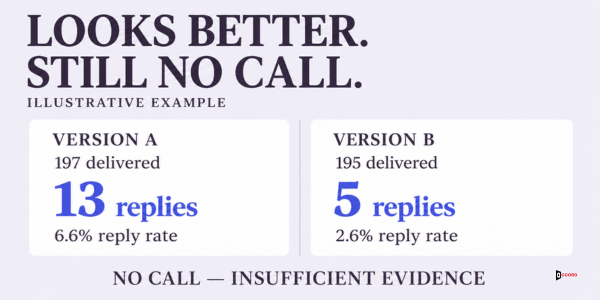
Batch 1 sends 200 emails of each version. For A, 3 bounce, so 197 are delivered. For B, 5 bounce, so 195 are delivered. Within 7 days, A gets 13 replies and B gets 5, each from a different person. The reply rates are 13 divided by 197, or 6.6%, and 5 divided by 195, or 2.6%. A looks more than twice as good. The plan says the reading comes after batch 2, so this is a look, not a decision. The total is 18, the gap is 8, and the noise is 2 times the square root of 18, or about 8.5. The gap is smaller, so it would be no call. A rate that looks twice as good was not enough with only 18 replies behind it.
Marlow sends batch 2 as planned, to new readers of the same kind. A has 4 bounces and B has 2, so 196 and 198 are delivered. A gets 11 replies and B gets 4.
Now comes the planned reading. Version A: 400 sent, 7 bounced, so 393 delivered, and 13 plus 11 is 24 replies. Version B: 400 sent, 7 bounced, so 393 delivered, and 5 plus 4 is 9 replies. The reply rates are 24 divided by 393, or 6.1%, and 9 divided by 393, or 2.3%. The total is 33 and the gap is 15. The noise is 2 times the square root of 33, or about 11.5. The gap is larger, so this test gives early support for version A on this list.
Then Marlow reads the kinds of replies. Of A's 24 replies, 9 are useful, 2 are stop requests and 13 are other answers. Of B's 9 replies, 3 are useful, 1 is a stop request and 5 are other answers. The useful reply rates are 9 divided by 393, or 2.3%, and 3 divided by 393, or 0.8%. There are only 12 useful replies in all, below 15, so Marlow does not test them alone. They point the same way, which fits the early support but does not prove it.
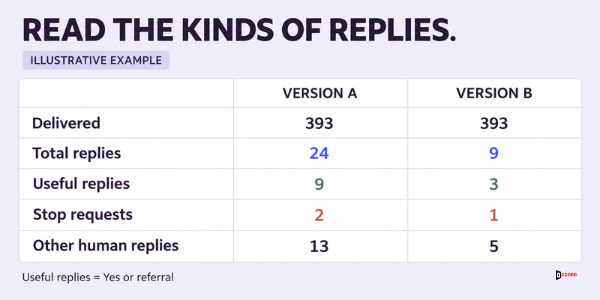
The tool also reports opens: 240 of 393 for A, or 61.1%, and 228 of 393 for B, or 58.0%. Opens differ by about 3 points, while replies differ by more than a factor of two. Judged by opens, the test would have looked like a tie.
Marlow keeps the fact style as its working subject and notes a cost the test did not measure: a fact takes research time for each reader, while a problem can be written once for the whole group.
What if the result is a tie, or nobody replies?
Both can happen, and neither is a failure.
No call. If the rule gives no call at the planned reading, do not keep adding batches until a gap appears, because that makes chance look like a result. Pick the clearer subject by judgment, write in your notes that the choice is judgment, not proof, and move to the next question.
Too few replies. If the total at the planned reading is under 15, you sent too few emails or your reply rate is lower than you thought. Make no call, and size the next test with step 6 and the real rate.
Nobody replies at all. If 150 or more delivered emails per version bring almost no replies, then in our view the subject line is probably not the main problem. For b2b cold email subject lines to matter, the email must first reach the inbox, so look first at where the mail lands, then at the list and the offer.
You do not know. If you cannot tell whether a message came from a person, do not count it as a reply, and treat both versions the same way.
Frequently asked questions
What is a good open rate for B2B cold email?
This post gives no open rate to aim for, because Apple's Mail Privacy Protection can make an open count without a person reading the email. Judge your subject lines by replies divided by delivered emails instead.
How long should a cold email subject line be?
No outside study cited here proves one best length. A fair starting test is two or three words against five to seven words, with the same body and the list split by chance. Let your own replies decide.
Should I put the reader's name or company in the subject line?
Test it. A name or company can show that the email is meant for the reader, but a wrong or broken one is worse than none, so check a sample of real previews before every send.
Are there spam words I must avoid in a subject line?
Google's email sender guidelines do not publish a list of banned or spam words, and we did not find one on Yahoo's or Microsoft's sender pages. Lists on vendor sites are opinions. Avoid deception, such as a fake "Re:", and run the placement test on your own mailboxes.
How many emails do I need to test two subject lines?
Take your usual reply rate, double it, and divide 15 by the result. That is the number of delivered emails for each version. At a 5% reply rate, it is 15 divided by 0.10, or 150 per version. This is an Accord starting point. It only sizes the test to expect about 15 replies in all, so catching a smaller difference needs more.
What if my tool only shows opens and not replies?
Count replies by hand from the sending mailboxes for the test window. Separate real replies from automatic ones, count each person once, and note which version each reader received.
Next step
If you would like a second pair of eyes on your own subject lines or your test plan, book a 30-minute working session with the Accord team. Bring the subject lines you use now and your last batch's delivered and reply counts, and we will run the counting rule together. There is no obligation. Accord sells outbound, email, lead-generation, SEO and AEO, web and social services, so we have an interest in this subject.