
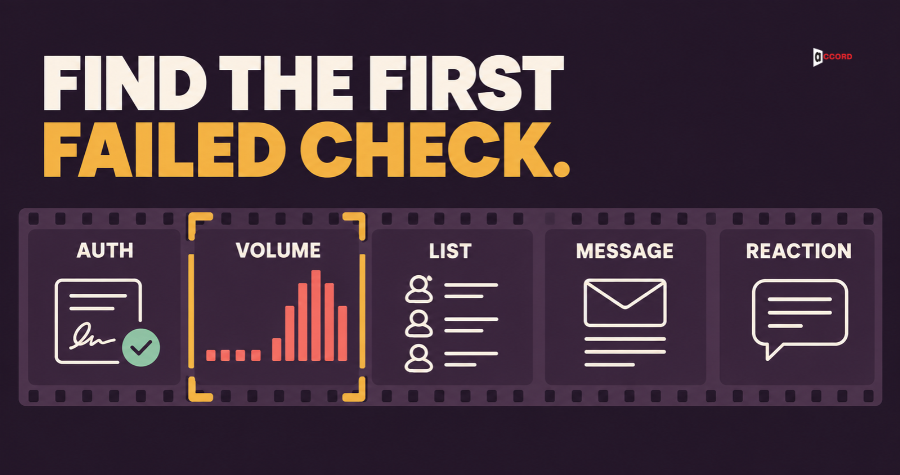
If your cold emails land in spam or get no replies, check five things in a fixed order. Check who you are, how you send, who you send to, what you send, and how people react. That order is the shortest honest answer to how to improve cold email deliverability. Fix the first check that fails before you touch the next one, because a later fix cannot rescue an earlier failure. No check and no tool can promise inbox placement; each check only removes one known reason for mail to be filtered or ignored.
Accord Tech Solutions already publishes a broader guide to a deliverability-first cold email system. This post does one narrower job: it tells you in which order to test when something looks wrong, with a plain test, a pass line and a fix for each step. Accord also sells outbound and email services, so we have an interest in this topic.
A note on the numbers. Limits from Google, Microsoft, Yahoo and the FTC are named as theirs. Figures from software vendors are called vendor views. Every other number here, such as a pass line, a daily cap or a bounce line, is Accord's own starting point for your first tests. It is not an industry rule, so adjust it to your own results.
Is it a spam folder problem or a no-interest problem?
Two different problems look the same in a campaign report, because both show up as few replies. If your mail lands in spam, buyers never see it. If it lands in the inbox and nobody answers, the cause is more likely relevance than placement, although a small test cannot prove that a buyer opened your message. The first problem needs the five checks in this post. The second needs a better list, offer or message.

Run a simple placement test before you change anything. Placement means which folder a message lands in: inbox, spam or junk. Use your real sending mailbox and your real message.
Send to your own test mailboxes. Make or borrow free mailboxes at Gmail, Outlook.com and Yahoo, and add one on a business domain if your buyers use that kind. Send the exact message you plan to send, from the same mailbox and through the same sending tool. Wait ten minutes, then look in the inbox, the spam or junk folder and any tabs.
Read the message header. The header is the hidden block of technical lines at the top of every email. Google's help page says that in Gmail you open the message, click More next to Reply, and choose Show original. Microsoft's documentation says the Authentication-Results line records the outcome of the sender checks.
Look for refusals. Open the sending mailbox and look for bounce messages, which are automatic replies from a mail server saying it did not accept your message. Microsoft names the refusal "550; 5.7.515 Access denied" for domains that fail its sender requirements. Google Postmaster Tools, a free dashboard for senders, also shows delivery errors. Check 5 explains what it can and cannot tell you.
Now read the result. If any test copy lands in spam or junk, or you see a refusal, you have a deliverability problem, so start with check one. If every copy lands in the inbox, placement looks healthy in the tests, so investigate relevance next. The last section covers that. Know the limits of the test: your test mailboxes have no history with your sender, and your buyers do. The result is a snapshot of one day, not a forecast.
Why should you check in a fixed order?
Any plan for how to improve cold email deliverability needs a fixed order, because each check depends on the one before it. Perfect copy cannot fix a missing sender signature. A clean list cannot fix a new mailbox that sends hundreds of messages on day one. So run the placement test, find the first check that fails, fix that one thing, and test again. As a starting point, wait one normal day of sending between changes. The table shows the whole order.
| # | Check | Plain test | Pass line | If it fails |
|---|---|---|---|---|
| 1 | Who you are | Read the header of a test message | SPF and DKIM pass, DMARC passes with alignment | Fix the sender records |
| 2 | How you send | Count mailboxes, daily volume, domain use | At most 50 a day per mailbox, slow ramp | Cut volume, restart the ramp |
| 3 | Who you send to | Count bounces in the first batch | Bounces under 2% | Pause, clean the list |
| 4 | What you send | Read it as a stranger | Short, honest, one link at most | Rewrite it plainer |
| 5 | How people react | Count complaints and stop requests | A stable placement test | Stop, return to check 1 |
Check 1: Can receiving servers confirm who you are?
This check is the cheapest, and a common reason for a sudden drop. Receiving servers want proof that a message really comes from the domain in the From line. Three settings give that proof, and all three live in your DNS, the public settings area for your domain name. SPF is a published list of the servers allowed to send mail for your domain. DKIM is a digital signature that lets the receiver confirm a message came from your domain and was not changed on the way. DMARC tells receivers what to do when a message fails.
What the providers say. Since February 2024, Google's email sender guidelines ask every sender to set up SPF or DKIM, and recommend all three settings. Bulk senders, which Google defines as those sending close to 5,000 messages or more in one day to personal Gmail accounts, must set up SPF, DKIM and DMARC. Yahoo asks all senders for SPF or DKIM, and bulk senders for both plus a DMARC policy. Microsoft requires SPF, DKIM and a DMARC policy of at least p=none from domains sending more than 5,000 emails a day to its consumer addresses. The policy p=none only asks receivers to report, not to block. Most small outbound teams send far fewer than 5,000 a day, but Google applies its basic list to everyone. Microsoft's post is unclear on whether failing mail is junked or rejected, so plan for either.
What pass means. Set up both SPF and DKIM, because either one can break without warning. DMARC passes when at least one of SPF or DKIM passes and is aligned, which means the domain that passed matches the domain in the From line. Google says the same for bulk senders: both must be set up, but only one needs to be aligned. So you need one aligned pass for DMARC, not three matching results.
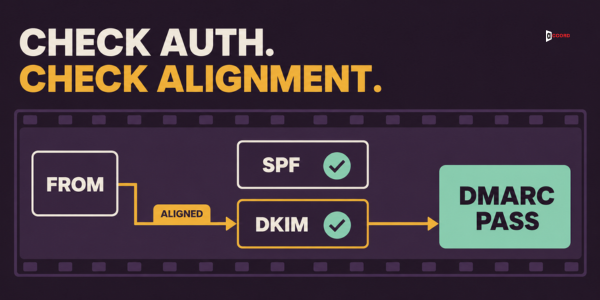
The plain test and pass line. Open the header of your test message and read the SPF, DKIM and DMARC results. The pass line is SPF pass, DKIM pass, and DMARC pass through at least one aligned method. A common failure is a sending tool that signs mail with its own domain. That signature passes, but it does not match your From domain.
The fix. Add the records your sending tool asks for in your DNS, then send a new test and read the header again. The step-by-step setup is in the SPF, DKIM and DMARC setup guide for B2B outbound. Do not move on until DMARC passes.
Check 2: Is the way you send believable?
A mailbox that was silent last week and sends 200 messages today looks different from one that grew slowly.
What the providers say. Google's guidance is plain. Start with a low volume sent to engaged users, raise it slowly, avoid sudden spikes, and send at a steady rate. Google, Microsoft and Yahoo do not publish a daily number for small senders. One vendor suggests no more than 40 to 50 per account per day, and another says never more than 100 per inbox. Treat these as a range, not a rule.
The plain test and pass line. Write down the number of mailboxes that send cold mail, the messages each sends on a normal day, the days since each mailbox started, and whether the same domain also carries customer mail, such as invoices and support replies. The pass line is at most 50 messages a day per mailbox. A new mailbox starts at 10 to 20 a day and adds about 5 every few days, and cold mail does not share a domain with customer mail. If you need 150 a day, use three mailboxes at 50, not one at 150.
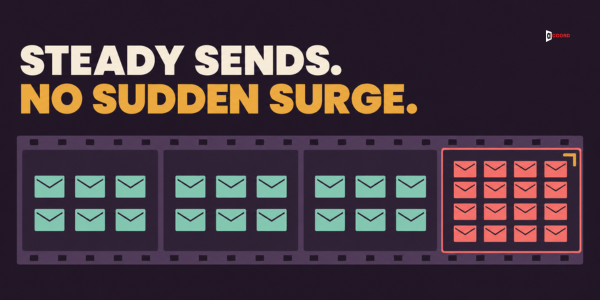
Warm-up and the second domain. Warm-up means raising volume slowly, which matches Google's guidance. Some tools also exchange mail between their own accounts. Whether that helps is a vendor claim we could not confirm on a provider page, so a warm-up score should never replace a placement test. A separate sending domain protects your main domain, because Postmaster Tools reports reputation only for the exact domain used for signing.
The fix. Pause, cut each mailbox to the cap and restart the ramp from the low number. If cold mail shares a domain with customer mail, move it to its own domain and repeat check 1 there. Do not switch domains just to escape a bad result.
Check 3: Do you send to the right people at real addresses?
Even a perfect setup fails when the list is wrong. Bad addresses produce bounces, and wrong people produce complaints.
What the providers say. Microsoft recommends removing invalid addresses regularly to reduce bounces and complaints. Yahoo and Google both say not to buy mailing lists. Google also asks senders to make sure recipients opt in, and cold email has no opt-in by nature. That leaves you less room for error, because a stranger who did not ask for your message is more likely to press the report-spam button.
The plain test and pass line. Count the hard bounces in your first batch of 50 to 100 messages. A hard bounce is a permanent failure, such as an address that does not exist. The pass line is hard bounces under 2% of that batch. No provider publishes a bounce limit. One vendor suggests aiming under 4%, and says addresses on catch-all servers bounce about 20% of the time. A catch-all server accepts mail for any address at its domain, so a checker cannot confirm the mailbox is real. Then take a random sample of 100 records and check that each person still holds the role and fits your target customer. Our CRM data quality checklist for outbound gives the full twelve-point version of that sample.
The fix. Pause the campaign. Move every bounced address to your suppression list, the list of people you must never contact again. Remove catch-all addresses you cannot confirm, narrow the audience to the roles that match your offer, and send a small batch before you return to full volume.
Check 4: Is the message itself plain and honest?
Look hard at the message only after the first three checks. People start here because copy is easy to edit, but it is rarely the first thing that is broken.
What the providers say. Google asks that links in the body be visible and easy to understand. It says not to hide content with HTML and CSS, and warns that this might cause messages to be marked as spam. Google and Microsoft both ask for accurate subject lines and headers, and Google says a subject should not start with "Re:" or "Fwd:" unless the message really is a reply or a forward. The provider pages cited here do not publish a list of banned words, so be wary of any article that sells one as fact. In the United States, the CAN-SPAM Act also requires accurate sender details, a subject that reflects the content, a valid postal address and an opt-out honored within 10 business days, according to the Federal Trade Commission. This post is not legal advice, so check the rules for every country you send to.
The plain test and pass line. Read your message as a stranger. Can you say within ten seconds who sent it, why it reached you and what the sender wants? The pass line is a message of around 120 words or fewer, with at most one link, no attachments and no images in the first email, an honest subject, and a real person as the sender. It ends with a clear way to say stop, such as "If this is not relevant, reply no and I will not write again." Vendor views point the same way.

The fix. Rewrite it shorter and plainer. Remove links and images, use an honest subject, and add the opt-out line. Turn off open and click tracking for the test, because tracking adds a hidden image and rewritten links. Send a new test and compare the placement with the earlier one. If it does not improve, the cause is probably earlier in the order.
Check 5: How are people reacting to your mail?
The last check looks at results. Providers watch how recipients treat your mail, and you cannot set this signal up in advance.
What the providers say. Google says to keep the Postmaster Tools spam rate below 0.10% and never to reach 0.30% or higher. Yahoo says to keep its spam complaint rate below 0.3%. In plain numbers, 0.10% is 1 report in every 1,000 messages, and 0.30% is 3 in 1,000.
Your own count is not the dashboard. Keep two numbers apart. Your own count is simple division: the complaint signals you can see, divided by the messages you sent. You will rarely see real spam-button reports, so use stand-ins, such as replies that say "stop" or "this is spam", unsubscribe requests, a sudden drop in replies, and a test message that moves to the spam folder. If you send 250 messages and one person replies that it is spam, your own count is 1 in 250, or 0.4%.
The dashboard works differently. Google defines its spam rate as the share of messages delivered to the inbox of engaged recipients and then marked as spam. Postmaster Tools shows this rate for DKIM-authenticated mail, it updates daily, and it may leave out days when volume is low, so a quiet dashboard is not proof that all is well. The two figures use different denominators, so 0.4% on your own count does not mean Google shows 0.4%. Use your own count as an early warning, use the dashboard as the provider's view, and do not compare them directly.
The plain test and pass line. After each batch of 100 messages, count complaint-style replies, stop requests, hard bounces and real replies. Run the placement test once a week during an active campaign. The pass line is no more than one complaint-style reply per 200 messages and a test that stays in the inbox. Add every stop request to the suppression list the same day, because Yahoo asks senders to honor unsubscribe requests within 2 days.
The stop rule. Stop the send and go back to check 1 if a test copy lands in spam, hard bounces pass 2% on a batch, refusal codes appear, or complaint-style replies rise above the line. Stopping costs a day or two. Pushing on can cost you the mailbox, and in the worst case the domain.
Do tools fix a failed check?
No. A tool can measure a check, speed up a step or keep a record, but it cannot make a failed check pass. An address checker tells you which addresses look risky, and you decide who stays on the list. A placement tester shows where a message landed, but not why. When you are learning how to fix email deliverability under pressure, name the failing check first and ask what exactly a tool would change. If you cannot answer, the tool is not the fix.
What if every check passes and replies are still low?
Then placement looks healthy in your tests, and relevance is the next thing to investigate. The tests cannot show that a buyer read your message, only that it did not land in spam on the day you tested.
Ask five questions in order. Is this the right person for the problem you solve? Does the first sentence say why you are writing to them in particular? Is the offer something they would want this quarter? Is the ask small enough to answer in one line? Does each follow-up give a new reason to reply? We give no reply-rate targets, because the figures online come from vendors and differ widely. Judge your own results over several batches.

Imagine: a 12-person firm, three mailboxes and a silent week
The details of this example are invented. Imagine a 12-person IT services firm. It runs cold email from yourcompany.com, the same domain that carries its invoices and support replies. Three mailboxes, each one week old, send 80 messages a day to a list of 1,200 operations managers. After a working week, the firm has one reply, and it is not a happy one.
The sales lead runs the placement test. The message lands in the Outlook.com inbox but in the Gmail spam folder. The header of the Yahoo copy shows that DKIM did not pass for the firm's own domain.
Check 1 fails first. The sending tool signs messages with its own domain, and the firm never added the tool's records to its DNS. The lead adds them, and DMARC now passes. Gmail still sends the test to spam, so the lead moves on. Check 2 fails too. Each mailbox sends 80 a day, above the 50 proposed here, and the domain also carries customer invoices. The lead cuts each mailbox to 20 a day, moves cold mail to a second domain, repeats check 1 for it, and adds 5 messages a day every few days.
Check 3 shows a warning. Of the 240 messages sent on day one, 12 bounced. That is 5%, over the 2% line. The lead removes the bounced addresses, which brings the list from 1,200 to 1,030 records. After about two weeks, the Gmail test copy lands in the inbox. Nothing promises the same result tomorrow, so the lead keeps testing weekly.
Frequently asked questions
Why do my cold emails go to spam?
Common reasons are failing sender checks, too much volume too quickly, wrong or invalid addresses, a message that looks pushy or hides something, and recipients who report it. No provider publishes a single score that decides it. Use the placement test to see whether you have a spam problem, then work through the five checks in order.
How long does it take to improve cold email deliverability?
No provider publishes a timeline, so be wary of any promise of a fixed number of days. Change one thing, send for a normal day, test again, and judge the trend over several weeks.
Should I buy a new domain if my current one lands in spam?
Not as the first step, because a new domain carries your habits with it. A separate domain does make sense when cold mail shares a domain with customer mail.
How can I test cold email inbox placement for free?
Send your real message from your real mailbox to your own free Gmail, Outlook.com and Yahoo mailboxes. Wait ten minutes, then note whether each copy landed in the inbox, spam or junk, and read the header for the SPF, DKIM and DMARC results. This shows where mail landed on one day. It does not show how your buyers' mailboxes will treat it.
How many cold emails can one mailbox send per day?
No provider publishes a number for small senders. Vendor views range from 40 to 50 a day to 100 a day per mailbox. As a starting point, we suggest at most 50 a day per mailbox, with a slow ramp for a new mailbox. Then let your bounces, complaint signals and placement tests tell you whether to go lower.
Does passing SPF, DKIM and DMARC put my email in the inbox?
No. Passing proves that the message really comes from your domain, which removes one reason for mail to be filtered. It says nothing about your volume, your list or your message. That is why checks 2 to 5 exist, and why a clean header is the start of the work, not the end.
Next step
If you want a second pair of eyes on a campaign that is landing in spam or going quiet, book a 30-minute working session with the Accord team. Bring one test message with its header and your daily volume per mailbox, and use the time to find the first check that fails.