
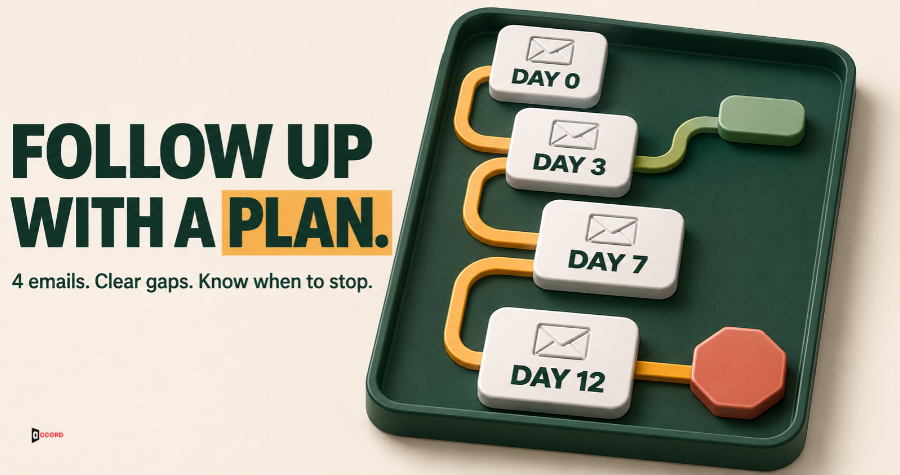
Your first cold email went out and nobody answered. Now you have two poor choices. You can send nothing and let a good reader go quiet, or you can send "just checking in" and become one more empty message in a full inbox. A cold email follow up sequence works only when each message has a new job, a fixed gap before it and a clear point where it stops.
It starts after the first message from our post on the B2B cold email template. The count, the gaps and the limits here are Accord's own starting points, not industry rules. The outside facts come from a software vendor and the US Federal Trade Commission and are linked where they appear.
Quick answer. Send the first email and three follow-ups, four emails in all. Send the follow-ups on business days 3, 7 and 12 after the first email, counting Monday to Friday. Stop the sequence for a person as soon as a human replies. An automatic out-of-office reply only pauses it.
How long should a cold email follow up sequence be?
A sequence is the set of emails you send to one person until that person replies or you stop. Accord's starting rule is the first message plus three follow-ups, which is four emails. No law, standard or independent study fixes a number, so treat four as a starting point and adjust it with data from your own list.
We have three reasons. The first two follow-ups each need something new and true to say, and the third only closes the loop, so a small team needs just two true things to say about a reader. Every extra email is another chance for a stop request or a spam report. And four sits at the low end of the vendor range described next, so you can add steps later.
Vendor advice differs. One example is Instantly, a company that sells cold email software. Its 2026 benchmark report, marked as updated on 12 January 2026 and opened for this post on 1 November 2026, uses its own platform data from 1 January to 18 December 2025. The report says 58% of all replies come from the first email and 42% from follow-ups. It calls 4 to 7 steps the "sweet spot" for sequence length and says to space steps 3 to 4 days apart. The details are on Instantly's cold email benchmark report. The report calls the first email step one, so we read its range as the first email plus 3 to 6 follow-ups.
Keep three limits in mind. It is a vendor's view of its own users, and your list may differ. A reply may be a yes or a request to stop, and a total hides which. Use the range as a fence, not a target.
When should you go longer? Add a fifth email only after two batches of about 50 readers each, with no spam reports and with a new true fact for the new email. The closing line then moves to the new last email, and the old follow-up 3 must carry a new true fact instead. Why two batches to add but three to cut a step? Adding tests whether one more email is safe, which two clean batches can show. Cutting tests whether a step does nothing, and a rare useful reply can miss a batch by chance.
How many days apart should the follow-ups be?
Count in business days, which are Monday to Friday. Day 0 is the day the first message goes out. Send the follow-ups on business days 3, 7 and 12. The gaps are 3, 4 and 5 business days, so they widen. If a US holiday falls on a send day, move that one email to the next business day and keep the other dates.
For example, you send the first message on a Tuesday. Follow-up 1 goes out that Friday, business day 3. Follow-up 2 goes out the next Thursday, business day 7. Follow-up 3 goes out the Thursday after, business day 12. That is 16 calendar days in all.
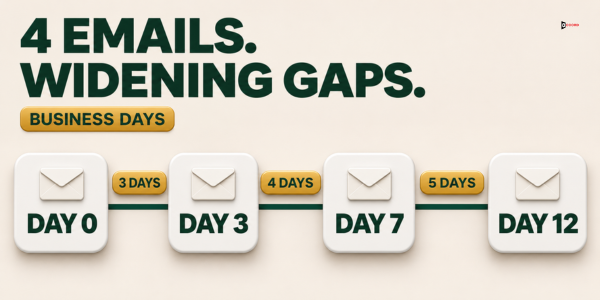
Why widen the gaps? In our view, the first reminder can come soon, while the first message is fresh, and later ones should come further apart so the sequence does not feel like pressure. This is our judgment, not a finding.
Never send two emails to the same person on one day.
Keep each follow-up in the same thread, which is the chain of messages under one subject line, with the same subject as the first message. Do not type "Re:" or "Fwd:" yourself, because the FTC's CAN-SPAM compliance guide says a subject line must not be deceptive. Check that your sending tool does not add "Re:" on its own.
What should each follow-up say?
Each follow-up has one job and a list of things it must not repeat. Business day 0 is the first message. The first two follow-ups give the reader new information. The third gives closure and an easy way to answer, and makes no new claim.
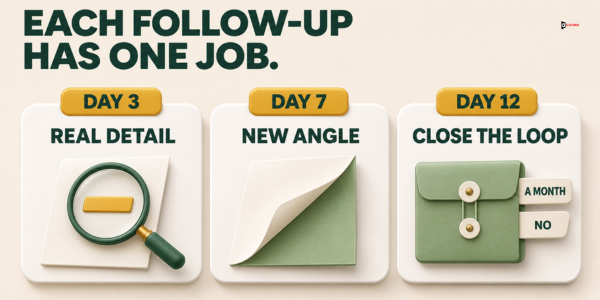
| Send on | Its one job | Must not repeat | |
|---|---|---|---|
| First message | Business day 0 | Reason, problem, offer, one question | Not applicable |
| Follow-up 1 | Business day 3 | Show one real detail of the thing you offered | The reason, the problem, the first question |
| Follow-up 2 | Business day 7 | Show the problem from a new side and ask who handles it | The detail from follow-up 1, the first problem |
| Follow-up 3 | Business day 12 | Close the loop and give an easy way to answer | Any pitch, sample or problem |
Rules that apply to every follow-up
Size. Write 30 to 70 words from the greeting to the sign-off, with the footer extra. That is shorter than the first message, which runs 60 to 120 words.
No meeting ask, soft or hard. The reader has not yet answered the first question, so the first message rule still holds. Do not ask the reader to talk, meet or get on a call, with or without a time. "Open to a quick chat?" counts. Search each draft for these words before you send: minutes, week, call, chat, talk, connect, quick, catch up, calendar, schedule, book, demo, "open to" and any day of the week.
No attachments and at most one link. Describe the thing you offered in words.
The same footer every time. Each follow-up carries your business name, postal address and opt-out line. The FTC puts its penalty on each separate email, so treat every follow-up as a full email.
The new-thing test for follow-ups 1 and 2. Delete the greeting, sign-off and footer. Does what is left tell the reader something no earlier email said? If yes, send it. If no, add a true detail or cut the step. Follow-up 3 passes a different test: it makes no claim, and it gives the reader two easy ways to answer.
The three follow-up templates
Square brackets show what you replace.
Follow-up 1, business day 3: show one real detail. The first message offered something, such as a sample or a one-page summary. Describe one real detail of it, so a yes costs the reader nothing. Then ask a new question.
Subject: [The same subject line as the first message]
Hi [first name],
[One real detail of the thing you offered, in one or two sentences.]
[A new question that is easy to answer, such as whether this is close to what their team uses today.]
[Your name, job title and business name]
Check: could you send the thing within a day if the reader asked? Fix: if not, change the offer in the first message before you send more emails.
Follow-up 2, business day 7: a new side of the problem. Name a second problem that people in the reader's role run into. Then ask the who-handles question. It gives the reader an easy way out and gives you a route to the right person.
Subject: [The same subject line as the first message]
Hi [first name],
[One sentence about a different problem, or a different side of the first one.]
[Are you the right person for this at (company), or should I ask someone else?]
[Your name, job title and business name]
Check: would a person in that role say "yes, that happens here"? Fix: if not, use a problem you have heard from a real person in that role.
Follow-up 3, business day 12: close the loop. Say plainly that this is your last email for now. Give two easy answers: a month to write again, or a no. Add no pitch and no new claim.
Subject: [The same subject line as the first message]
Hi [first name],
[One sentence saying this is your last email on this topic for now.]
[One sentence: if the timing is wrong, reply with a month and you will write then. If it is not for them, reply no and you will not write again.]
[Your name, job title and business name]
Check: is it true that you will send nothing else to this person about this offer for 90 days? Fix: if not, do not write "last email".
What to leave out
Leave out any line whose only job is to say that an earlier email exists, such as "just checking in", "bumping this", "circling back", "following up on my last email" or "did you see my note?" The soft forms count too, such as "Wanted to make sure this did not get buried." Leave out pressure as well: no invented deadline, no untrue "last chance", and no guess at the reader's feelings, such as "I assume you are not interested".
When must the sequence stop for one person?
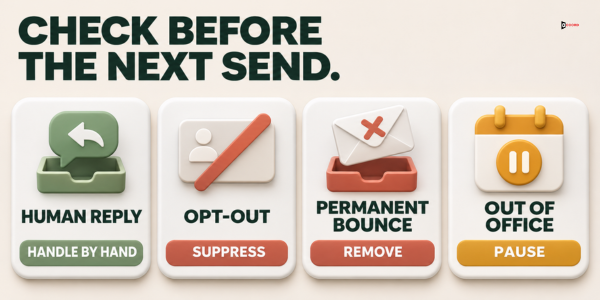
A sequence ends for a person as soon as one of the events below happens. Check before every send, not once a week.
| Event | What to do | Sequence |
|---|---|---|
| Any reply from a person: a yes, a no, "not now", "wrong person", a question or a vague "interesting" | Take the person out the same day and answer by hand. Our guide on cold email reply handling covers how to sort and answer each kind. | Stops |
| A request to stop, in any words: "stop", "unsubscribe", "remove me", "we do not accept sales emails" or a plain "no thanks" | Add the address to your do-not-email list the same day. That is a list of addresses your whole business agrees never to email again, for every campaign and every sender. If you cannot tell whether a no is a stop request, treat it as one. | Stops |
| A permanent bounce. A bounce is an automatic message from a mail server saying your email was not delivered. It is permanent when, for example, the address does not exist | Take the person out and never retry. If your tool does not say which kind of bounce it is, treat it as permanent. Our cold email deliverability guide uses bounces under 2% of a first batch as its starting line. | Stops |
| A temporary bounce, for example because the mailbox is full | Try once more at the next step. Remove the address if that fails too. | Continues, one retry |
| An out-of-office reply, which is an automatic reply saying the person is away | Restart two business days after the return date it gives, with the step you paused on. If it says the person has left the company, end the sequence and look for the right contact. | Pauses |
| A spam report: your tool or a mail provider tells you a reader marked your email as spam | Treat it as a stop request. Then look at your list and your wording. | Stops |
| Anything unclear, such as "Interesting, but not sure", or a colleague who replies for the reader | When in doubt, stop. Pausing a person costs one follow-up, while emailing someone who wanted to stop can cost a spam report. Answer by hand and ask one plain question, such as "Should I send the sample, or stop writing?" | Stops |
Stop requests and the law
The law allows more time than we do. The same FTC guide says you must honor an opt-out request within 10 business days and that the law makes no exception for business-to-business email. We stop the same day because a follow-up that was already scheduled can go out before anyone has processed the request. The guide lists penalties of up to $53,088 for each separate email in violation, as read on 1 November 2026, and the figure may change. This is a summary of one US law, not legal advice. Canada, the UK and the EU use other rules.
The check before every follow-up
Before each follow-up, run this short check.
- Collect every reply and auto-reply since the last send, from each mailbox you send from.
- Compare the day's send list with your do-not-email list and take out every match.
- Remove permanent bounces and pause everyone with an out-of-office reply.
- Take out anyone with a reply, a stop request or a spam report.
- Send, and read the inbox once more an hour later.
The check passes when nobody with a reply or a stop request gets an email. If one slips through, send nothing more to that person and find out why your tool did not stop it.
What should you do when nobody replies after the last follow-up?
Silence after four emails is not a no and not a yes. You do not know why.
End the sequence and write it down. Mark each person "no reply" with the date of the last email.
Look at the batch before the wording. If almost no one in a whole batch replies, the emails may be going to the spam folder. The deliverability guide gives the order of checks. Fix delivery first, because new wording will not help emails nobody sees.
Rest the address for 90 days. This is Accord's starting point. The closing email said "for now", so nothing should go to that person for 90 days. After that, send a new first message only if you have a new, true reason, such as a fresh fact about their company. Do not send the same four emails again.
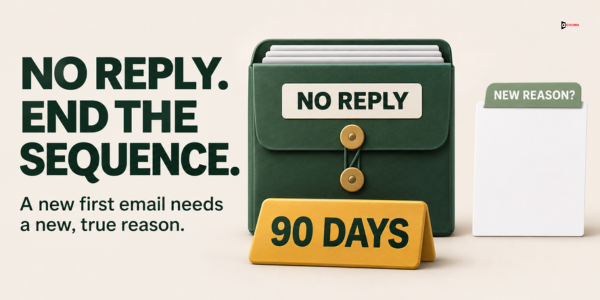
Do not add a fifth email to squeeze out more. If the silent group is large and the batch was clean, test a different group or a different first message. Another channel, such as LinkedIn, has its own rules, so check them and write a new message for it.
How do you read a batch and decide whether to add or cut a step?
Count one rate the same way every time. A useful reply is a yes, or the name of the right person to contact. The rate is useful replies divided by the first emails delivered. Count each reply under the step that came just before it. For each step, also count the replies that ask you to stop or say no, the bounces and the spam reports. A follow-up that draws more stop-or-no replies than useful ones needs new wording or a better list.
Keep all four emails for at least three batches of about 50. Cut a step only if it brought no useful reply in all three. That needs more batches than adding a fifth email, because a quiet step can be silent in one batch by chance. One batch of 50 is small, because one extra reply moves the rate by 2 points. Change one part between batches. If you change two, you cannot tell which one mattered.
Imagine: one batch of 50 through all four emails
This example is invented, including every name and number. Imagine Rosa, who runs sales for Ferncliff Quoting, a two-person company that sells job-quoting software to print shops with 20 to 100 employees. Rosa writes to Jordan, the owner of a print shop called Harbor Press. The first message went out on a Tuesday with the subject "Quoting at Harbor Press". It said that Harbor Press opened a second press room this spring and that Rosa can show a one-page quote example. It asked, "Would it be useful if I sent it?"
Jordan does not answer by Friday, so follow-up 1 goes out. Each message also carries the same footer as the first.
Subject: Quoting at Harbor Press
Hi Jordan,
The one-page example shows a quote for a 5,000-flyer job built from a past order, with paper, ink and press time on separate lines.
Is a view like that close to what your estimators use today?
Rosa Alvarez, Founder, Ferncliff Quoting
That has 43 words from the greeting to the sign-off and passes the new-thing test. Jordan stays silent, so follow-up 2 goes out on the next Thursday.
Subject: Quoting at Harbor Press
Hi Jordan,
A quote that leaves out setup time can turn a good job into a loss once the press is running.
Are you the right person for quoting at Harbor Press, or should I ask someone else?
Rosa Alvarez, Founder, Ferncliff Quoting
That has 43 words, and the problem is new, since it is about setup time and not about two rooms. Jordan stays silent again, so follow-up 3 goes out on the Thursday after that.
Subject: Quoting at Harbor Press
Hi Jordan,
This is my last email on quoting for now.
If the timing is wrong, reply with a month and I will write then. If it is not for you, reply no and I will not write again.
Rosa Alvarez, Founder, Ferncliff Quoting
That has 44 words and no pitch, no sample and no problem, because its job is closure. None of the three follow-ups contains a word from the meeting-ask search list.
Now the whole batch. Rosa sends the first message to 50 print-shop owners, and all 50 are delivered. Each row below counts the replies that arrived after that step and before the next one.
| Step | Emails sent | Useful replies | Stop or no | Not now or wrong person | Bounces |
|---|---|---|---|---|---|
| First message, business day 0 | 50 | 2 | 1 | 1 | 0 |
| Follow-up 1, business day 3 | 46 | 1 | 1 | 0 | 1 |
| Follow-up 2, business day 7 | 43 | 1 | 0 | 1 | 0 |
| Follow-up 3, business day 12 | 41 | 1 | 0 | 1 | 0 |
| Total | 5 | 2 | 3 | 1 |
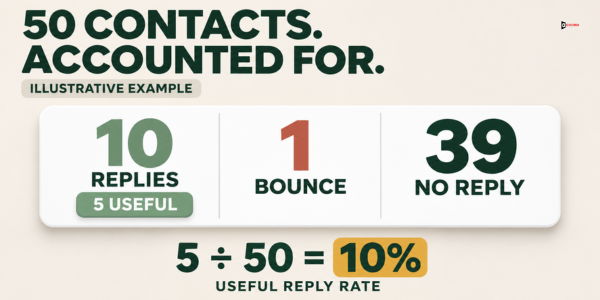
Everyone who replies or bounces leaves the sequence the same day, so each step goes to fewer people. The one stop request goes on the do-not-email list at once. Follow-up 1 goes to 50 minus 4, which is 46 people. Follow-up 2 goes to 46 minus 1 bounce and 2 replies, which is 43. Follow-up 3 goes to 43 minus 2, which is 41. After it, two more replies arrive, and 39 people never replied. They are marked "no reply" with the date.
Check the arithmetic. The replies are 5 plus 2 plus 3, which is 10. Add the one bounce and the 39 silent people, and the total is 50.
The useful replies are the yes answers and the right-person name. In rates, 2 of 50 is 4.0% for the first message and 1 of 50 is 2.0% for each follow-up. The total is 5 of 50, or 10.0%. Three of the five useful replies came from follow-ups.
What does Rosa read from this? These sample numbers are not a benchmark, and they do not match Instantly's split of 58% and 42%, a different measure from a different data set. Cutting follow-up 3 would have lost one yes and one dated "not now", because one of the last two replies names a month and Rosa sets a dated reminder. Follow-up 1 drew one no thanks and one useful reply, so it does not draw more stop-or-no replies than useful ones. Nobody reported spam. A batch of 50 is small, so Rosa changes one part only for the next batch, such as moving follow-up 2 to business day 8.
Frequently asked questions
How many follow-ups should I send after a cold email?
Accord's starting point is three follow-ups after the first message, which makes four emails. No primary source sets a number. Instantly, a software vendor, calls 4 to 7 steps the sweet spot in its 2026 benchmark report. Start at the low end and add steps only with data from your own list.
How many days should I wait between cold email follow-ups?
Accord's starting schedule is business days 3, 7 and 12 after the first message, which makes gaps of 3, 4 and 5 business days. Instantly's benchmark report suggests 3 to 4 days between steps and does not say whether those are business days.
Should I send follow-ups in the same email thread?
Yes, keep them in the same thread with the same subject line as the first message. Do not type "Re:" or "Fwd:" yourself, because the FTC says a subject line must not be deceptive.
What should the last follow-up say?
Say that this is your last email for now, then give two easy answers: a month to write again, or a no. Add no pitch and no deadline. Write "last email" only if you will send nothing to that person about this offer for 90 days.
Can I keep emailing someone who opened my email but did not reply?
The Accord schedule does not use opens at all. It uses four clear signals: a reply, a stop request, a bounce and a spam report. A reader with none of the four gets the next follow-up on the set day.
Does every follow-up need an unsubscribe line?
In the United States, treat every email as a full email. The FTC's CAN-SPAM compliance guide says the law makes no exception for business-to-business email, and its penalty applies to each separate email in violation. Put your postal address and a plain opt-out line in every follow-up. This is a summary of one US law, not legal advice.
What should I do when someone replies "not now"?
Take that person out of the sequence the same day, because any reply ends it. If the reply names a month, set a reminder and send a new first message then. If it gives no timing, wait 90 days.
Next step
If you would like a second pair of eyes on your own follow-up plan, book a 30-minute working session with the Accord team. Bring your first message and the group of readers it goes to, and we will go through the schedule and the stop rule together. There is no obligation, and you can use everything in this post without us. Accord sells outbound, email, lead-generation, SEO/AEO, web and social services, so we have an interest in this subject.