
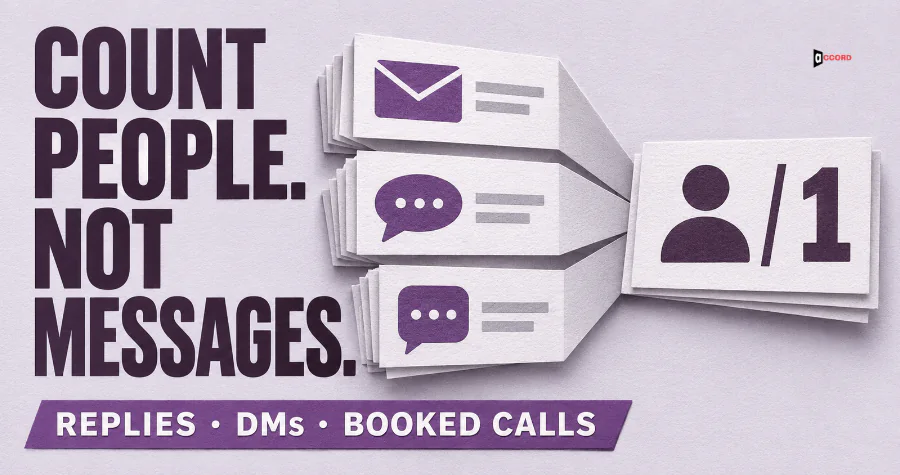
On Monday morning someone asks how many conversations your outbound started last week. The email tool shows a reply count that includes automatic notices. LinkedIn is a list of messages that a person reads by hand. Instagram has a few more. One person wrote on two channels, one message was a request to stop, and one direct message was only a thumbs-up. Nobody can give the real number, so nobody can say whether this week beat the last one.
This post shows how to track outbound conversations in one sheet. It gives one definition of a conversation started, tests it against nine awkward messages, and offers a sheet you can copy, with one row per person and a weekly line that shows its numerator and denominator. It also gives one rule for people who appear in two channels.
The rules, limits and time windows here are Accord's own starting points, not industry standards. Change them once you have your own history. No outside study is used. The only outside page linked is a spreadsheet help page.
Why do replies from three channels never add up?
Each channel counts something different. An email tool counts replies, and that count may include out-of-office notices, delivery notices and requests to stop. LinkedIn and Instagram have no shared count with email, so a person reads the messages and adds them up by hand, if anyone does. A single person can answer by email and then message again on LinkedIn. A single direct message, or DM, can hold a real question or one emoji. Add the three numbers and you get a total that mixes people, messages and noise.
The fix is one unit and one rule. The unit is the person. The rule says which messages from that person count.
The live weekly growth scorecard shows four checkpoints from first contact to booked meeting. Its second checkpoint counts people who gave a positive response, meaning they asked for times, price, details or a call. This post is the sheet underneath one step of that page. Its definition is a little wider. A person who only names a colleague counts here at once, while the scorecard waits until the colleague answers. If you use both, call the people counted here "conversations started" and keep "positive response" for the smaller group on the scorecard.
What counts as a conversation started?
Here is the whole rule in one sentence. A conversation started is one person who, after you contacted them first, sends a message that a human wrote, that is not a request to stop, and that gives you something to answer. That person is counted once, in the week the message arrives.
Each part of the sentence has a job.
After you contacted them first. This count is for outbound. A person who writes to you without being contacted is real and useful, but that person belongs in an inbound count. The sheet keeps a row for such people so they are not lost, and they do not enter this number.
A human wrote it. An automatic reply, a delivery notice and a tool label do not count. Read the message yourself. A sending tool may mark a reply "interested" when the person only said thanks.
Not a request to stop. A message that asks you to stop never counts, even if it also says something friendly or interested. The stop request wins, and the address leaves every list that day.
Something to answer. The message must give you a next step that a person could take. We use four kinds: interest, a question, a time to come back, or the name of a person to contact. If the only sensible reply is "thanks", nothing is open, so nothing is counted.
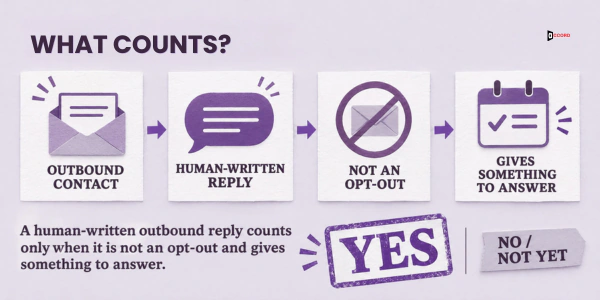
Use this quick test on any message. Could you write a useful reply that is longer than thank you? If yes and the other three parts hold, count it. If no, log it as a row that does not count, and give the reason.
The rule leaves out a plain "no thanks". A conversation started should mean a door is open, and a flat no closes it. If your team wants to count declines, keep them in a separate column. Write one rule at the top of the sheet and use it every week.
Does the definition hold up against real messages?
A rule is only useful if it settles the hard cases. Here are nine, with the answer and what to write down in each.
An out-of-office reply. It does not count, because no human wrote it for this message. Log it as Auto. If it names a covering colleague, write a first message to that colleague. The colleague counts only after writing back.
A request to stop. "Remove me", "stop emailing" and "please take me off your list" do not count. Soft forms such as "not interested, please do not contact me again" do not count either. If a message holds both interest and a stop request, the stop request wins. Log it as Opt-out and remove the person from every list the same day.
A flat decline. "No thanks" and "not for us" do not count, as explained above. Log it as Decline.
A wrong-person reply. "I am not the right person, talk to Maria" counts, because it gives you a name to contact. Log it as Pointer. "I am not the right person" with no name or role does not count. Log it as Decline. When Maria writes back, she is a new row and counts then.
A DM that is only a like. A reaction on your message, a thumbs-up emoji, a new connection, a follow-back and a bare "thanks", "noted" or "got it" do not count. Log them as Reaction. A real sentence from the same person the next day makes the row count.
A reply after the report closes. Count a message in the week it arrived, not the week you read it and not the week of your first message. If a reply arrived on Sunday night and you find it on Tuesday, add it with its true arrival date. The old week's line goes up by one and is marked "revised". A reply that arrives weeks after your first message also counts in the week it arrived.
A timing reply. "Try me again in March" counts, because it gives you a time to come back. Log it as Timing. "Not now" with no date leaves nothing to act on, so log it as Decline.
A message you cannot read. Some replies are a single word, a forwarded note, or in a language your team does not read. Log it as Unclear, which shows "Not yet", and send one short question. If the answer makes it a Yes, it counts in the week the first message arrived. With no answer, leave it as "Not yet".
A message from someone you never contacted. A person who finds you and writes first is logged as Inbound and does not count here. Put "None (they wrote first)" in the First contacted via column.
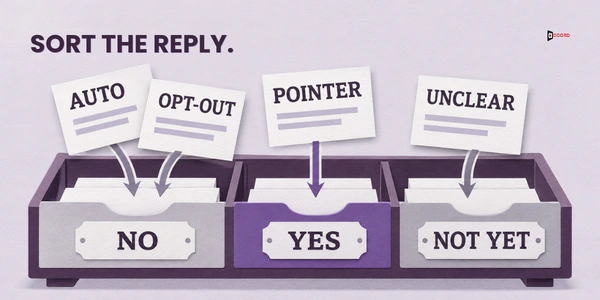
These nine cases are why the sheet has a Type column. The person logging the reply picks the type from a list, and the sheet decides whether it counts.
How to track outbound conversations: what does the sheet look like?
Make one spreadsheet with two tabs. The first tab, Log, has one row for each person who sent a response, whether or not it counts. The non-counting rows are deliberate. They show why a week looked weaker than the tool counts suggested. The second tab, Summary, has one line per week.
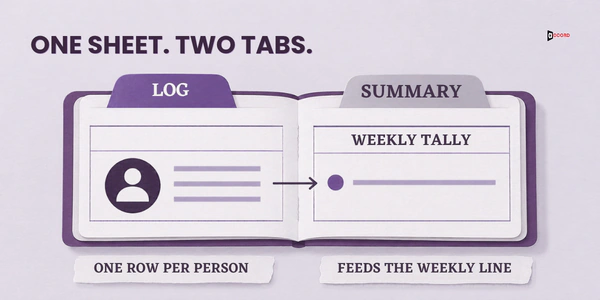
Here are the 15 columns of the Log tab. Columns I and K are formulas, so nobody types in them.
| Column | Name | What goes in it |
|---|---|---|
| A | ID | A running number, such as C001 |
| B | Person | Full name |
| C | Company | Company name, as the person writes it |
| D | Contact key | The email address or the profile link, which is how you find the same person again |
| E | First contacted via | Email, LinkedIn, Instagram, or "None (they wrote first)" |
| F | First contact date | The day you first contacted this person on any channel |
| G | Replied via | The channel of the first message that counts, or of the first message if none counts |
| H | Response date | The day the message arrived |
| I | Week starting | Formula: the Monday of the response date |
| J | Type | A dropdown list: Interest, Question, Timing, Pointer, Unclear, Auto, Opt-out, Decline, Reaction, Inbound |
| K | Counts? | Formula: Yes, No or Not yet, set by the Type |
| L | Also seen on | Other channels where the same person wrote later |
| M | Call booked date | Empty until a call with a date and time is on the calendar |
| N | Owner | The person who answers this reply |
| O | Note | One short line, with no private or sensitive details |
Use a dropdown (called data validation in Google Sheets and Excel) for columns E, G and J, so spelling never splits one value into two.
Here are the two formulas, one per paragraph, for row 2.
For column I, week starting: =H2-WEEKDAY(H2,3)
For column K, counts: =IF(OR(J2="Interest",J2="Question",J2="Timing",J2="Pointer"),"Yes",IF(J2="Unclear","Not yet","No"))
The first formula depends on the type 3 option of the WEEKDAY function. Google's help page, opened on 1 November 2026, says that with type 3 days are counted from Monday, where Monday is 0 and Sunday is 6. Subtracting that number gives the Monday of the week. Other programs may number the options differently, so test the formula on one known date.
Share the sheet only with people who need it. Do not paste full messages into it, and never put passwords or private details in a note.
How do you build the weekly line?
The Summary tab has one line per week, from Monday to Sunday, in one time zone that you write at the top. A line has two rates, and their definitions never change.
Conversations-started rate. The top is the number of people whose message counted as a conversation started in the week, from the Log tab. The bottom is the number of different people you contacted for the first time that week, on any channel. A person you reached by email and by LinkedIn in the same week is one person on the bottom.
Booked-call rate. The top is the number of calls booked in the week, meaning a date and time are on the calendar. The bottom is the number of conversations started in the same week.
Enter these columns on the Summary tab. A is the week starting. B, C and D are the new people you contacted by email, LinkedIn and Instagram. E is the number of people counted twice in B, C and D because you reached them on two channels that week. F is the total of different people. G is conversations started. H is the rate. I is calls booked. J is the booked-call rate.
For F, people contacted: =B2+C2+D2-E2
For G, conversations started: =COUNTIFS(Log!I:I,A2,Log!K:K,"Yes")
For H, rate: =G2/F2
For I, calls booked: =COUNTIFS(Log!M:M,">="&A2,Log!M:M,"<"&A2+7)
For J, booked-call rate: =I2/G2
Two details keep the numbers honest. Count people, not messages, on the bottom: a person who gets three emails is one person. And count only people you had never contacted before. A person emailed in week 1 and messaged on LinkedIn in week 3 is not a first contact in week 3.
Fill B, C and D from your sent folders and sending tools, or by hand. If a number is missing, write "not known" and leave the rate blank for that week.
Read each rate as a signal, not as a true conversion rate. A message that arrives this week may answer a first message sent last week, and a call booked this week may come from last week's conversation. The scorecard post explains this mismatch and how to read small numbers. In short, add the top counts of four weeks, add the bottom counts, divide, and read the people when the bottom count is small.
What if the same person shows up in two channels?
You email a person and send a LinkedIn request on the same day. The person answers on LinkedIn, and a day later answers the email too. Counted by messages, that is two replies. Counted by people, it is one.
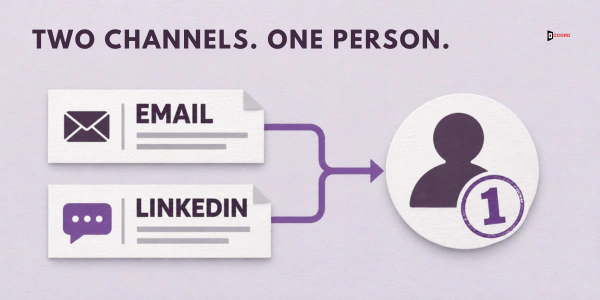
The rule has four lines.
One person, one row, one count. The row's channel is the channel of the first message that counts, so put that in the Replied via column. The later message on the other channel goes in Also seen on, plus a few words in the note. It does not get a new row.
One person, one place on the bottom. A person first contacted on two channels in the same week counts once in F. The number in E is how many such people you had.
Find the match before you add the row. Search the Log tab for the email address or profile link first, then for the full name and company. If they match and nothing says otherwise, it is the same person.
When you are not sure, split and mark. Two profiles with the same name at the same company may be one person or two. Give each its own row and write "possible duplicate" in the note. On Monday, look at both threads and merge the rows if they are one person. A wrong merge can hide a real person, so a split is the safer error.
Two further cases come up. A person whose conversation ended and who writes again 30 days or more after you marked it closed gets a new row, with "returning" in the note. And two people at the same company are two rows, because the unit is the person. The guide on CRM deduplication rules covers the same question for the full customer database.
Who updates the sheet, and when?
Two jobs keep this sheet true.
The person who answers a reply adds the row the day they read it, because that person can choose the Type in seconds.
One person, the keeper, checks the sheet every Monday. The check takes about 20 minutes in our starting estimate. Here are the steps.
- Close the week: Monday to Sunday, in the time zone written on the sheet.
- Open the email inbox, LinkedIn messages and Instagram messages. Look for any reply that is not in the Log yet. Also look for a separate folder for messages from people you are not connected to. Such folders may exist, and their names change, so look inside your own account.
- Fix the Type of any row that looks wrong, and settle every Unclear row you can.
- Fill the bottom counts for the week in the Summary tab, and read the line.
- Write one sentence under the line, such as "Eight conversations, two of them from LinkedIn, one revised from last week."
Imagine: one week, 96 people, 14 messages and 8 conversations
This example is invented, including every name, company and number. The numbers are not a benchmark. Imagine a small software company, Fernhill Systems, that contacts owners of print shops by email, LinkedIn and Instagram.
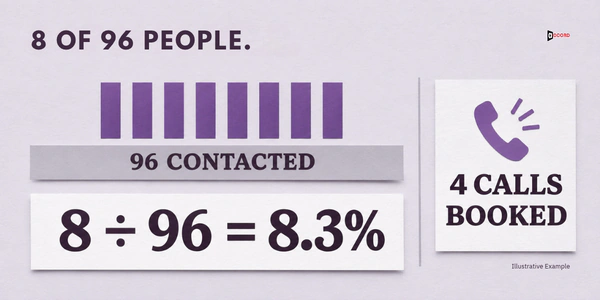
In one week, Fernhill contacted 60 new people by email, 25 by LinkedIn and 15 by Instagram. That adds up to 100 contacts, but four people were reached on two channels that week. The bottom of the rate is 96 different people: 60 plus 25 plus 15 minus 4.
During the week, 14 messages came in. The email tool showed 8 replies, LinkedIn showed 4 messages and Instagram showed 2. They came from 13 people, because Kim wrote on both email and LinkedIn. Here are the 13 rows of the Log tab, with the columns that matter.
| ID | Person | Contacted via | Replied via | Type | Counts? | Call booked |
|---|---|---|---|---|---|---|
| C101 | Ana | Interest | Yes | |||
| C102 | Ben | Question | Yes | |||
| C103 | Carla | Interest | Yes | Booked | ||
| C104 | Dev | Auto | No | |||
| C105 | Elena | Opt-out | No | |||
| C106 | Farid | Pointer | Yes | |||
| C107 | Hugo | Reaction | No | |||
| C108 | Iris | Question | Yes | |||
| C109 | Jon | Decline | No | |||
| C110 | Kim | Email and LinkedIn | Interest | Yes | Booked | |
| C111 | Leo | Timing | Yes | |||
| C112 | Mina | Decline | No | |||
| C113 | Noel | Email, two weeks ago | Interest | Yes | Booked |
Noel's first email went out two weeks ago, so he is on the bottom count of that earlier week and on the top count of this one. Eight rows say Yes, so 8 conversations started. The five others are Dev (an automatic reply), Elena (a request to stop), Hugo (a reaction only), Jon (a decline) and Mina (a wrong-person reply with no name, which is a decline). Eight plus five make 13 rows, matching the 13 people.
By channel, the 8 split into 5 by email, 2 on LinkedIn and 1 on Instagram. Kim's email reply is not a ninth conversation, because her Also seen on cell says "Email". The conversations-started rate is 8 of 96 people, or 8.3%. Farid named a colleague, Gina. She is not in this week's rows, because she has not written. Fernhill will contact her next week and count her then.
Three of the 13 people booked a call this week: Carla, Kim and Noel. Pat also booked a call this week, from a conversation that started the week before. So calls booked is 4, and the booked-call rate is 4 of 8 conversations, or 50.0%. Because Pat's call comes from the earlier week, the ratio mixes two weeks, and Fernhill reads it as a signal only.
Now the late reply. Omar answered by email on the Sunday before this week, at 10 PM. The keeper found it on Tuesday, after the Monday report went out. The previous week had been reported as 8 of 98 people, or 8.2%. With Omar added in his arrival week, it becomes 9 of 98, or 9.2%, marked "revised".
Fernhill reads four weeks together. The weekly lines were 7 of 92, 6 of 90, 9 of 98 (revised) and 8 of 96. The conversations add up to 30 and the people to 376, so the four-week figure is 30 of 376, or 8.0%. One more conversation this week would have made it 9 of 96, or 9.4%. That is a move of about one point from a single person, so Fernhill reads the people behind each week. It keeps 8.0% as its baseline and sets no target yet.
What if nobody replies, or you cannot tell?
A week with zero is a valid result. Write 0 of 96, then check that the bottom count is right and that you looked in every inbox. A tool that sends from another account can hide replies in a mailbox nobody opens. That is part of how to track outbound conversations honestly: a zero week still goes on the sheet.
When you cannot tell whether a message counts, use Unclear and ask one short question. When you cannot tell whether two profiles are one person, split and mark them. When you cannot tell how many people you contacted, write "not known". A blank rate with a note beats a rate built on a guess.
If a tool reports a number that does not match your sheet, keep the sheet and write down why. The tool counts replies and the sheet counts people. For a finer sorting of reply types, the Accord guide on cold email reply handling covers the next step for each.
Frequently asked questions
Next step
If you would like a second pair of eyes on your own count, book a 30-minute working session with the Accord team. Bring last week's inbox exports or screenshots with private details hidden, and we will test your definition on the awkward messages together. There is no obligation, and you can use everything in this post without us. Accord sells outbound, email, lead-generation, SEO/AEO, web and social services, so we have an interest in this subject.