

You have dozens of old posts and time to fix a few. Which one do you open first, what do you change, and how will you know the change helped? Guessing costs a week, and a careless edit can break a post that was quietly working. This guide on how to refresh old blog posts gives you a six-step checklist. Every step has a test, a result that counts as a pass and a fix for when the test fails. It also gives you a rule for choosing the post from Search Console data you already have. You get a rule for what must never change (the URL), a rule for the date and a plan for posts with no impressions.
Search Console is Google's free tool that shows how your pages appear in Google Search. The limits in this post, such as 200 impressions and a 28-day window, are Accord's own starting points, not Google rules. The outside facts come from two Google Search Central pages, linked where they appear. A refresh also does not promise a better ranking or an AI citation. The section near the end explains what it can and cannot do.
Should you refresh an old post or write a new one?
Refresh the post when the question it answers is still a question your buyers ask. Write a new post when the question has changed. The test is simple: can you state the post's question in one sentence that is still true today? "How do I write a first cold email?" is still true. "What should I know about last year's email rules?" is not, and the post needs a different title and a different reader.
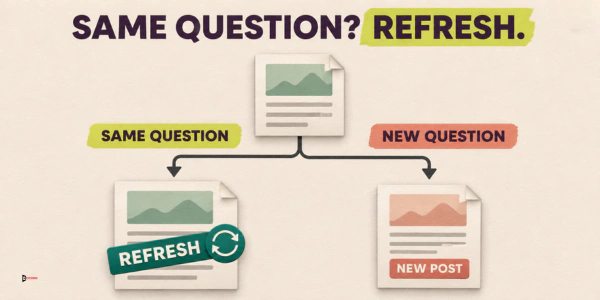
In our view, an old post that already shows up in search has something a new page starts without: a track record of impressions, and often a few links from other sites. That is why you edit the existing page in place. Do not copy the text into a new draft, publish the copy and delete the original. That creates a new address, and the old one loses its history. Our monthly plan in AEO vs SEO: what to add, keep and cut already tells small teams to keep a steady refresh cycle for pages that have lost visits. This guide covers the how.
A refresh is also not a full rewrite. As a rule of thumb, if you would keep less than half the words, you are writing a new post under an old address. Decide which job you are doing before you start, because the checks below assume the post stays the same post.
How to refresh old blog posts: what is the six-step checklist?
The checklist for how to refresh old blog posts has six steps, and you run them in order on one post at a time. Each step gives a test, a result that passes and a fix. If a step fails and you cannot fix it, write that down and move on.
Step 1: Choose the post and record its baseline
Open the Performance report in Search Console and set the date range to the last three months. Switch to the table of pages and sort by impressions. Four columns matter here. Impressions is how many times your page appeared in Google results. Clicks is how many times someone clicked through. CTR, or click-through rate, is clicks divided by impressions. Average position is where the page sits in the results, with 1 at the top, so a lower number is better. It is an average, so it moves from day to day.
Now apply the choosing rule. Pick posts with at least 200 impressions in those three months and an average position between 8 and 30. In plain words, the post is seen often enough to matter and sits close enough to the first page that a better answer might move it. Both numbers are our starting point. Among the posts that pass, take the one with the most impressions.
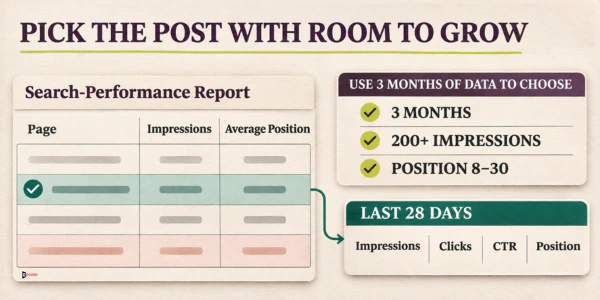
Test. Does the post meet both numbers? Passes if yes. Then change the date range to the last 28 days and write down impressions, clicks, CTR and average position for this one page. These four numbers are your baseline. Save a copy of the old text as well, so you can go back if the edit makes things worse.
If it fails. If the post has fewer than 200 impressions, read the section on posts with no impressions further down. If its position is worse than 30, a light refresh may not be enough to change anything. The post may need to become a much better answer than the pages ahead of it, which is a rewrite, not a refresh. If its position is better than 8, it is already near the top. Look at its CTR and title instead of its body.
Step 2: Match the post to the questions people search
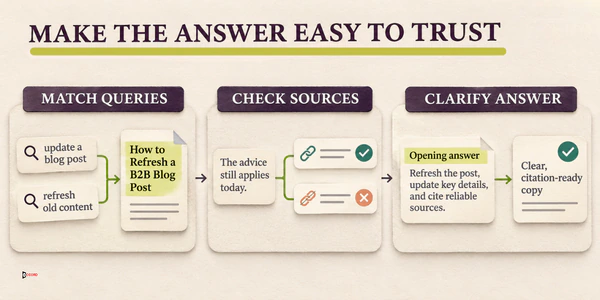
Filter the report to your chosen page, then open the queries tab. A query is the words someone typed into Google before your page appeared. Write down the five queries with the most impressions.
Test. For each of the five queries, can you point to a heading or a paragraph in the post that answers it? Passes if all five have an answer. A short paragraph counts, as long as it gives the answer and not just a mention of the topic.
If it fails. Add a short section for each missing answer, written as an H2 or H3 heading that a reader could type as a question. Keep each new section under 150 words. If a query asks something quite different from your post, such as a cold email post shown for a search about email software prices, do not stretch the post to cover it. A post that answers two different questions may answer neither well. Note the query as an idea for a separate post.
What if the top five queries are all off-topic? Then the title and opening probably promise a different post than the one you wrote. Rewrite the title and the first paragraph to describe what the post actually contains, and keep the body.
Step 3: Check every fact, number and link
Read the post with a pen and mark each sentence that holds a number, a year, a law, a price, a product name or words such as "new", "latest" and "current". Then click every link.
Test. Does each marked sentence have a source you opened this month, or a plain label such as "our starting point" or "invented example"? Does every link open the page it claims to? Passes if yes to both.
If it fails. Replace the claim with the figure from the primary source, and link that source next to the claim. A primary source is the page of the company or agency that produced the number, not a blog that repeats it. If you cannot open a primary source, relabel the claim as a vendor view or cut it. Replace dead links with a live page or remove the link and keep the sentence. Fix tool names and screenshots that no longer match the product. Do not write "recently" or "this year". Write the month and year, so the sentence stays true or visibly out of date.
In our view, a fresh date on a post with a stale statistic is worse than an old date on a correct one.
Step 4: Make the answer easy to find and quote
In our view, a page that states its answer plainly is easier for both people and AI tools to quote. Our 8-point B2B citation checklist scores a page on this in about ten minutes. For a refresh, run three quick tests from it.
Test. First, cover everything except the opening paragraph. Does it answer the main query from step 2 in two to four sentences, without a warm-up? Second, would a smart reader outside your industry understand every technical term, because each is explained the first time it appears? Third, are the stages of any process numbered, so someone can quote "step three" without rereading the post? Passes if all three are yes.
If it fails. Move the answer into the first paragraph and cut the warm-up. Define each unexplained term in the same sentence where it first appears. Turn long paragraphs that describe a process into numbered steps. Change vague headings such as "Our Approach" into the question a buyer would ask. Check that the post shows who wrote it and when it was last reviewed.
Step 5: Keep the URL and set the date honestly
This step has two rules.
Rule one: the URL does not change. Edit the post in place and keep its address exactly as it is, character for character. That includes the case where the address has an old year in it. Do not shorten it, tidy it, add a keyword or move the post to a new category folder. Moving a post to a new address is a separate job, with its own risks, and it needs a redirect set up by whoever runs your site. This checklist does not cover it.
Rule two: change the visible date only when the post has changed in a way a reader would notice. Test it this way: write one sentence telling the reader what is new, such as "Updated November 2026: new tests for steps 2 and 4." If you can, change the date. If you cannot, or you are unsure, leave it. A fixed typo, a swapped image, a repaired link and a changed word do not count. Google's helpful content guidance lists a question to ask yourself about this: are you changing the date of pages to make them seem fresh when the content has not substantially changed? The same page asks whether you add or remove a lot of content mainly to make your site seem fresh, and it answers that question with a plain no.
When you do change the date, keep the original too. Google's page on publication dates in search results says you can provide a publication date, a last updated date, or both. It asks for a user-visible date, labeled with words such as "Publish" or "Last updated". It also asks you to make dates consistent and to minimize other dates on the page. Our advice follows from that: make the date a reader sees match the date in your structured data, which is code on the page that tells search engines facts such as the date. Your website team or plugin often sets it, so ask them. Google says it looks at several factors to estimate when a page was published or significantly updated, and does not rely on a single date. Remove "as of 2022" lines you no longer need.
Test. Is the URL identical to the old one? Does the date you show match the real size of the change? Passes if both are yes. If it fails. Restore the old URL first. Then correct the date to match the change.
Step 6: Publish, log the change and read the result
Publish the edit. Then keep a log. These lines work as a template:
Post address: [the URL]
Date changed: [day, month, year]
Baseline, last 28 days before the change: [impressions, clicks, CTR, average position]
What changed: [steps 2 to 5, in one sentence each]
Check date: [the day your second window starts]
Result, 28 days later: [impressions, clicks, CTR, average position]
Decision: [leave it, adjust the title, or refresh again]
Wait one week after the change, then read the next 28 days. This gap is our starting point. It gives the edit time to be picked up and avoids counting the days of the change itself. Compare those 28 days with the baseline 28 days. Always compare windows of the same length.
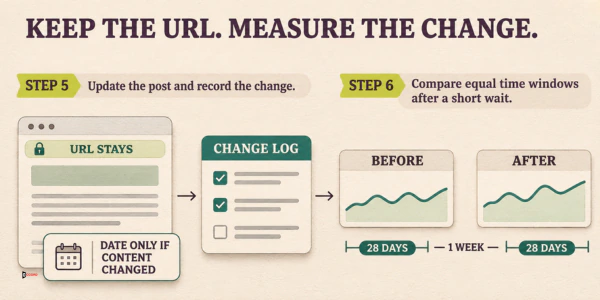
Test. Compare impressions, clicks, CTR and average position. Passes if clicks are up and the other three have not moved the wrong way. If it fails. Read the movements one by one. If impressions rose but clicks did not, rewrite the title and the first sentence so they promise what the post delivers. If clicks and impressions are flat, do not edit again inside the same window, because you would not know which edit mattered. If everything is worse, compare the saved copy with the new text, and revert only the parts you cannot defend.
Add a second check for AI answers. Before the edit and again at the check date, ask the same three buyer questions in the AI tools your customers use, and write down which companies are named. Our guide on measuring AI search citations when there are no clicks shows how to keep that log. Answers change from one day to the next, so treat the result as a sample.
What should you do with a post that has no impressions?
A post with no impressions in the last three months has given you nothing to compare. The Performance report cannot tell you why. There are four common reasons, and you can tell some of them apart yourself.
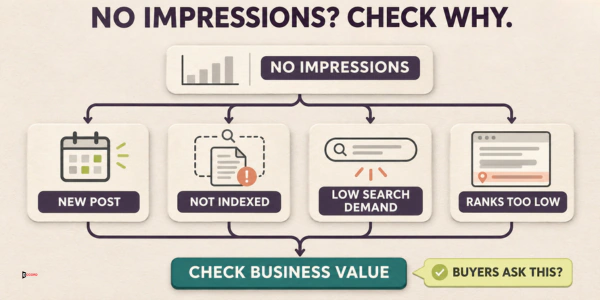
The post is new. If it is a few weeks old, wait. Check again after three months.
Google has not indexed it. An index is the list of pages Google keeps and can show in results. A page that is not in it cannot appear. Ask whoever manages your Search Console to confirm that the page is indexed, and if it is not, fix that first. No rewrite will help a page Google cannot list.
Nobody searches for its question. That is not always a problem. A post written to answer a question sales hears often can still help buyers who arrive another way.
The page is too far down to show. It may rank so low that few people see it. In that case, the issue is the post, not the date.
Then decide on business value, not on impressions. Ask whether the post supports a service you sell or a question your sales team hears every month. If yes, run the six steps anyway. In step 2, use the questions your buyers ask on calls and in emails instead of Search Console queries. Your baseline is zero, so the result you watch is simply whether the page starts to appear. If no, leave the post alone. Removing a post is a separate decision, and this checklist does not make it.
Imagine: one refresh, from choice to result
Imagine a small software company called Quillbrook that has six old posts. This example is invented, including every name and number, and the numbers are not a benchmark. Quillbrook applies the rule from step 1: at least 200 impressions in the last three months and an average position between 8 and 30. Here are the six posts, with figures for those three months:
| Post | Impressions | Clicks | Average position | Passes the rule? |
|---|---|---|---|---|
| Cold email subject lines | 1,840 | 23 | 14.2 | Yes |
| CRM cleanup checklist | 960 | 9 | 27.5 | Yes |
| What is lead scoring | 5,300 | 4 | 52.0 | No, position worse than 30 |
| Webinar follow-up email | 310 | 2 | 9.1 | Yes |
| Holiday campaign ideas | 45 | 0 | 38.0 | No, under 200 impressions |
| Our office move | 0 | 0 | none | No, no impressions |
Three posts pass. The one with the most impressions is the subject lines post, with 1,840. The lead scoring post has more impressions, but at position 52 a light refresh is unlikely to be enough, so Quillbrook notes it as a possible rewrite. The office move post has no impressions, and Quillbrook decides to leave it.
For the chosen post, the 28 days before the change show 560 impressions and 7 clicks. That is a CTR of 7 divided by 560, which is 1.25%. The average position is 14.2. Quillbrook saves the old text and runs the steps.
In step 2, two of the top five queries are about subject lines for messages to company owners, and the post has no section on that. Quillbrook adds one short section. In step 3, it finds one statistic with no source, which it cuts, and two dead links, which it replaces. In step 4, it moves the answer into the first paragraph and rewrites three headings as questions. In step 5, the address stays the same. Because the post gained a new section, Quillbrook shows "Published March 2023" and "Last updated 28 November 2026", with a one-line note on what is new. In step 6, it writes the log.
One week later, Quillbrook reads the next 28 days. It shows 640 impressions and 14 clicks. The CTR is 14 divided by 640, which is 2.19%. The average position is 12.9. Here is the change, with each figure recomputed:
Impressions rose by 80, from 560 to 640, which is 14.3% (80 divided by 560). Clicks doubled, from 7 to 14. CTR rose by 0.94 points, from 1.25% to 2.19%. The average position moved 1.3 places closer to the top, from 14.2 to 12.9.
This reads as a pass under the rule from step 6, because clicks are up and the other three did not move the wrong way. Quillbrook still reads it with care. Seven clicks and 14 clicks are small numbers, and one click more or less in the second window would move the CTR by about 0.16 points (1 divided by 640). Another change on the site, a season or a competitor's update could also explain part of it. So Quillbrook treats the result as a direction, keeps the log and checks again at the next quarterly review. It does not call the refresh a proof.
What can a refresh not do?
A refresh cannot promise a higher ranking, more traffic or a mention in an AI answer. In our view, nobody outside the search and AI companies can promise those. A refreshed post can go up, stay flat or go down for reasons you do not control. Competitors publish. Search results change. AI tools pull from many sources and give different answers on different days.
What a refresh can do is narrower. It can make the post more correct, easier to read and quote, and clearer about what has changed. It can also fix a mismatch between what searchers ask and what the page says. Those are good outcomes even when the numbers do not move.
Two habits keep a refresh honest. First, never use the date to claim freshness the content does not have. Second, never report one window as proof. Keep the log, repeat the same check next quarter and look for a direction over several posts. If you refresh ten posts the same way and most of them improve, that tells you more than any single result.
Frequently asked questions
Next step
If you would like a second pair of eyes on your own refresh, book a 30-minute working session with the Accord team. Bring the Search Console page table for your last three months and the one post you would refresh first, and we will run the six steps on it together. There is no obligation, and you can use everything in this post without us. Accord sells outbound, email, lead-generation, SEO and AEO, web and social services, so we have an interest in this subject.