
A buyer sends your form and sees "Thank you." Then nothing arrives. No email, no name, no sign that a person has seen the message. Or a cheerful automatic note says "We will get back to you right away," and two days pass in silence.
The gap sits between two parts of your B2B growth engine: the website, which collects the inquiry, and email, which should answer it. The buyer may have come from search, social or a cold email, and the silence makes that work look wasted.
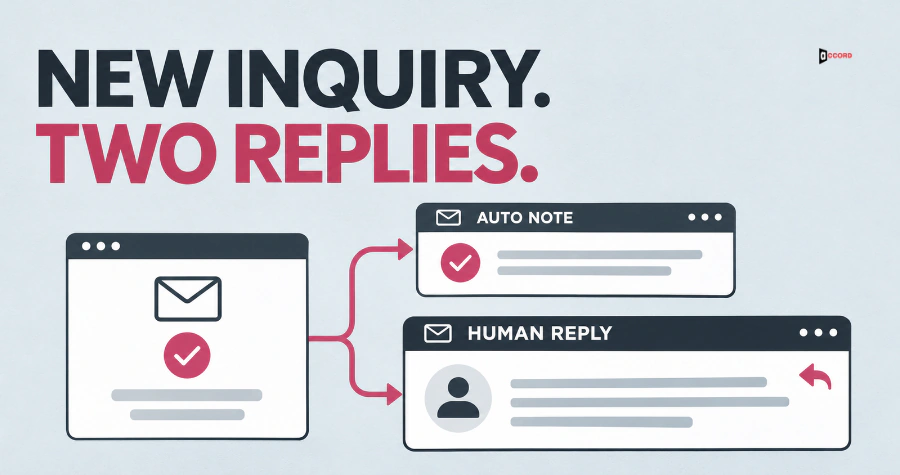
Two short messages fix this. The first is the website inquiry auto reply email: software sends it at once, and it says only that the message arrived and what happens next. The second is the first reply from a named person, which answers the question. The limits and rules here are starting points, not industry standards.
What does a new website inquiry need to hear first?
A new inquiry needs two things, and one message cannot give both: proof that the message arrived, and an answer from a person.
An automatic acknowledgement is a message your website or email tool sends the moment the form is submitted. A first human reply is a message written by a named person for this one inquiry, which answers the question or proposes the next step.

Our live guide on speed to lead makes the same split. Its rule is that an automatic acknowledgement does not stop the response clock. We would add that the clock would then measure your software, not your team.
What should the automatic note contain?
Keep it to five parts, in this order.
1. Receipt. Say the message arrived, and name what it was about. "We received your message about a website rebuild" beats "Thank you for contacting us." Use the topic from the form, which the web part captured. If the form has no topic, name the form: "your request through our contact page." Test: would the buyer know this note is about their message? Fix: add the topic or the form name.
2. Who will answer. Name a team or a role in the note, such as "our sales team." Name a person in the note only when that person sends the reply. The owner is always named, with one backup, in your own document. Test: can you point to the owner today? Fix: if not, give one person the team's inbox.
3. When. Give one time window your team can keep, with the time zone, for example "by the end of the next business day, 6:00 p.m. Eastern." The window is a ceiling you may promise, not your target.
Business time means only the hours your team is on duty to answer. An inquiry that arrives outside those hours counts from the start of the next duty period.
To pick the window, take your last 20 inquiries (all of them if you have 10 to 19) and write down how long each first human reply took, counted from submission. Then try these windows, shortest first: one business hour, the end of the same business day, the end of the next business day, the end of the second business day. Choose the shortest window that at least 90% of the inquiries met. With 20 inquiries, that is 18 or more.
If no window reaches 90%, or you have fewer than 10 inquiries on record, promise no time yet. Write "A person on our [team name] team will read your message and reply," which names no time, so there is nothing to count. Fix the owner and inbox problems first, then test again on your next 20 inquiries.
For a demo or quote request, put a window of 15 business minutes at the front of the list, which our speed-to-lead guide proposes for those requests. Test it on your last 20 requests of that type.
Test: at least 90% of those same inquiries got a human reply inside the window. Fix: take the next longer window, or drop the time.
4. A way to reach you if it is urgent. Give a reply address that a person reads, and a phone number if someone answers it. Test: send a reply and see who gets it. Fix: replace any no-reply address with a monitored one.
5. What happens next, in one sentence. Tie it to the window, so it can be counted: "A person will read your message and reply by [day and time]." Test: can you check whether it happened inside the window? Fix: cut any step you cannot check.

Leave out sales copy, attachments and any request to fill in a second form, which tells the buyer the first one did not count.
Aim for 50 to 90 words from the greeting to the sign-off. Our post on which B2B contact form fields to keep or cut argues for a short form, which suits this note.
What may the automatic message promise, and what must it never promise?
Copy this rule into a team document.
The promise rule. Every sentence in the automatic message must be true when it is sent. The only other sentence allowed is a promise that a named owner has agreed to keep. If the promise names a time, you count it. Anything else is cut.
Three kinds of sentence pass. A fact that is true when sent: "We received your message." A promise with a time that an owner keeps and someone counts: "A person on our sales team will reply by the end of the next business day." A way to reach you that a person really reads: "You can reach us at this address."
Five kinds fail. Do not promise a price, a quote or a proposal. Do not promise fit, such as "We can help with that," because nobody has read the request yet. Do not promise a meeting time unless the buyer picked one in a booking tool. Do not promise a reply faster than your own records show you deliver. And do not promise results of any kind.
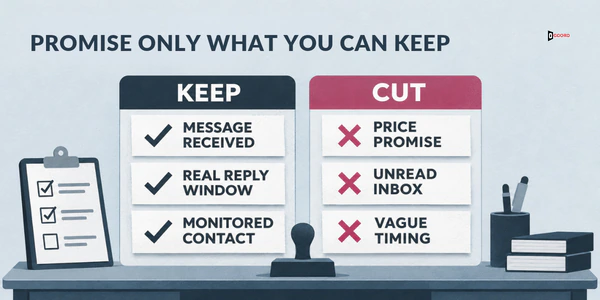
Test the rule on the soft forms too. "Soon," "shortly," "right away" and "within minutes" name no time that anyone can check. A hard limit such as "within the hour" breaks the rule too when nobody watches the inbox. Replace each with a window you can keep, or cut it.
The note should not pretend to be a person. A note signed "Sarah" that nobody typed invites a reply to Sarah, who may not own the inbox. Sign with the team or business name.
What is a copyable website inquiry auto reply email?
Square brackets show what you replace. The note below has about 65 words from the greeting to the sign-off.
Subject: We received your message about [topic]
Hi [first name],
We received your message about [topic from the form]. This note was sent automatically so that you know it arrived.
A person on our [team name] team will read your message and reply by [day, time and time zone]. If your question cannot wait, reply to this email or call [phone number].
[Business name], [a reply address that a person reads].
Some form tools cannot work out "the next business day" on their own. If yours cannot, use one wording that is true every day: "by the end of the next business day, Monday to Friday, 9:00 a.m. to 6:00 p.m. Eastern." Or add an after-hours version that names the day, such as "by the end of Monday."
What should the first human reply say?
Give this message four parts.
Who you are and what you read. One sentence with your name, job title and the topic, so the buyer sees right away that a person read the form.
The answer, or what you need to give one. Answer before you ask, in two or three sentences if you can. If you need facts you do not have, say exactly which ones.
One next step. Name one thing, with a date if possible: a written outline by Thursday, or two times for a call. Offer a call or a chat only when the buyer asked to talk.
One question. End with a question that needs only a few words to answer, such as "Is the end of March a hard deadline?" Two questions split the reply.

Aim for 70 to 150 words from the greeting to the sign-off.
Subject: Your question about [topic]
Hi [first name],
This is [your name], [job title] at [business name]. I read your message about [topic].
[Your answer in one to three sentences, or the facts you need]
[One next step, with a date]
[One question that needs only a few words to answer]
[Your name], [job title], [business name], [direct phone number or email].
What if the form gave you almost nothing to answer?
Some inquiries say only "Please contact me." Send the same message anyway. Make the answer one sentence on what you do for companies like theirs. Ask the most useful question you have, such as "What prompted you to write this week?"
What does the FTC say about these messages?
A common question is whether the automatic note needs a postal address and an opt-out line. This is a summary of one US law, not legal advice.
The FTC's CAN-SPAM compliance guide, as read again on 21 November 2026, defines a commercial message by its "primary purpose": "the commercial advertisement or promotion of a commercial product or service." A commercial message must include a valid physical postal address and a clear and conspicuous explanation of how to opt out.
The guide sets apart a second kind, transactional or relationship messages. These must consist only of listed content, such as confirming a transaction the recipient already agreed to. The guide adds that "the law views these categories narrowly." Such a message may not contain false or misleading routing information, meaning the header details about who sent it. It is otherwise exempt from most provisions of the Act.
When one email mixes both kinds of content, the primary purpose decides. Two signals that a message is commercial are a subject line that would lead the reader to think so, and transactional content that does not appear mainly at the beginning.
The guide does not say whether a reply to a website inquiry counts as transactional or relationship, so we cannot tell you. The note above leaves out a postal address and an opt-out line because it has no promotion and describes only the buyer's own request. That is our design choice, not an FTC ruling. The guide says the primary purpose of the message decides which rules apply. If your adviser says yours counts as commercial, add both to the footer.
Who sends the messages, and what if the human reply is late?
Write an owner and a backup for the form, the note and the first reply in a shared document next to the form. If nobody owns the reply, name a default owner. Ask whoever manages the form to send bounce notices (the messages that come back when an address is wrong) to the owner.
Send a reminder to the owner and the backup when three quarters of the business time to the deadline has passed. Our post on a reassignment rule for untouched leads gives a copyable rule for this.
If the window passes anyway, send a short late note from a person, not the system. Say sorry, give one fact now and name the day and time of the full answer.
If more than 1 in 10 inquiries needs the late note, your window fails the 90% test in the When part. Take the next longer window.
How do you test both messages before a real buyer sees them?
Test the whole route. A note in a spam folder, or an alert to a mailbox nobody reads, can delay the first reply. Ask a colleague with an outside address to help with these five steps.
- Submit the form with a realistic topic and time the note. Pass if: within five minutes and in the inbox, not the spam folder. Fix: have your website email setup checked.
- Read the note on a phone. Pass if: the topic, the time window and the reply address are all visible with one scroll. Fix: shorten it.
- Reply to the automatic note. Pass if: the owner or the backup receives it within the window. Fix: change the reply address to one a person reads.
- Check what reaches your team. Pass if: the owner and the backup both get the alert and any bounce notice, and one of them reads it the same day. Fix: add the backup and send bounce notices to the shared inbox.
- Read the first human reply aloud. Pass if: it answers before it asks, and it ends in one question. Fix: move the answer to the top.

Repeat the test after any change to the form, tool or owner, and each quarter.
To see whether the messages work, use two rates with one fixed definition each. The acknowledgement rate is the number of inquiries that received the automatic note divided by all inquiries in the period. The on-time reply rate is the number of inquiries that received the first human reply inside the promised window divided by the inquiries whose window has closed. If no note reached the buyer, count the inquiry against the window you promise everyone else. Remove spam and anything that is not a real inquiry, such as a job application or a vendor pitch, and say so in your record. Report inquiries whose window is still open as a separate number. A reply that arrives after you count updates the record, not the old report. Report both rates for each source, so the person who runs that source sees them.
Imagine: one week of inquiries at a small firm
Imagine a 40-person payroll services firm called Fernhill, invented here along with every number, none of which is a benchmark. Last week its general contact form received 12 real inquiries, after the team removed spam and non-inquiries. All 12 windows had closed by the time of the count. The form saves each buyer's source: 6 came from search pages, 4 from a link in cold emails and 2 from LinkedIn posts.
Before the change, the automatic note said "We will get back to you within the hour." Eleven of the 12 buyers received it. The twelfth, from the cold email link, mistyped the address, so the note bounced and nobody read the returned message. The acknowledgement rate is 11 of 12 inquiries, or 91.7%.
Now the human replies, counted from submission. Three inquiries got one within one hour, which is 25% of 12. Two more got one by the end of the same business day, which makes 5, or 41.7%. Five more came by the end of the next business day, which makes 10, or 83.3%. One more came by the end of the second business day, which makes 11, or 91.7%. The last took four days, because the reply also went to the mistyped address until a colleague phoned the number on the form.
Against the old promise "within the hour," counted in business time here, the on-time reply rate is 3 of 12, or 25%. The first window to reach 90% is the end of the second business day. So the note now promises "by the end of the second business day, 6:00 p.m. Eastern," gives a phone number for urgent matters and uses a shared inbox that two people read. The longer, honest window replaces a broken short one. Fernhill's goal is the next business day for 9 in 10 inquiries, once its records support it.
The more useful change is what travels between the web, email and the source owners. Each Monday every source owner gets that source's line, counted against the new window:
| Source | Inquiries | Acknowledged | On time |
|---|---|---|---|
| Search pages | 6 | 6 | 6 |
| Link in cold emails | 4 | 3 | 3 |
| LinkedIn posts | 2 | 2 | 2 |
| Total | 12 | 11 | 11 |
The cold email owner now sees that 1 of the 4 inquiries was nearly lost to a typo, not to a lack of interest. The campaign now shows 3 on-time conversations from 4 form fills, and the owner can see why the fourth was late. The form owner reads every bounce the same day and phones the buyer.
Twelve inquiries is a very small sample, and 11 of 12 was bound to pass because the window was chosen from those same 12. The real test is the next 20. On these 12, one more late reply would move the rate by about 8 points. On the next 20, it would move it by 5.
Where does the first reply fit in a B2B growth engine?
Our guide to the B2B growth engine defines it as "a connected system that helps the right buyers find, trust, and respond to your company." Five connected services make up that system. The guide names the parts a little differently, and they match one to one.
| Service | Its job in the system | The guide's name for it |
|---|---|---|
| SEO and AEO | Helps buyers, and AI answer tools, find you (AEO means answer-engine optimization) | Search visibility |
| Lead generation | Finds the accounts to reach | Account data |
| Starts and keeps conversations, from first outreach to follow-up | Outbound outreach | |
| Web | Turns attention into a booked call | Website conversion |
| Social | Builds familiarity and trust before and after contact | Social proof |
All five feed one pipeline, which in this post means the path from a first sign of interest to a booked call. The wording of both messages belongs to email. The web part owns the form and the trigger that sends the note, and whoever answers buyers, often sales, sends the first human reply.
Here is what goes wrong when one part is weak. A buyer reads your cold email, clicks to the form, fills it in and waits two days. The campaign report shows one form fill, and sales never sees a conversation.
You can check your own parts in ten minutes. Open your last five inquiries and write down, for each one, where the buyer came from, how long the first human reply took, and whether the person who runs that source can see the result. A blank is any missing answer; count an inquiry once however many it lacks. If two or more of five inquiries have a blank, your parts are not connected yet. With fewer than five inquiries, one blank is already a finding. If your form does not save the source at all, that is your first finding.
Frequently asked questions
Next step
In the session we map which part of your growth engine this topic belongs to and which part is weakest. Then we run the five-step test and the promise rule on your own messages. If that helps, book a 30-minute working session with us. Bring your current automatic message, your last 20 inquiries with their times and sources, and the name of whoever replies today. You can use everything in this post without us. Accord sells lead generation, email, SEO and AEO, web and social as one connected growth engine.