
Visitors arrive from AI answers and a few send a form, but no meeting reaches the calendar: where does it stall? AI search visibility usually turns into held meetings only when four places work: the landing page, the form, the follow-up and the booking page. A plain test for each place follows, then a way to count leads and held meetings, and a list of what you cannot track.
Why does AI search visibility not become leads on its own?
AI search visibility, or visibility in AI search, means how often and how accurately AI answer tools name your company or link to your pages when buyers ask questions. These tools include ChatGPT, Perplexity, Google's AI Overviews (summaries Google shows above some results) and AI Mode (Google's conversational search). Being named is a good start, but it is not a lead.
A lead is a person who gives you contact details and a reason to talk, usually by sending a form. A held meeting is a booked call that took place with the buyer present. Between the AI answer and the held meeting, a buyer has to visit your site, read a page, send a form, pick a time and show up. Some people drop out at every step. Many drop-outs happen in four places you control.
A note on the numbers. Every time limit, count and window in this guide, such as a one-hour response target or a 30-day window, is an Accord starting point. It is not a rule from Google, OpenAI or any tool maker. Change them to fit your team. When a fact comes from a provider, the text says so. Accord sells SEO, lead generation, email and web services, so we have an interest in this topic. Most of what follows needs only a spreadsheet and the tools you already have; the form fields and the lead event need a web developer.
Place 1: What must the landing page do when a buyer arrives from an AI answer?
A buyer who arrives from an AI answer has usually read a summary. In our reading, that visitor wants to check it and decide if you are worth a call. The basics for such a buyer are a short summary at the top, plain words on who you serve and one clear next step, set out in what to do when AI search recommends your company. Two tests show whether your page does the job.
Find the page first. The page an AI answer links to may not be the page you would choose. Many AI answer tools show links to their sources. The tracking section below shows how to see which of your pages receive AI visits. Until then, test the service page closest to the buyer's question and the blog post that answers it best.
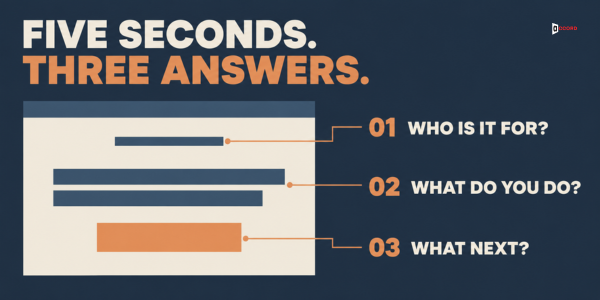
The first-screen test. Show the top of the page for five seconds to three people outside your team. Then ask: who is this for, what does the company do, and what can I do next? The pass line is that at least two of the three answer all three questions correctly. A failing page is one where outsiders say "a marketing company" and cannot say what to do next. The fix is to rewrite the first sentences.
The match test. Run the buyer question in the AI tool, copy each claim it makes about you, and find the sentence on your page that supports it. A claim with no matching sentence is a gap. Add accurate wording, or, if the tool is simply wrong, keep your page precise and note the error.
Place 2: What must the form ask, and what must it record?
Contact details and a problem box are the start. Six more habits turn a form into a reliable source of meetings.
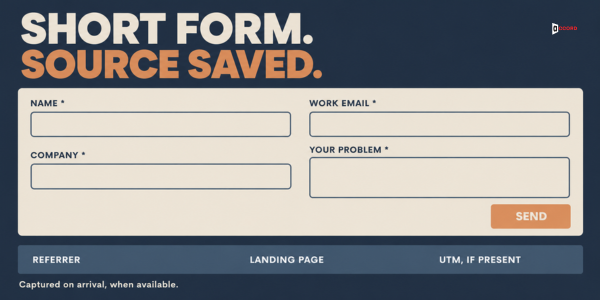
Keep it to four required fields. Name, work email, company name or website, and the problem box. The phone number and a "How did you hear about us?" box are optional extras. In Accord's view, extra required fields can give a visitor another reason to leave.
Save the source when the visitor first arrives. A hidden field is a form box the visitor does not see; the page fills it in. Visitors often click from the landing page to a separate form page, and the referrer (the website or app the visitor came from) is then your own site. So save the referrer and the landing page on arrival, for example in a cookie or session storage (a small store in the browser). Copy them into hidden fields when the form is sent, together with any UTM tags, which are short labels such as utm_source=newsletter that tell analytics where a click came from. A saved record might read: landing page /services, referrer a chat assistant's website, buyer note "a chatbot suggested you". Browsers can limit how much of the address they pass on, so the referrer can be incomplete. Respect your consent settings.
Send the form to your CRM. A CRM is the tool where you keep records of people and deals. Analytics does not fill it, so the form has to carry the saved source across. Keep the tracked source and the buyer's own words in separate fields.
Count the form as an event. Ask your web developer to record each successful form send as an event, a record that something happened on your site, and to mark it as a key event, an action that matters to your business.
End with a thank-you message that does work. Say who will reply, by when and how, and show the booking link right there. "We will be in touch" can waste the moment when a buyer wants a time.
Test the form. Send three test forms: one from a computer, one from a phone and one using a company already in your CRM. The pass line is that each one reaches the CRM within a few minutes with an owner, the typed answer and the source fields. The owner must also get an alert. The fix is to ask whoever manages the form tool to trace where the entry stops.
Place 3: What must happen in the first hours, and the days after, once the form is sent?
An AI answer cannot reply to the buyer. A person has to.
Name one owner and one backup, and set a response target. If the answer to "who replies?" is "whoever sees it first", two people reply or nobody does. Accord's speed-to-lead post gives sample response times, not rules: 15 minutes of business time for a demo or quote request and one business hour for a positive reply to cold email. A quote request states a wish to buy and a general form may not, so we suggest one business hour. Pick a response target your team can meet every week.
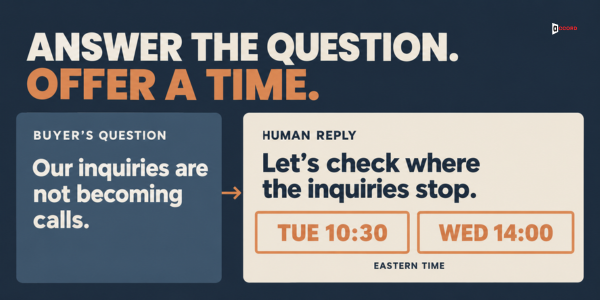
Answer the question that was typed. The first reply should respond to the problem box, give one useful fact and offer a next step. For example: "Hello Marcus, thank you for writing about [their problem]. [One helpful fact, for example: the first step is usually to see where your current inquiries stop.] I have Monday at 9:00 or Thursday at 3:30 Central open for a short call, or you can pick your own time here: [link]." Change the name, days and times every time. If the box is empty, ask one plain question, such as "What prompted you to get in touch?". Tracking cannot show what the buyer asked an AI tool, so do not claim to know it. If they wrote that one pointed them to you, ask what the answer said and record their words.
Then follow up lightly, and stop. If the buyer does not pick a time, send one note after two business days and one last note a week later. Then close the record as "no reply" and pause, or stop sooner if the person asks. If the same person or company is in a cold email sequence, pause it as soon as they write to you.
Test the follow-up. Take the last ten forms and count how many received a human reply inside your response target. The pass line is nine of ten. The fix is to look at the slowest three and find where each one waited, such as an alert that never fired. If nobody recorded the reply time, start today, with fixed CRM status words such as replied, booked, held and no-show.
Place 4: What must the booking page do so the meeting is held?
A booked meeting is not a held meeting. The invite, reminders and no-show messages are set out in booking the call after a positive cold email reply, and they work the same way for a form lead.
Use a different booking link for each source. This shows where bookings come from. Calendly's UTM help page lists five UTM values: utm_source, utm_medium, utm_campaign, utm_content and utm_term. You add them after a question mark in the link, then filter the Calendar page by tracking ID and export a CSV file, a plain table that opens in a spreadsheet. The link in your first reply might end in ?utm_source=reply-email and the link on the landing page in ?utm_source=website.
Mark every meeting the same day. Record held, no-show or moved. A moved meeting is still the same meeting, so do not count it twice.
Test the booking page. Book a test meeting from a phone, using an email address that is not on your team. The pass line has four parts. The confirmation arrives within a minute and shows the time zone. The invite adds to the buyer's calendar. The reminder and reschedule link both work. The fix is to change the settings in your booking tool until all four pass.
How do you track leads from AI search, and what can you not?
Some visits from AI answers can be counted, some are mixed with other traffic, and some leave no trace. This section uses Google Analytics, Google's free tool that counts visits to your site. It sorts each visit into a channel, a label such as Organic Search, Referral or Direct. Google Analytics calls one visit a session; this guide says visit.
| What the buyer did | How it may appear | What you can say |
|---|---|---|
| Clicked a link that carried its referrer, from an assistant on Google's list | In the AI Assistant channel | Count those visits. Others may be missing |
| Clicked a link in a Google AI Overview or AI Mode | In Organic Search, per Google's channel page | Neither Google page linked below describes a separate line for them |
| Clicked a link in an assistant not on the list | Possibly Referral or Direct (our reading) | Check the source report by hand |
| Saw your name, then typed your address or searched your name later | Direct (Google: a saved link or typed address) or Organic Search | Analytics cannot show it. Only the form can |
| Wrote "an AI tool told me" in the form | Your form field | Record it as self-reported, never as tracked |
Google's help page on default channel groups describes the AI Assistant channel, for sources such as ChatGPT, Gemini, Deepseek, Copilot or Grok. It says that channel excludes AI Overviews and AI Mode, and that Organic Search includes them. Google's page on AI features in Search says sites shown in those features count in overall search traffic in Search Console, Google's free tool that shows how your site appears in Google Search. The channel page also links a downloadable list of sources. Open it to see whether your buyers' assistant is on it, and under which name.
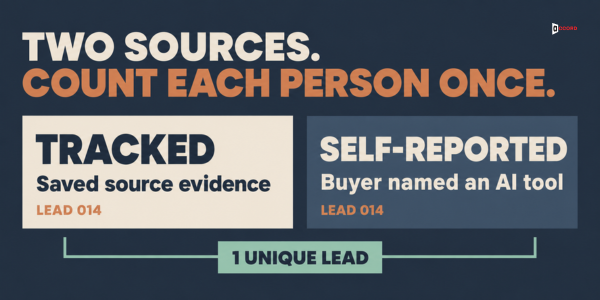
Count with these rules. An AI-linked lead is a person who sent the form and is one of two kinds. A tracked lead's form record shows a visit from a source on Google's AI Assistant list. A self-reported lead wrote in the form that an AI tool pointed them to you, and is not already tracked. Then follow this life cycle:
- Count each lead in the month the form was sent, once.
- A lead's first booked meeting is that lead's meeting, and a moved meeting is the same meeting. Follow it for 30 days from the form date.
- A meeting booked inside that window but dated after it is pending. Close the month's first read when the window for its last form ends, with pending leads left out of the booked-to-held and lead-to-held rates.
- Do not drop pending meetings. Add each late result to a late-results line, which is one extra line under that month's rates so the first read stays on record, and follow a moved meeting for at most 60 days from the form date.
- Restate the month's rates once, when every pending or moved meeting is held, cancelled or has reached 60 days, whichever comes first. Compare months only on restated rates.
Track four rates:
- Visit-to-form rate: tracked leads in the month, divided by visits in the AI Assistant channel that month. Self-reported leads are left out, because their visits cannot be counted.
- Lead-to-booked rate: AI-linked leads who booked a meeting inside the window, divided by all AI-linked leads of the month.
- Booked-to-held rate: leads whose first meeting was held, divided by leads who booked one, pending leads left out until restated.
- Lead-to-held rate: leads whose first meeting was held, divided by all AI-linked leads of the month, pending leads left out until restated. It is the whole path in one number.
The first rate divides people by visits, because one person can make several visits. The other three count people only. Treat any month with fewer than about 20 AI-linked leads as a rough guide.
See which pages AI visitors reach. In Google Analytics, open the Landing page report (in the left menu, Engagement, then Landing page). Google suggests adding the secondary dimension Session source / medium. Visits in the AI Assistant channel have the medium ai-assistant, according to the channel page, so look for those rows. The report's Key events metric counts events and not people, so take the number of people from your CRM and use the metric as a cross-check. For the full monthly report, with a citation log and a CRM field for AI-influenced deals, see how to measure AI search citations and pipeline.
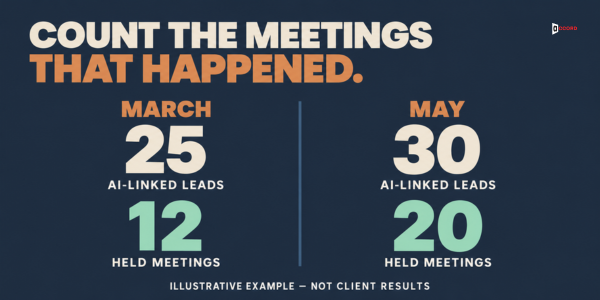
Imagine: 25 leads in March and 30 in May
This example is invented, and real rates may be much lower. Imagine a 12-person company that sells inventory software to wholesalers in the US. It counts leads by the rules above.
In March, 230 visits came from the AI Assistant channel, and 14 people who made those visits sent a form. These are the tracked leads, so the visit-to-form rate is 14 divided by 230, about 6.1%. Another 11 people sent a form and wrote that an AI tool pointed them to the company, while analytics did not label their visits as AI. These are the self-reported leads. March has 14 plus 11, which is 25 AI-linked leads.
Of the 25, 17 booked a meeting inside their windows, so the lead-to-booked rate is 17 divided by 25, which is 68%. The first read closed on 30 April. By then 11 first meetings had been held and 5 had not. The five included two leads who asked to move their meeting and got no answer, who were counted as cancelled.
One more lead had sent a form on 29 March, and that lead's window ended on 28 April. The lead had booked a call for 5 May, so the meeting was pending: 11 held, 5 not held and 1 pending make the 17. With that lead left out, the booked-to-held rate was 11 divided by 16, about 69%, and the lead-to-held rate was 11 divided by 24, about 46%.
On 1 May the team studied the first read. Of the eight leads who did not book, five waited more than a day for a reply. Two got an answer with no time offered and went quiet. One was not a fit. Of the five meetings not held, three people had not seen the invite, and two asked to move the meeting and nobody answered. The team also ran the page and form tests from this guide. Only one of three outsiders could name the next step on the main service page, and the form had seven required fields.
Each main finding got a change, all starting 1 May. A one-business-hour response target with an owner and a backup was meant to fix the slow replies. Two offered times plus a link in the first reply were meant to fix the quiet leads. A reminder the day before and same-day answers to reschedule requests were meant to fix the unheld meetings. A rewritten first screen and a form cut to four required fields were meant to fix the test results. April was left out on purpose, because its windows run into May and mix old and new habits.
On 6 May the late result arrived: the 5 May call was held, 37 days after the form. No pending or moved meetings remained, so the team added the result to a late-results line under March's rates, keeping the first read on record, and restated March once. Now 12 of the 17 leads who booked had a held meeting, a booked-to-held rate of about 71%. The lead-to-held rate was 12 divided by 25, which is 48%.
In May, 250 visits came from the AI Assistant channel and 21 of those people sent a form, so the visit-to-form rate is 21 divided by 250, which is 8.4%. Another nine were self-reported leads, so May has 21 plus 9, which is 30 AI-linked leads. Of these, 24 booked inside their windows, a lead-to-booked rate of 80%. The first read closed on 30 June with no pending or moved meetings, so it was also the restated read.
Of the 24 leads who booked, 20 had a held meeting, a booked-to-held rate of about 83%. The lead-to-held rate was 20 divided by 30, about 67%. On restated rates, March held about 71% of its booked leads and 48% of all its leads, and May held about 83% and 67%. The team cannot say which change did the most, because it made them together, and small numbers can move by chance. The point is the method: count the same way each month, find the biggest leak, and fix that first.
Frequently asked questions
Can we track leads that came from ChatGPT or Perplexity?
Some of them. Google's channel page names ChatGPT, Gemini, Deepseek, Copilot and Grok, and does not name Perplexity, so open the source list linked from that page to see whether your buyers' assistant is included. A buyer who sees your name and visits later is not tracked, so ask "How did you hear about us?" and record the answers as self-reported.
Should we build a separate landing page for visitors from AI answers?
Probably not at first. Start with the pages AI answers already reach, because real buyers land there. Run the first-screen test and the match test on them.
How long does it take for AI search visibility to produce booked meetings?
No one can say, and anyone who gives a date is guessing. What AI tools choose to show changes over time. Review each month on the same rules, and look at three months in a row before you judge a change.
What is the difference between a booked meeting and a held meeting?
A booked meeting has a time on both calendars. A held meeting took place with the buyer present. Report both, and divide held by booked to see how many bookings become conversations.
Is it reliable when a buyer writes that an AI tool told them about us?
It is a useful clue and not a measurement, because people forget where they first saw a name. Keep the buyer's words in their own field, apart from the tracked source, and look for a pattern across many leads.
How many fields should a lead form have?
There is no official number. In Accord's view, four required fields at most: name, work email, company and one open question about the problem. Add the phone number and the how-did-you-hear box as optional extras, and test the form on a phone.
Next step
If you would like a second pair of eyes on the path from an AI answer to a held meeting, book a 30-minute working session with the Accord team. Bring the page an AI answer links to, your lead form, the replies to your last ten forms and your booking page, and test the four places together.