
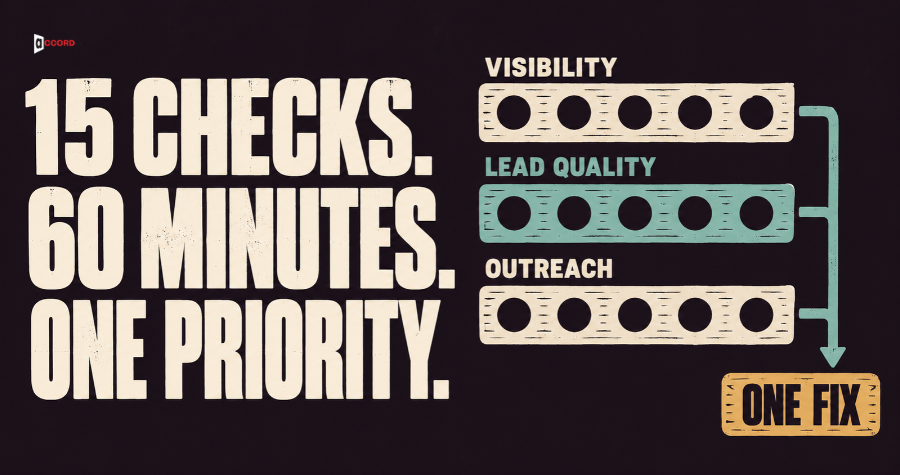
A marketing audit checklist for a small B2B team should fit into one hour a month once the data is pulled. Pulling the data is not part of that hour, and month one usually takes about two hours in all (an Accord estimate). It should give every check a score and end with one thing to fix. It has 15 checks in three areas: visibility (can buyers find you), lead quality (do the people who contact you fit), and outreach (do your emails arrive and get answered). You spend 20, 20 and 15 minutes on them and 5 minutes adding up the score, and the total tells you where to start.
What is a marketing audit checklist for B2B teams?
A marketing audit checklist is a fixed list of questions about your marketing and sales work, each with a test and a pass line. This one runs monthly and shows where to look, not why something is wrong. It leaves out paid ads, social posting, pricing and revenue.
Accord already publishes a 30-minute AI visibility audit and a guide on channels that do not produce sales meetings. The first tests ten buyer questions in AI tools, and the second counts six numbers to find one leaking stage. This guide adds 15 scored checks into one total and says what to fix first.
A note on the numbers. Where Google or the FTC states a rule, the text says so. Every other line in this guide, such as a pass line, a percentage or a score band, is Accord's own starting point and not an industry standard. Accord also sells lead generation, email, search and web services, so we have an interest.
What do you need before the timer starts?
The hour starts once the data is pulled. Before the timer, export the last full month's leads, plus sending numbers for that month and the three before it, and check that you can open each tool. This preparation sits outside the hour. Gather these items:
- Access to Google Search Console, Google Analytics 4 (GA4) and your website.
- The leads from the last full month, from your CRM (the tool or sheet where you keep records of people and deals).
- Your cold email sending tool and the mailbox you send from.
Then agree on four rules.
One owner. One named person runs the audit, writes the scores and shares them.
One window. Use the last full calendar month and compare it with the month before. Run the audit in the first week of the new month.
"I do not know" scores zero. If you cannot answer a check, because you have no access or nobody tracks it, give it 0 points, unless the check's own lines say otherwise. The fix is to make it answerable.
Three checks compare with earlier months, and two look back. V1 and V3 compare with the month before, and O3 uses the three months before the last full month. L5 looks back over your last five meetings, and O5 over the past 90 days. If the earlier month does not exist, because the GA4 property or sending tool is new, that check gets 1 point and you write the number down. If it should exist but you cannot get it, score 0.
How does the scoring work?
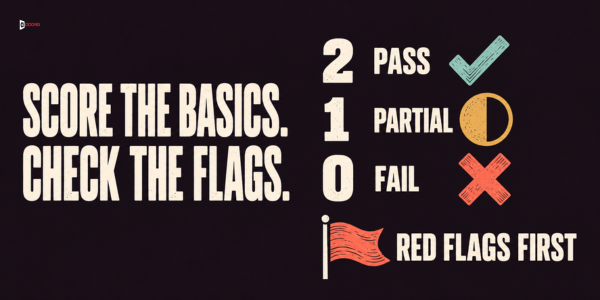
A pass scores 2 points, a partial scores 1 point, and a fail scores 0 points. Each area has five checks, so it can score up to 10, and the audit up to 30. Copy the table into a spreadsheet as your scoring sheet. The Minutes column is the time budget: 20, 20 and 15 minutes for the areas and 5 for adding up, which makes 60.
| Area | Check | Minutes | Score (2, 1 or 0) |
|---|---|---|---|
| Visibility | V1 Search clicks and impressions | 3 | |
| Visibility | V2 Key pages are indexed | 4 | |
| Visibility | V3 Search visits lead to action | 4 | |
| Visibility | V4 AI answers name you correctly | 6 | |
| Visibility | V5 Your own pages agree | 3 | |
| Lead quality | L1 Leads fit your ideal customer | 4 | |
| Lead quality | L2 Leads hold the right role | 3 | |
| Lead quality | L3 Lead records are complete | 4 | |
| Lead quality | L4 Meetings held are qualified | 4 | |
| Lead quality | L5 Your lead ranking matches reality | 5 | |
| Outreach | O1 Sender checks pass | 3 | |
| Outreach | O2 Bounces and complaints are low | 3 | |
| Outreach | O3 Reply rate holds | 3 | |
| Outreach | O4 Positive replies get a fast answer | 3 | |
| Outreach | O5 Stop requests are honored | 3 | |
| All | Add up, choose one fix, set the next date | 5 | Total out of 30 |
What does the total mean? First look for red flags, which are fails on O5, O1, O2 or V2. A red flag needs a stop step this week, whatever the total. A stop step is the one action that ends the damage today, and it is listed under each of those four checks. The first red flag in the order given at the end also becomes the month's fix. Then read the total in three bands. A total of 24 to 30 means the basics are steady if there is no red flag, so watch for drops. With a red flag, deal with that first. A total of 16 to 23 means there are gaps, and one fix this month is worth your time. A total of 0 to 15 means the base is weak, so use the fix-first rules below before any new spend or sends.
Samples of a few dozen leads or 5 meetings are small, so read those checks, and any list under 20 leads, as warning lights.
Three scoring rules apply to every check. Exact percentages: compare the exact result and do not round first, so 69.5% is a partial where the pass line is 70%. Read each line literally: "at least" and "or less" include the number, "under" and "over" do not, so nothing falls between two lines. One line per check: if two lines seem to fit, the lower score wins, except in L5, which lists its own order.
Nothing to count. If a check divides by zero, because there were no meetings held (L4), no first emails (O2, O3) or no positive replies (O4), it can neither pass nor fail. Give it 1 point and write "nothing to count" beside it. Two cases differ. A month with no leads at all scores 0 on L1, L2 and L3, because an audit that finds no leads has found its problem. On V1, a number that was zero and is now above zero counts as up, and a number that is zero in both months counts as down. L5 and O5 have their own rules.
Visibility: which five checks take 20 minutes?
Visibility means buyers can find your company when they search or ask an AI tool, and what they find is true. You need Search Console (Google's free tool for how your site appears in search) and GA4 (Google's tool for what visitors do on your site).
V1. Search clicks and impressions (3 minutes). Open the Performance report for Search results. A click is a visit from a Google result to your site, and an impression is a time your page showed in a result. Note both for the last full month and the month before. Under about 100 clicks a month, treat the 10% line as rough. Google says its AI features are counted in the same report, under the Web search type.
Pass: both numbers are up, or down by 10% or less.
Partial: exactly one is down by more than 10%.
Fail: both are down by more than 10%, or you cannot open the report.
Fix: find the pages that lost the most clicks and check them in V2 and V3.

V2. Key pages are indexed (4 minutes). A page is indexed when Google has stored it and can show it in results. Paste your five most important pages, one by one, into the URL Inspection tool, Search Console's check for one page. A page can be left out on purpose, for example with a noindex tag, an instruction that tells Google not to list it. Google's AI features guide says a page must be indexed and eligible to show with a snippet (the short text preview under a result) to appear as a supporting link in AI Overviews and AI Mode, and that no additional technical requirements apply. AI Overviews are Google's AI-written summaries, and AI Mode is a Google Search view for longer, more complex questions.
Pass: all five are indexed, or left out on purpose.
Partial: four of five are indexed or left out on purpose.
Fail: three or fewer, or you cannot tell.
Stop step (a fail is a red flag): if a noindex tag or a block was added by mistake, remove it today. Fix: read the reason Search Console gives and remove the cause.
V3. Search visits lead to action (4 minutes). In GA4, open Reports, then Acquisition, then Traffic acquisition. Find the row Organic Search, which is visits from unpaid search results, and read its Key events column. A key event is an action you have marked as important, such as a sent contact form. The column fills only after you mark an event as a key event, and Google says that takes the Marketer role or above on the property, or Editor or above for an event that already exists. The column adds up all key events, so count only your main contact action.
Pass: your main contact action is set up as a key event, Organic Search shows at least 1 key event in the last full month, and the count is equal to or above the month before.
Partial: it is set up, but Organic Search shows none in the last full month or fewer than the month before.
Fail: no key event is set up, so nobody can tell.
Fix: mark your contact form or booking as a key event, then look at pages that get visits but no action.
V4. AI answers name you correctly (6 minutes). Write three buyer questions once and reuse them: on the problem you solve, ways to solve it, and what to look for in a provider. Ask each in Google Search, where an AI Overview may appear, and in one AI chat tool your buyers use, which gives up to six answers. Record whether you are named and whether anything said about you is wrong. Do not regenerate until one pleases you. Google says AI Overviews appear only when its systems judge them additive to classic Search, so a missing overview is not a fail. Answers vary from run to run.
Pass: you are named in at least one answer and nothing said about you is wrong.
Partial: you are named in none, and nothing is wrong.
Fail: any answer says something wrong about your company, or you skipped the check.
Fix: find the page that states the wrong fact and correct your own pages first. A partial is normal in the first months.
V5. Your own pages agree (3 minutes). Compare your home page, a main service page and your LinkedIn page on three facts: what you sell, who you sell to, and where you work.
Pass: all match on all three pages.
Partial: exactly one fact differs.
Fail: two or more facts differ, or any page states something untrue.
Fix: choose one sentence per fact and update the page that differs.
Lead quality: which five checks take 20 minutes?
A lead, in this guide, is a person who asked for a call, a price or details in the last full month, through a form, a message or a positive reply to your outreach. Count each person once. With fewer than 40 leads, check all of them. With 40 or more, avoid picking by hand: divide the number of leads by 20, round down to a whole number n, and take every nth lead through the whole list. You will get about 20 to 30 leads. Score by percentage.
L1. Leads fit your ideal customer (4 minutes). Your ideal customer profile, or ICP, is a short written description of the companies you can help best, such as size, industry and country. Count how many of the sampled leads fit it.
Pass: 70% or more.
Partial: at least 50% but under 70%.
Fail: under 50%, or no written description exists.
Fix: with no description, write three lines first; Accord's B2B ICP scorecard guide shows how. With one, look for a shared source among the leads that did not fit.
L2. Leads hold the right role (3 minutes). Use the same leads. Count how many hold a job that can buy or strongly influence the decision, using the roles named in your ICP.
Pass: 70% or more.
Partial: at least 50% but under 70%.
Fail: under 50%.
Fix: change what the form, post or email asks for, so the right role feels addressed.

L3. Lead records are complete (4 minutes). Open the same records. A complete record has a source (where the lead came from), a named owner, and either a next step with a date or a closed reason.
Pass: 90% or more.
Partial: at least 75% but under 90%.
Fail: under 75%.
Fix: make those three fields required and fill the gaps.
L4. Meetings held are qualified (4 minutes). A qualified meeting is one that took place with a person in a target role at a company that fits your ICP. Count the meetings held in the last full month, then the qualified ones.
Pass: 60% or more.
Partial: at least 40% but under 60%.
Fail: under 40%, or nobody counts them. If no meeting was held, see "nothing to count" above.
Fix: ask the person who ran each meeting to mark it within a day, not the person who booked it.
L5. Your lead ranking matches reality (5 minutes). A lead ranking rule is a written way to put leads into groups, such as top, middle and low, so the team knows who to call first. Take your last five meetings held and check which group the rule had given each person before the meeting. A rule written after a meeting does not count for that meeting. Go down these lines in order and stop at the first that applies:
- Fail: there is no written rule.
- Partial: fewer than five of your recent meetings were held after the rule was written, so it cannot be tested yet. This covers a new rule and a run of quiet months.
- Pass: at least 3 of the 5 were in the top group and none were in the low group.
- Partial: at least 3 of the 5 were in the top or middle group.
- Fail: anything else, which means 2 or fewer were in the top or middle group.
Fix: with no rule, write one with three questions: fit, timing and a way to reach the person. With a rule that missed, change one line.
Outreach: which five checks take 15 minutes?
Outreach here means cold email, a first message to someone who did not ask for it, and its follow-up. Count first emails: the first message sent to each person. When a check fails, open Accord's guide on how to improve cold email deliverability.
O1. Sender checks pass (3 minutes). Mail servers want proof that a message comes from your domain. Three records give it: SPF lists the servers allowed to send for your domain, DKIM signs each message, and DMARC says what to do with a message that fails. Send a test email through your sending tool, from your outreach mailbox, to your own Gmail address. Google's help page says to open the message, click More next to Reply, and choose Show original. Look for the SPF, DKIM and DMARC results.
Pass: all three show pass.
Partial: SPF and DKIM pass, but DMARC is missing or failing.
Fail: SPF or DKIM does not pass, or you cannot read the result.
Stop step (a fail is a red flag): pause cold sending from that mailbox until a new test passes. Fix: add the records your sending tool asks for, then send a new test.
O2. Bounces and complaints are low (3 minutes). A hard bounce is a permanent failure, such as an address that does not exist. Divide hard bounces on first emails by first emails sent. The bounce lines are Accord's own. The spam rate lines are Google's: its sender guidelines say to keep the spam rate reported in Postmaster Tools below 0.10% and never reach 0.30% or higher. Postmaster Tools is Google's free dashboard for senders. Google says it shows nothing until your domain is verified, and that data may be missing when a day's message count is too low.
Pass: bounces under 2%, and a spam rate below 0.10% if Postmaster Tools shows one.
Partial: bounces of at least 2% but no more than 4%, or a spam rate of at least 0.10% but under 0.30%.
Fail: bounces over 4%, or a spam rate of 0.30% or higher.
Stop step (a fail is a red flag): stop the send now. Fix: for a partial, check the list source and slow the send; for a fail, find why before sending again. Move bounced addresses to your do-not-contact list.
O3. Reply rate holds (3 minutes). The reply rate is the number of people who sent a human reply, divided by the number of people emailed for the first time. Do not count automatic replies. Compare it with the average of the three months before the last full month, not with a number from the internet.
Pass: at or above your average.
Partial: below it, but by no more than one fifth of the average.
Fail: down by more than one fifth.
Fix: check O1 and O2 first, then L1, because a list that no longer fits your ICP produces silence.
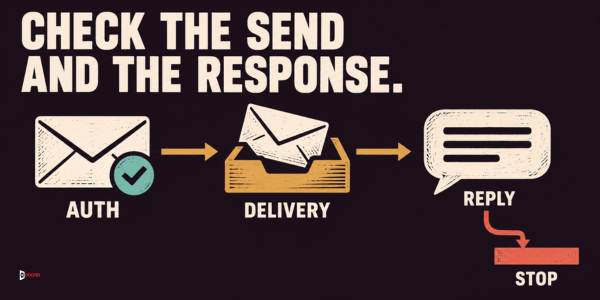
O4. Positive replies get a fast answer (3 minutes). A positive reply is a human reply that asks for times, a price, details or a call. Count the positive replies of the last full month, then how many received a human answer within one business day.
Pass: 90% or more.
Partial: at least 70% but under 90%.
Fail: under 70%, or you cannot tell. If there were no positive replies, see "nothing to count" above.
Fix: name one owner and one backup for the inbox where replies land.
O5. Stop requests are honored (3 minutes). The FTC's CAN-SPAM compliance guide says you must honor an opt-out request within 10 business days, and that the law makes no exception for business-to-business email. Take the last 10 people who asked to stop in the past 90 days, or all of them if fewer. Check that none received an email from you after the date they asked to stop. This is not legal advice.
Pass: you keep a do-not-contact list, and none of the people checked was emailed after asking to stop. This is stricter than the 10-day rule on purpose. If nobody asked to stop in the past 90 days, having the list is enough for a Pass.
Partial: you keep a do-not-contact list, but cannot check it against what the sending tool sent.
Fail: anyone was emailed after asking to stop, or there is no list.
Stop step (a fail is a red flag): remove them from every sequence (a planned series of automatic emails) in every tool now. Fix: keep one shared list that every tool checks.
Minutes 55 to 60: how do you add up the score and choose what to fix first?
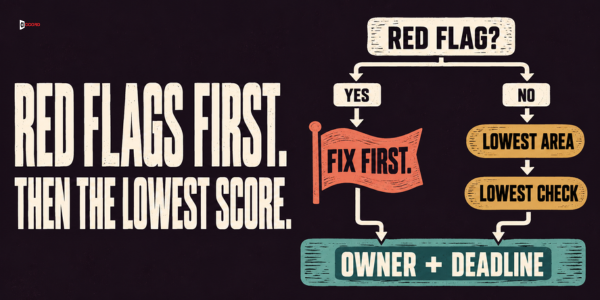
Add the five scores in each area, then add the three areas. Then handle any red flags, and choose the one fix for the month, using these rules in order.
- Red flags come first, and their stop steps cannot wait. Every red flag gets its stop step this week, even when there are several: stop the O5 emails, pause the O1 mailbox, stop the O2 send, remove the V2 block. A stop step only ends the damage and is not the month's fix. With more than one red flag, the month's fix is the first of them in the order O5, O1, O2, V2. The rest wait for later months, with their stop steps still in place.
- No red flag? Take the lowest area. If two areas tie, choose in this order: outreach, lead quality, visibility. Outreach comes first because a sending problem can harm your reputation with mail providers.
- Inside that area, take the lowest check. If several tie, take the one that comes first on the sheet.
Write the fix in one line: what changes, who does it, by when, and which check shows it. Do one fix a month, plus any stop steps. A fix is done when its check scores higher next time. Book the next audit date, and keep the questions and pass lines fixed so months stay comparable.
Imagine: a 25-person software consultancy scores its October
This example is invented. Imagine a 25-person consultancy that sells software projects. In early November, its operations manager scores October, with sending numbers for the three months before it.
Visibility. Clicks fell from 450 in September to 414 in October, a drop of 8%, and impressions rose from 9,500 to 9,800 (V1: 2). Four of five key pages are indexed, because a noindex tag stayed on a service page after a redesign (V2: 1). The contact form is a key event, and Organic Search shows 3 key events against 2 in September (V3: 2). The company is named in none of the answers, and nothing wrong is said (V4: 1). The home page and the LinkedIn page word one fact differently (V5: 1). Visibility: 2 + 1 + 2 + 1 + 1 = 7.
Lead quality. It had 60 new leads, so n is 3, and every third lead gives a sample of 20. Of those 20, 8 fit the ICP, which is 40% (L1: 0). Fifteen hold the right role, which is 75% (L2: 2). Sixteen records are complete, which is 80% (L3: 1). Six meetings were held and 3 were qualified, which is 50% (L4: 1). Of the last five meetings, the lead ranking rule had put 2 in the top group, 1 in the middle and 2 in the low (L5: 1). Lead quality: 0 + 2 + 1 + 1 + 1 = 5.
Outreach. SPF, DKIM and DMARC all pass (O1: 2). Of 640 first emails, 19 hard bounced, which is 19 divided by 640, or 2.97%. Postmaster Tools shows no data (O2: 1). Twenty-two people replied, which is 22 divided by 640, or 3.4%. The three months before October were 3.9%, 4.1% and 3.8%, an average of 3.9%, and one fifth below that is about 3.1%. The 3.4% sits between the two (O3: 1). Of 9 positive replies, 7 were answered within a business day, or 78% (O4: 1). Ten people had asked to stop in the past 90 days, and the team keeps a do-not-contact list, and none was emailed after asking (O5: 2). Outreach: 2 + 1 + 1 + 1 + 2 = 7.
The last 5 minutes. The total is 7 + 5 + 7 = 19, in the middle band of 16 to 23. There is no red flag: O1, O5 and O2 are not fails, and V2 scored 1. Lead quality is the lowest area, with 5 points, and L1 is its lowest check, with 0. The manager opens the 12 unfit leads and sees that 7 came from one broad directory listing. The fix: rewrite the listing to name the company size and industry served, and add a company size question to the contact form by the end of November, with L1 as the check. The target for the next audit is 50% or better (partial), with 70% as the pass line.
Frequently asked questions
How often should a B2B company run a marketing audit?
Once a month works for this light audit, because the numbers refresh monthly and a fix takes about a month to show.
What is a good score on a monthly marketing audit?
There is no outside standard for this score, and the bands are Accord's starting point. Your own trend says more than any single total.
Is a sample of about 20 to 30 leads enough?
It is enough for a warning. On a sample of 20, one lead moves a result by 5 percentage points, so treat a swing of one or two leads as noise.
Can we run this audit without a CRM?
Yes. A spreadsheet of the month's leads works, if it records the source, an owner and a next step or closed reason for each person.
Do we need to test AI answers every month?
Yes, a light monthly test is enough. AI answers change over time, so repeat the same three buyer questions each month and compare. Google says AI Overviews and AI Mode have no additional technical requirements beyond the basic Search ones, so see check V2 for your pages.
What if we cannot answer a check?
Score it 0 and write down why, such as missing access or a number nobody tracks, unless the check's own lines say otherwise. The fix is to make the check answerable.
Next step
Run the audit yourself first, because the checklist works without us. Then, if you want a second pair of eyes, book a 30-minute working session with the Accord team. It comes after the audit and is not part of the hour. Bring your filled sheet, the total and the one fix you chose, and we will go through the scores you are least sure about and check the fix against the rules above.